logging
Reference
Quick fact
-
Once the logger is configured, it becomes part of the Python interpreter process that is running the code. In other words, it is global.
- You can also configure Python logging subsystem using an external configuration file.
-
The logging library is based on a modular approach and includes categories of components: loggers, handlers, filters, and formatters.
- Loggers expose the interface that application code directly uses.
- Handlers send the log records (created by loggers) to the appropriate destination.
- Filters provide a finer grained facility for determining which log records to output.
- Formatters specify the layout of log records in the final output.
-
These multiple logger objects are organized into a tree that represents various parts of your system and different third-party libraries that you have installed.
-
When you send a message into one of the loggers, the message gets output on all of that logger’s handlers, using a formatter that’s attached to each handler. The message then propagates up the logger tree until it hits the root logger, or a logger up in the tree that is configured with
propagate=False. -
If your goals are aimed at the Cloud, you can take advantage of Python’s set of logging handlers to redirect content
-
Logging levels:
- CRITICAL
- ERROR
- WARNING
- INFO
- DEBUG
Python logging best practices
Setting level names
LogWithLevelName = logging.getLogger('myLoggerSample')
level = logging.getLevelName('INFO')
LogWithLevelName.setLevel(level)
Logging from multiple modules
- if you have various modules, and you have to perform the initialization in every module before logging messages, you can use cascaded logger naming:
logging.getLogger("core")
logging.getLogger("core.network")
logging.getLogger("core.filesystem")- Making
core.networkandcore.filesystemdescendants of the loggercore, and propagating their messages to it, it thereby enables easy multi-module logging.- This is one of the positive side-effects of name in case the library structure of the modules reflects the software architecture.
Logging with Django and uWSGI
- To deploy web applications you can use
StreamHandleras logger which sends all logs to
# For Django you have:
  'handlers': {
    'stderr': {
        'level': 'INFO',
        'class': 'logging.StreamHandler',
        'formatter': 'your_formatter',
      },
},- uWSGI forwards all of the app output, including prints and possible tracebacks, to syslog with the app name attached:
uwsgi --log-syslog=yourapp ...Logging with Nginx
- In case you need having additional features not supported by uWSGI — for example, improved handling of static resources (via any combination of Expires or E-Tag headers, gzip compression, pre-compressed gzip, etc.), access logs and their format can be customized in conf.
access_log /var/log/nginx/access.log;Log analysis and filtering
- after writing proper logs, you might want to analyze them and obtain useful insights.
- First, open files using blocks, so you won’t have to worry about closing them.
- Moreover, avoid reading everything into memory at once. Instead, read a line at a time and use it to update the cumulative statistics.
- The use of the combined log format can be practical if you are thinking on using log analysis tools because they have pre-built filters for consuming these logs.
with open(logfile, "rb") as f:
    for line in csv.reader(f, delimiter=' '):
self._update(**self._parse(line))- Python’s CSV module contains code the read CSV files and other files with a similar format.
- In this way, you can combine Python’s logging library to register the logs and the CSV library to parse them.
Basic Python Logging Concepts
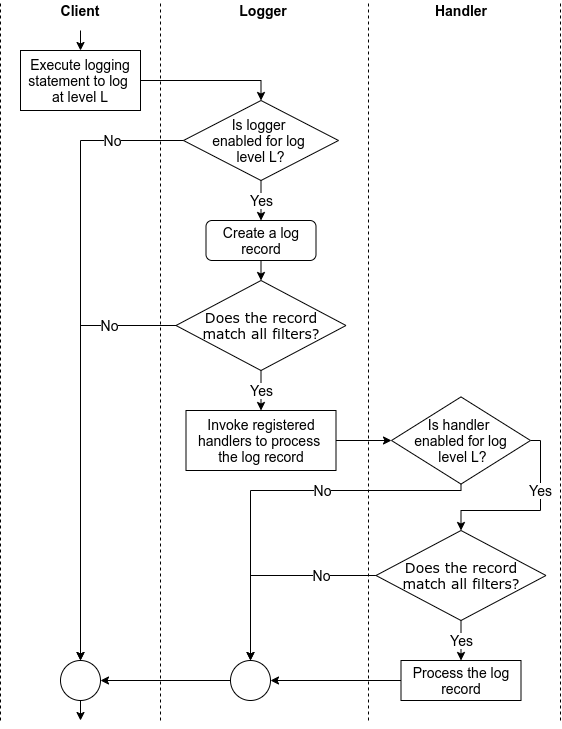
- When we use a logging library, we perform/trigger the following common tasks while using the associated concepts (highlighted in bold).
-
A client issues a log request by executing a logging statement.
- Often, such logging statements invoke a function/method in the logging (library) API by providing the log data and the logging level as arguments.
- The logging level specifies the importance of the log request.
- Log data is often a log message, which is a string, along with some extra data to be logged.
- Often, the logging API is exposed via logger objects.
-
To enable the processing of a request as it threads through the logging library, the logging library creates a log record that represents the log request and captures the corresponding log data.
-
Based on how the logging library is configured (via a logging configuration), the logging library filters the log requests/records. This filtering involves comparing the requested logging level to the threshold logging level and passing the log records through user-provided filters.
-
Handlers process the filtered log records to either store the log data (e.g., write the log data into a file) or perform other actions involving the log data (e.g., send an email with the log data).
- In some logging libraries, before processing log records, a handler may again filter the log records based on the handler’s logging level and user-provided handler-specific filters.
- Also, when needed, handlers often rely on user-provided formatters to format log records into strings, i.e., log entries.