ch02.an_array_of_sequence
Ch 2. An Array of Sequences
graph LR;

%% Node Definitions

B["Python sequences\n - Mutable\n - Immutable"]
P["Beyond lists and tuples\n - array.array in standard library\n - NumPy and SciPy for numerical processing\n - collections.deque(Versatile, Thread-safe)"]

C["Sequence types\n - Flat sequences\n - Container sequences"]
D["Flat sequences\n - Compact\n - Faster\n - Limited to atomic data"]
E["Container sequences\n - More flexible\n - Can hold mutable objects"]
F["Immutable container issue\n - Python lacks a foolproof immutable type"]
G["Tuples in Python\n - Role: Records with unnamed fields\n - Role: Immutable lists"]
H["Tuple value fixed condition\n - All items must be immutable"]
I["Tuple as record\n - Tuple unpacking for extraction"]
J["* operator in unpacking\n - Works with lists and iterables"]
K["Pattern matching\n - Introduced in Python 3.10\n - match/case supports more powerful unpacking"]

Operation["Sequence operation"]

L["Sequence slicing\n - Supports multidimensional slicing"]
M["Repeated concatenation\n - seq * n to initialize lists of lists\n - Care needed for immutable items"]
N["Augmented assignment\n - += and *= behavior for mutable and immutable sequences"]
O["Sort method and sorted function\n - Use of key argument"]


%% Link Creations
B --> P
C --> D
C --> E
E --> F
G --> H
G --> I
I --> J
I --> K
Operation --> L
Operation --> N
Operation --> O
L --> M
Overview of Built-In Sequences in Python
Python provides a variety of built-in sequence types that offer a rich set of operations, such as iteration, slicing, sorting, and concatenation. These sequences can be categorized based on their characteristics:
Common Traits of Sequences
- Mutable vs. Immutable: Determines whether the sequence can be modified.
- Container vs. Flat: Indicates whether the sequence holds references to objects or stores values directly.
Types of Sequences
-
Container Sequences:
- Definition: Hold items of different types, including nested containers.
- Examples:
list,tuple,collections.deque. - Characteristics: Store references to the objects they contain.
-
Flat Sequences:
- Definition: Hold items of one simple type.
- Examples:
str,bytes,array.array. - Characteristics: Store the value of their contents in their own memory space, not as distinct Python objects.
- Efficiency: More compact as they hold primitive machine values like bytes, integers, and floats.
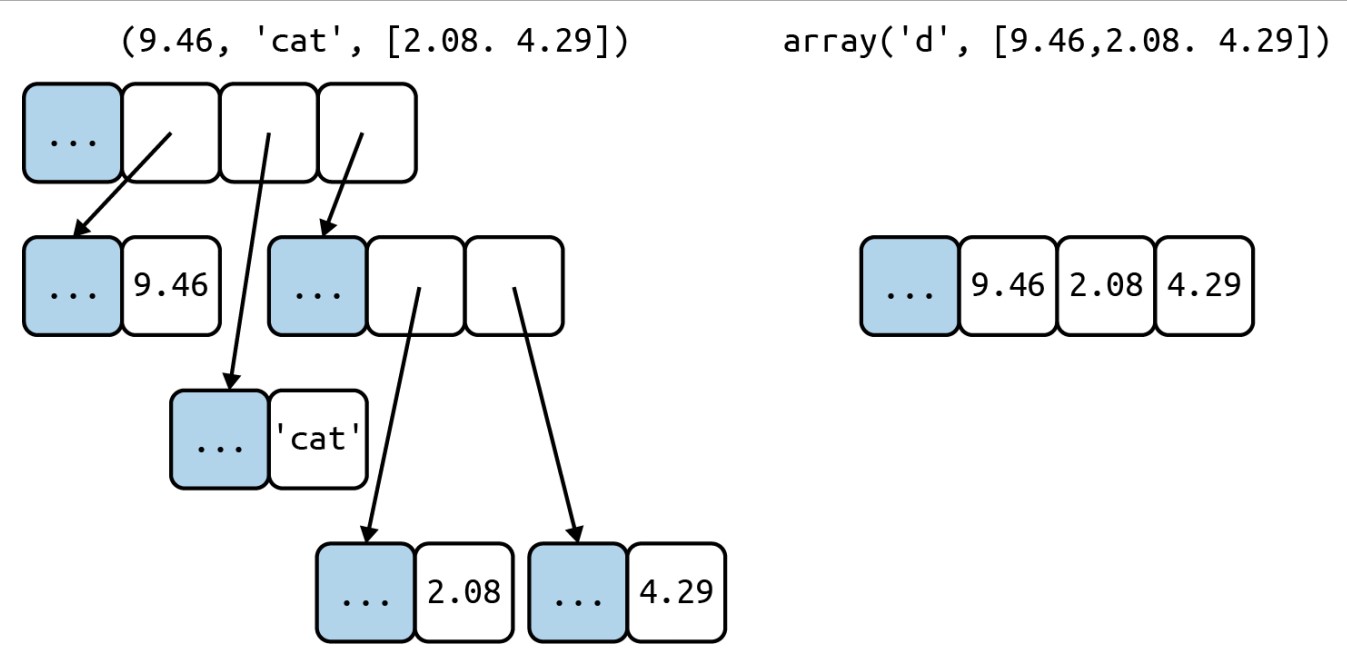
- Gray cells represent the in-memory header of each Python object—not drawn to proportion.
- The tuple has an array of references to its items. Each item is a separate Python object, possibly holding references to other Python objects, like that two-item list.
- In contrast, the Python array is a single object, holding a C language array of three doubles.
Memory Structure of Python Objects
Every Python object in memory has a header with metadata:
- ob_refcnt: The object's reference count.
- ob_type: A pointer to the object's type.
- ob_fval: A C double holding the value of the float.
On a 64-bit Python build, each field takes 8 bytes. Hence, flat sequences (e.g., array.array of floats) are more memory-efficient than container sequences (e.g., tuple of floats) because the former stores raw values directly, while the latter stores references to separate float objects.
Mutability of Sequences
-
Mutable Sequences:
- Examples:
list,bytearray,array.array,collections.deque. - Characteristics: Can be modified after creation.
- Methods: Inherit all methods from immutable sequences and implement additional methods for modification.
- Examples:
-
Immutable Sequences:
- Examples:
tuple,str,bytes. - Characteristics: Cannot be modified after creation.
- Examples:
Sequence Abstract Base Classes (ABCs)
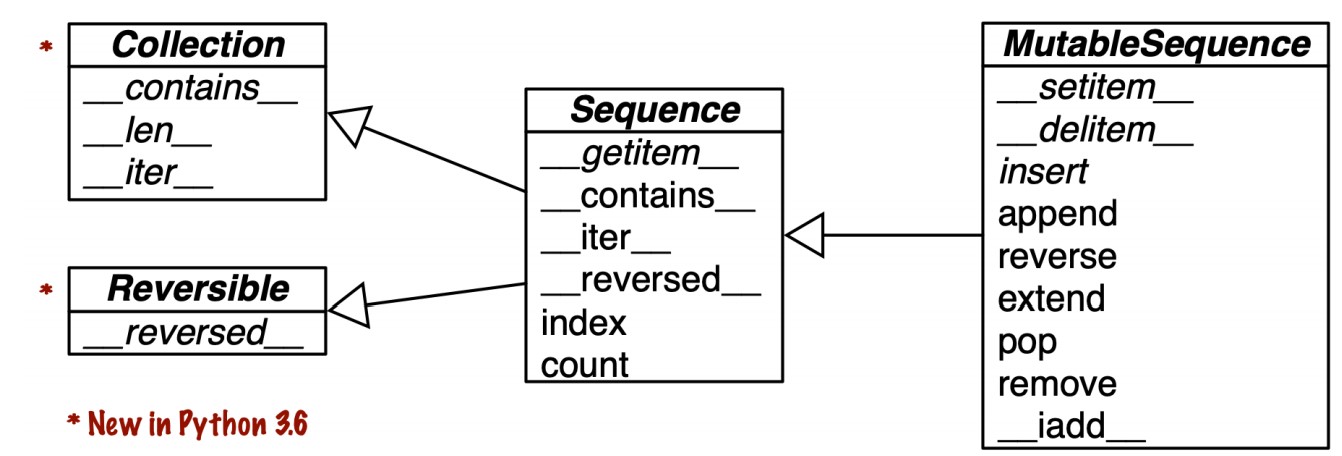
The built-in concrete sequence types do not subclass the Sequence and MutableSequence ABCs but are virtual subclasses registered with these ABCs.
from collections import abc
print(issubclass(tuple, abc.Sequence))  # True
print(issubclass(list, abc.MutableSequence))  # True
List Comprehensions and Generator Expressions
List Comprehensions
Definition: A syntactic construct for creating a list based on existing lists or other sequences.
Syntax:
[expression for item in iterable if condition]Example:
symbols = '$¢£¥€¤'
codes = [ord(symbol) for symbol in symbols]
print(codes)  # Output: [36, 162, 163, 165, 8364, 164]
Generator Expressions
Definition: Similar to list comprehensions but produce a generator, which yields items one at a time.
Syntax:
(expression for item in iterable if condition)Example:
symbols = '$¢£¥€¤'
codes_gen = (ord(symbol) for symbol in symbols)
print(list(codes_gen))  # Output: [36, 162, 163, 165, 8364, 164]
When to Use Generator Expressions:
- Memory Efficiency: Generators are more memory-efficient for large sequences because they yield items one by one, instead of creating a complete list.
- Lazy Evaluation: Useful when you don't need all the items at once.
Readability and Performance
Readability:
- Explicit Intent: List comprehensions and generator expressions make the intent of creating a new list or generator explicit.
- Conciseness: They are often more concise than traditional loops, improving readability for simple operations.
- Avoid Overuse: Avoid using list comprehensions for side effects or complex logic. If a comprehension spans more than two lines, consider using a loop for clarity.
Performance:
- Speed: List comprehensions are generally faster than traditional loops because of internal optimizations.
- Memory: Generator expressions are more memory-efficient for large datasets.
Examples
-
Filtering and Transforming Lists:
numbers = [1, 2, 3, 4, 5, 6] even_squares = [x**2 for x in numbers if x % 2 == 0] print(even_squares) # Output: [4, 16, 36] -
Flattening a List of Lists:
nested_list = [[1, 2, 3], [4, 5, 6], [7, 8, 9]] flat_list = [item for sublist in nested_list for item in sublist] print(flat_list) # Output: [1, 2, 3, 4, 5, 6, 7, 8, 9] -
Using Generator Expressions with Functions:
import math
numbers = range(10)
sqrt_gen = (math.sqrt(x) for x in numbers)
for sqrt in sqrt_gen:
    print(sqrt)
Syntax Tip for Python Code
In Python, line breaks are ignored within pairs of [], {}, or ().
- This allows for clean, multiline code without needing the
\line continuation escape, which can be problematic if a space is accidentally typed after it. - Additionally, using a trailing comma in comma-separated series inside these delimiters is beneficial for maintenance and readability.
Examples
Multiline Lists:
my_list = [
    'apple',
    'banana',
    'cherry',  # trailing comma makes future additions easier
]
Multiline Tuples:
my_tuple = (
    'apple',
    'banana',
    'cherry',  # trailing comma
)
Multiline Dictionaries:
my_dict = {
    'name': 'Alice',
    'age': 30,
    'city': 'Wonderland',  # trailing comma
}
Multiline List Comprehensions:
numbers = [1, 2, 3, 4, 5, 6]
squares = [
    x**2
    for x in numbers
    if x % 2 == 0
]
List Comprehensions vs. filter and map
List comprehensions build lists from sequences or other iterable types by filtering and transforming items. While filter and map can achieve the same result, list comprehensions are generally more readable.
List Comprehension Example:
numbers = [1, 2, 3, 4, 5, 6]
even_squares = [x**2 for x in numbers if x % 2 == 0]
print(even_squares)  # Output: [4, 16, 36]
Equivalent Using filter and map:
even_numbers = filter(lambda x: x % 2 == 0, numbers)
even_squares = map(lambda x: x**2, even_numbers)
print(list(even_squares))  # Output: [4, 16, 36]
Local Scope Within Comprehensions and Generator Expressions
In Python 3, comprehensions (list, set, dict) and generator expressions create a local scope for the variables defined in their for clause. However, variables assigned using the "Walrus operator" (:=) remain accessible after the comprehension or expression has finished.
Local Scope in Comprehensions
Variables defined within comprehensions are local to the comprehension.
Example:
x = 'ABC'
codes = [ord(x) for x in x]
print(x)       # Output: 'ABC'
print(codes) # Output: [65, 66, 67]- Explanation:
- The variable
xin the list comprehension is local to the comprehension and does not affect the outerx.
- The variable
Behavior:
- The outer variable
xremains unchanged. - Variables used in comprehensions are isolated to avoid unintentional side effects.
Walrus Operator (:=) in Comprehensions
The "Walrus operator" allows assignment expressions within comprehensions and keeps the assigned variable accessible after the comprehension.
Example:
x = 'ABC'
codes = [last := ord(c) for c in x]
print(last)    # Output: 67
try:
    print(c)   # Raises NameError
except NameError:
print("NameError: name 'c' is not defined")- Explanation:
lastis assigned the valueord(c)during the comprehension and remains accessible after the comprehension.cis local to the comprehension and does not exist outside it. The variablecis not accessible outside the comprehension, adhering to the local scope rule.
Scope Rules of Assignment Expressions (PEP 572)
-
Local Scope:
- Variables in comprehensions (
forclause) are local to the comprehension.
- Variables in comprehensions (
-
Walrus Operator Scope:
- Variables assigned using
:=in comprehensions are scoped to the enclosing function, unless explicitly declared asglobalornonlocal.
- Variables assigned using
-
Explanation:
lastremains accessible within theexamplefunction.cis local to the list comprehension.
List Comprehensions vs. map and filter
Example Comparison
Using List Comprehensions:
symbols = '$¢£¥€¤'
beyond_ascii = [ord(s) for s in symbols if ord(s) > 127]
print(beyond_ascii)  # Output: [162, 163, 165, 8364, 164]
Using map and filter:
symbols = '$¢£¥€¤'
beyond_ascii = list(filter(lambda c: c > 127, map(ord, symbols)))
print(beyond_ascii)  # Output: [162, 163, 165, 8364, 164]
Analysis
-
Readability:
- List Comprehensions: More readable and explicit about the intent to create a new list.
mapandfilter: Less readable due to nested function calls and the need forlambdaexpressions.
-
Performance:
- Speed Test: In many cases, list comprehensions perform as well or better than
mapandfilter. Alex Martelli has noted that list comprehensions are not necessarily slower.
- Speed Test: In many cases, list comprehensions perform as well or better than
Example Use Case: Cartesian Products
Example:
colors = ['black', 'white']
sizes = ['S', 'M', 'L']
tshirts = [(color, size) for color in colors for size in sizes]
print(tshirts)
# Output: [('black', 'S'), ('black', 'M'), ('black', 'L'), ('white', 'S'), ('white', 'M'), ('white', 'L')]
Equivalent Using itertools.product:
import itertools

colors = ['black', 'white']
sizes = ['S', 'M', 'L']
tshirts = list(itertools.product(colors, sizes))
print(tshirts)
# Output: [('black', 'S'), ('black', 'M'), ('black', 'L'), ('white', 'S'), ('white', 'M'), ('white', 'L')]
Conclusion
- List Comprehensions: Offer a more readable and often more efficient way to generate lists compared to
mapandfilter, especially for simple transformations and filters. mapandfilter: Can still be useful, particularly when combined with existing functions, but may be less readable whenlambdaexpressions are involved.
Generator Expressions
Generator expressions (genexps) are a memory-efficient way to initialize tuples, arrays, and other sequence types. Unlike list comprehensions that build an entire list in memory, generator expressions yield items one by one using the iterator protocol.
Syntax
Generator expressions use the same syntax as list comprehensions but are enclosed in parentheses () instead of brackets [].
Examples of Generator Expressions
Example 1: Initializing a Tuple and an Array
Tuple Initialization:
symbols = '$¢£¥€¤'
genexp_tuple = tuple(ord(symbol) for symbol in symbols)
print(genexp_tuple)  # Output: (36, 162, 163, 165, 8364, 164)
Array Initialization:
import array

symbols = '$¢£¥€¤'
genexp_array = array.array('I', (ord(symbol) for symbol in symbols))
print(genexp_array) # Output: array('I', [36, 162, 163, 165, 8364, 164])- Note: When a generator expression is the single argument in a function call, enclosing parentheses are not required. However, if there are multiple arguments (as with the
arrayconstructor), parentheses are necessary.
Example 2: Cartesian Product with Generator Expression
Using generator expressions to handle large data sets efficiently, such as generating a list of T-shirts in different colors and sizes without building the entire list in memory.
colors = ['black', 'white']
sizes = ['S', 'M', 'L']
for tshirt in (f'{c} {s}' for c in colors for s in sizes):
    print(tshirt)
Memory Efficiency
Generator expressions are particularly useful when dealing with large datasets. They avoid the overhead of creating and storing large intermediate lists, making them ideal for scenarios where you only need to iterate over items once.
When to Use Generator Expressions
- When initializing sequences like tuples or arrays where memory efficiency is a concern.
- When working with large datasets where building an entire list would be costly in terms of memory.
- In place of list comprehensions when the goal is to iterate over items one at a time without storing the entire list in memory.
Tuples Are Not Just Immutable Lists
While some introductory texts describe tuples as "immutable lists," this definition is limiting. Tuples serve two primary roles: as immutable lists and as records with no field names. Understanding these roles can help you leverage tuples more effectively in Python.
Tuples as Records
Tuples can hold records, where each item represents a field, and its position gives it meaning. This use case is crucial because the order and number of items in the tuple are fixed and significant.
Example of Tuples Used as Records
Consider the following examples:
# Coordinates for Los Angeles International Airport
lax_coordinates = (33.9425, -118.408056)

# Data about Tokyo: city, year, population (thousands), population change (%), and area (km²)
city, year, pop, chg, area = ('Tokyo', 2003, 32_450, 0.66, 8014)

# List of tuples containing country code and passport number
traveler_ids = [('USA', '31195855'), ('BRA', 'CE342567'), ('ESP', 'XDA205856')]

for passport in sorted(traveler_ids):
    print('%s/%s' % passport)

for country, _ in traveler_ids:
    print(country)
Tuples as Immutable Lists
The Python interpreter and standard library make extensive use of tuples as immutable lists, and leveraging tuples in this way can bring clarity and performance benefits to your code.
Benefits of Using Tuples
-
Clarity:
- The length of a tuple is fixed and cannot be changed, providing a clear indication that the sequence of values is meant to remain constant.
-
Performance:
- Memory Efficiency: Tuples use less memory than lists of the same length.
- Optimizations: Python can optimize operations with tuples more effectively than with lists.
Immutability and Mutability within Tuples
- Immutability: The immutability of a tuple applies to the references it contains. You cannot delete or replace the references within a tuple.
- Mutability of Contained Objects: If a reference within a tuple points to a mutable object, the contents of that object can change, thus altering the perceived value of the tuple.
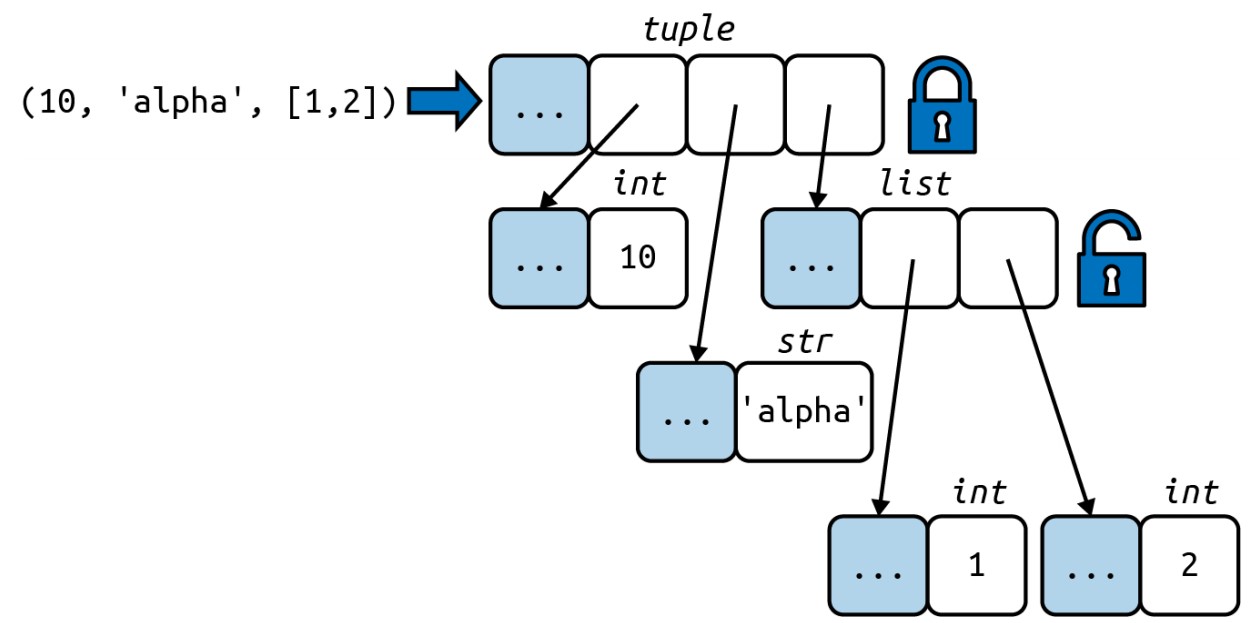
Example:
a = (10, 'alpha', [1, 2])
b = (10, 'alpha', [1, 2])
print(a == b)  # Output: True

b[-1].append(99)
print(a == b)  # Output: False
print(b) # Output: (10, 'alpha', [1, 2, 99])- Explanation: Although
aandbare initially equal, modifying the list insidebchanges its value, makingaandbdifferent.
Performance Advantages of Tuples
Python core developer Raymond Hettinger has summarized the performance advantages of tuples over lists:
-
Bytecode Efficiency:
- Evaluating a tuple literal generates bytecode for a tuple constant in one operation, whereas a list literal requires pushing each element separately to the data stack before building the list.
-
No Need for Copying:
- Given a tuple
t,tuple(t)simply returns a reference to the samet. For a listl,list(l)creates a new copy ofl.
- Given a tuple
-
Memory Allocation:
- Tuples are allocated the exact memory space needed, whereas lists are allocated with extra space to accommodate future appends, leading to memory overhead.
-
Storage Structure:
- Tuples store references to items in an array within the tuple structure itself, whereas lists hold a pointer to an array of references stored elsewhere. The indirect reference in lists makes CPU caches less effective.
Comparing Tuple and List Methods
When using tuples as immutable variations of lists, it's helpful to understand the similarities and differences in their APIs. Tuples support many of the same methods as lists, with some exceptions related to mutability.
Methods Supported by Lists but Not by Tuples
Lists support additional methods for modifying their contents, which tuples do not support due to their immutability: ``append,extend,insert,remove,pop,clear,sort,reverse` ...
Notable Exception: reversed()
-
Description: The
reversed()function works with tuples even though tuples do not have areversedmethod. -
Syntax:
reversed(my_tuple)my_tuple = (1, 2, 3) print(list(reversed(my_tuple))) # Output: [3, 2, 1]
Unpacking Sequences and Iterables
Unpacking works with any iterable, including those that do not support index notation, such as iterators.
Basic Unpacking
Unpacking assigns items from an iterable to a tuple of variables. This is often called parallel assignment.
Example:
lax_coordinates = (33.9425, -118.408056)
latitude, longitude = lax_coordinates  # unpacking
print(latitude)   # Output: 33.9425
print(longitude)  # Output: -118.408056
Swapping Values
You can swap the values of variables without needing a temporary variable by using unpacking.
Example:
a = 1
b = 2
b, a = a, b
print(a)  # Output: 2
print(b)  # Output: 1
Function Argument Unpacking
Unpacking can be used to pass arguments to functions.
Example:
print(divmod(20, 8))  # Output: (2, 4)

t = (20, 8)
print(divmod(*t))  # Output: (2, 4)

quotient, remainder = divmod(*t)
print(quotient, remainder)  # Output: (2, 4)
Returning Multiple Values
Functions can return multiple values as a tuple, which can be unpacked conveniently by the caller.
Example:
import os

_, filename = os.path.split('/home/user/.ssh/id_rsa.pub')
print(filename)  # Output: 'id_rsa.pub'
Using * to Grab Excess Items
The * operator is a versatile feature in Python that allows you to capture arbitrary excess items in sequences. While it is commonly used in function parameters (*args), Python 3 extends its utility to parallel assignment as well.
Parallel Assignment with *
In parallel assignment, the * operator can be used to assign the remaining elements of an iterable to a variable. This makes it easy to handle sequences of varying lengths without raising errors.
Examples:
-
Basic Usage:
a, b, *rest = range(5) print(a, b, rest) # Output: 0 1 [2, 3, 4] a, b, *rest = range(3) print(a, b, rest) # Output: 0 1 [2] a, b, *rest = range(2) print(a, b, rest) # Output: 0 1 []- The
*restvariable captures all remaining elements afteraandb.
- The
-
Flexible Positioning: The
*operator can be applied to exactly one variable, but it can appear in any position within the assignment.Middle Position:
a, *body, c, d = range(5) print(a, body, c, d) # Output: 0 [1, 2] 3 4- Here,
bodycaptures the middle elements of the range.
Start Position:
*head, b, c, d = range(5) print(head, b, c, d) # Output: [0, 1] 2 3 4- In this case,
headcaptures the initial elements of the range.
- Here,
Function Parameters with *args
The classic use of * in function parameters (*args) captures any number of additional positional arguments passed to the function.
Example:
def fun(*args):
    for arg in args:
        print(arg)

fun(1, 2, 3, 4)
# Output:
# 1
# 2
# 3
# 4*argscollects all the extra arguments into a tuple.
Unpacking in Function Calls
You can use the * operator multiple times in function calls to unpack multiple iterables.
Example:
def fun(a, b, c, d, *rest):
    return a, b, c, d, rest

result = fun(*[1, 2], 3, *range(4, 7))
print(result) # Output: (1, 2, 3, 4, (5, 6))- Explanation:
*[1, 2]unpacks the list into1, 2.*range(4, 7)unpacks the range into4, 5, 6.
Unpacking in Sequence Literals
The * operator can also be used when defining list, tuple, or set literals, making it easier to combine multiple sequences.
Examples:
Tuple Literal:
t = (*range(4), 4)
print(t)  # Output: (0, 1, 2, 3, 4)
List Literal:
l = [*range(4), 4]
print(l)  # Output: [0, 1, 2, 3, 4]
Set Literal:
s = {*range(4), 4, *(5, 6, 7)}
print(s)  # Output: {0, 1, 2, 3, 4, 5, 6, 7}
Nested Unpacking
Nested unpacking allows you to unpack complex, nested data structures in a concise and readable way. This is particularly useful when working with nested tuples or lists.
Example of Nested Unpacking
Consider a list of tuples representing various metro areas. Each tuple contains a record with four fields, where the last field is a coordinate pair (latitude, longitude).
metro_areas = [
    ('Tokyo', 'JP', 36.933, (35.689722, 139.691667)),
    ('Delhi NCR', 'IN', 21.935, (28.613889, 77.208889)),
    ('Mexico City', 'MX', 20.142, (19.433333, -99.133333)),
    ('New York-Newark', 'US', 20.104, (40.808611, -74.020386)),
    ('São Paulo', 'BR', 19.649, (-23.547778, -46.635833)),
]

def main():
    print(f'{"":15} | {"latitude":>9} | {"longitude":>9}')
    for name, country, pop, (lat, lon) in metro_areas:
        if lon <= 0:
            print(f'{name:15} | {lat:9.4f} | {lon:9.4f}')

if __name__ == "__main__":
    main()
Other Examples of Nested Unpacking
Unpacking in Function Calls
You can use unpacking to pass arguments to functions dynamically.
def show_coordinates(name, lat, lon):
    print(f"{name}: (Latitude: {lat}, Longitude: {lon})")

city_info = ('Tokyo', 35.689722, 139.691667)
show_coordinates(*city_info)

a, b, *rest = range(5)
print(a, b, rest)  # Output: 0 1 [2, 3, 4]

a, *body, c, d = range(5)
print(a, body, c, d)  # Output: 0 [1, 2] 3 4

def query_returning_single_row():
    return [(1, 'Alice', 'Engineering')]

[record] = query_returning_single_row()
print(record)  # Output: (1, 'Alice', 'Engineering')

def query_returning_single_row_with_single_field():
    return [(42,)]

[[field]] = query_returning_single_row_with_single_field()
print(field)  # Output: 42
Pattern Matching with Sequences in Python
Python 3.10 introduced pattern matching with the match/case statement, offering a powerful way to destructure and match complex data structures.
Example: Handling Commands
Consider a scenario where a robot accepts commands in the form of sequences. You can use pattern matching to handle these commands effectively.
class Robot:
    def beep(self, times, frequency):
        print(f'Beeping {times} times at {frequency} Hz')

    def rotate_neck(self, angle):
        print(f'Rotating neck to {angle} degrees')

    def handle_command(self, message):
        match message:
            case ['BEEPER', frequency, times]:
                self.beep(times, frequency)
            case ['NECK', angle]:
                self.rotate_neck(angle)
            case ['LED', ident, intensity]:
                self.leds[ident].set_brightness(ident, intensity)
            case ['LED', ident, red, green, blue]:
                self.leds[ident].set_color(ident, red, green, blue)
            case _:
                raise InvalidCommand(message)

# Example usage
robot = Robot()
robot.handle_command(['BEEPER', 440, 3])
robot.handle_command(['NECK', 45])- Explanation:
- The
matchstatement evaluates themessageand matches it against various patterns. - Each
caseclause specifies a pattern. If the pattern matches, the corresponding block of code is executed. - The
_case is the default case, matching any subject not matched by previous patterns.
- The
Destructuring Nested Tuples
Pattern matching also supports destructuring nested tuples. Here's an example based on geographic data.
    for record in metro_areas:
        match record:
            case [name, _, _, (lat, lon)] if lon <= 0:
                print(f'{name:15} | {lat:9.4f} | {lon:9.4f}')
Advanced Pattern Matching
Using * for Arbitrary Lengths:
The * operator can capture remaining items in a sequence.
a, b, *rest = range(5)
print(a, b, rest)  # Output: 0 1 [2, 3, 4]

a, *body, c, d = range(5)
print(a, body, c, d)  # Output: 0 [1, 2] 3 4
Using as to Bind Variables:
You can bind parts of a pattern to variables using the as keyword.
case [name, _, _, (lat, lon) as coords]:
    print(coords)  # coords is bound to (lat, lon)
Adding Type Information:
Patterns can include type constraints.
case [str(name), _, _, (float(lat), float(lon))]:
    print(f'{name} is at coordinates ({lat}, {lon})')
Using Guards for Additional Checks:
You can add conditions to patterns with guards.
case [name, _, _, (lat, lon)] if lon <= 0:
    print(f'{name} is in the Western Hemisphere')
Pattern Matching Sequences in an Interpreter
Original Code with if/elif and Unpacking
Comparison: using if/elif statements and unpacking
def evaluate(exp: Expression, env: Environment) -> Any:
    "Evaluate an expression in an environment."
    if isinstance(exp, Symbol):  # variable reference
        return env[exp]
    elif exp[0] == 'quote':  # (quote exp)
        (_, x) = exp
        return x
    elif exp[0] == 'if':  # (if test conseq alt)
        (_, test, consequence, alternative) = exp
        if evaluate(test, env):
            return evaluate(consequence, env)
        else:
            return evaluate(alternative, env)
    elif exp[0] == 'lambda':  # (lambda (parm…) body…)
        (_, parms, *body) = exp
        return Procedure(parms, body, env)
    elif exp[0] == 'define':  # (define name value)
        (_, name, value_exp) = exp
        env[name] = evaluate(value_exp, env)
    # ... more lines omitted
Refactored Code:
def evaluate(exp: Expression, env: Environment) -> Any:
    "Evaluate an expression in an environment."
    match exp:
        # Match if subject is a two-item sequence starting with 'quote'.
        case ['quote', x]:
            return x

        # Match if subject is a four-item sequence starting with 'if'.
        case ['if', test, consequence, alternative]:
            if evaluate(test, env):
                return evaluate(consequence, env)
            else:
                return evaluate(alternative, env)

        # Match if subject is a sequence of three or more items starting with 'lambda'. The guard ensures that body is not empty.
        case ['lambda', [*parms], *body] if body:
            return Procedure(parms, body, env)

        # Match if subject is a three-item sequence starting with 'define', followed by an instance of Symbol.
        case ['define', name, value_exp] if isinstance(name, Symbol):
            env[name] = evaluate(value_exp, env)

        # Catch-all case for handling invalid expressions.
        case _:
            raise SyntaxError(lispstr(exp))
Alternative Patterns for Lambda in Scheme
To match the Scheme lambda syntax safely, especially ensuring that the parameters part is always a list, you can use more specific patterns with nested sequence matching. This avoids incorrect matches and aligns the pattern with the expected structure of Scheme expressions.
Syntax of lambda in Scheme
-
Standard Lambda Definition:
(lambda (parms...) body1 body2...) -
Alternative Define Syntax for Functions:
(define (name parms...) body1 body2...)
Handling Lambda Patterns Safely
To correctly handle the lambda expressions in Scheme, ensure that the parameters are always a list. Here’s how to refine the pattern matching for lambda:
Original Unsafe Pattern
case ['lambda', parms, *body] if body:
return Procedure(parms, body, env)- Issue: This matches any value in the
parmsposition, including incorrect values like'x'.
Safer Pattern Using Nested Sequence
case ['lambda', [*parms], *body] if body:
return Procedure(parms, body, env)- Explanation:
- Ensures
parmsis a list (even if empty). - Adds structural validation, making the pattern more robust.
- Ensures
Adding Support for Alternative Define Syntax
Scheme allows defining named functions using an alternative syntax that includes the function name and parameters within a list. This can be matched using a sequence pattern:
Pattern for Alternative Define Syntax
case ['define', [Symbol() as name, *parms], *body] if body:
env[name] = Procedure(parms, body, env)- Explanation:
- Matches
definefollowed by a list containing the function name and parameters. - Ensures that
nameis aSymbolandparmsis a list of parameters.
- Matches
Full Example with Pattern Matching
Combining the refined patterns for lambda and define in the evaluate function:
def evaluate(exp: Expression, env: Environment) -> Any:
    "Evaluate an expression in an environment."
    match exp:
        # Match quote
        case ['quote', x]:
            return x

        # Match if
        case ['if', test, consequence, alternative]:
            if evaluate(test, env):
                return evaluate(consequence, env)
            else:
                return evaluate(alternative, env)

        # Match lambda with parameters list
        case ['lambda', [*parms], *body] if body:
            return Procedure(parms, body, env)

        # Match define with variable name
        case ['define', Symbol() as name, value_exp]:
            env[name] = evaluate(value_exp, env)

        # Match define with function definition
        case ['define', [Symbol() as name, *parms], *body] if body:
            env[name] = Procedure(parms, body, env)

        # Catch-all case for invalid expressions
        case _:
            raise SyntaxError(lispstr(exp))
Summary of Patterns
| Scheme Syntax | Sequence Pattern |
|---|---|
(quote exp) |
['quote', exp] |
(if test conseq alt) |
['if', test, conseq, alt] |
(lambda (parms...) body...) |
['lambda', [*parms], *body] if body |
(define name exp) |
['define', Symbol() as name, exp] |
(define (name parms...) body...) |
['define', [Symbol() as name, *parms], *body] if body |
Slicing
Python follows the convention of excluding the last item in slices and ranges. This approach works well with zero-based indexing and offers several benefits:
-
Easy Length Calculation:
-
The length of a slice or range is simply the difference between the start and stop indices.
-
Example:
len(range(3))  # Output: 3
len(my_list[:3])  # Output: 3
-
-
Non-overlapping Splits:
-
Slicing at index
xdivides the sequence into two non-overlapping parts. -
Example:
l = [10, 20, 30, 40, 50, 60]
l[:2]  # Output: [10, 20]
l[2:]  # Output: [30, 40, 50, 60]
l[:3]  # Output: [10, 20, 30]
l[3:]  # Output: [40, 50, 60]
-
Slice Objects
Slices can include a stride or step, specified as s[a:b:c], which allows skipping items or reversing the sequence.
Examples:
s = 'bicycle'
print(s[::3])  # Output: 'bye'
print(s[::-1])  # Output: 'elcycib'
print(s[::-2])  # Output: 'eccb'
Slices produce a slice object, which Python uses internally to retrieve elements.
-
Example with stride:
deck[12::13] # Output: [Card(rank='A', suit='spades'), Card(rank='A', suit='diamonds'), Card(rank='A', suit='clubs'), Card(rank='A', suit='hearts')]
Named Slices
Naming slices can make code more readable, especially when dealing with complex data structures.
Example:
invoice = """
0.....6.................................40........52...55........
1909 Pimoroni PiBrella                $17.50    3   $52.50
1489 6mm Tactile Switch x20           $4.95     2   $9.90
1510 Panavise Jr. - PV-201            $28.00    1   $28.00
1601 PiTFT Mini Kit 320x240           $34.95    1   $34.95
"""

SKU = slice(0, 6)
DESCRIPTION = slice(6, 40)
UNIT_PRICE = slice(40, 52)
QUANTITY = slice(52, 55)
ITEM_TOTAL = slice(55, None)

line_items = invoice.split('\n')[2:]

for item in line_items:
    print(item[UNIT_PRICE], item[DESCRIPTION])
Multidimensional Slicing and Ellipsis
The [] operator can take multiple indices or slices separated by commas. Python calls __getitem__ with a tuple of indices.
Example with NumPy:
import numpy as np
a = np.array([[1, 2, 3], [4, 5, 6], [7, 8, 9]])
print(a[1, 2])  # Output: 6
print(a[1:, 1:])  # Output: array([[5, 6], [8, 9]])
Using Ellipsis:
x = np.random.random((3, 4, 5))
print(x[1, ...])  # Equivalent to x[1, :, :]
print(x[..., 1])  # Equivalent to x[:, :, 1]
Changing Mutable Sequences with Slices
Slices can also be used to modify parts of mutable sequences in place.
Example:
l = [10, 20, 30, 40, 50]
l[2:4] = [300, 400]
print(l)  # Output: [10, 20, 300, 400, 50]
Using + and * with Sequences
Concatenation with +
The + operator concatenates two sequences of the same type, producing a new sequence.
Examples:
list1 = [1, 2, 3]
list2 = [4, 5, 6]
result = list1 + list2
print(result)  # Output: [1, 2, 3, 4, 5, 6]

str1 = 'Hello'
str2 = 'World'
result = str1 + str2
print(result)  # Output: 'HelloWorld'
Repetition with *
The * operator repeats a sequence a specified number of times, producing a new sequence.
Examples:
lst = [1, 2, 3]
result = lst * 3
print(result)  # Output: [1, 2, 3, 1, 2, 3, 1, 2, 3]

s = 'abcd'
result = s * 5
print(result)  # Output: 'abcdabcdabcdabcdabcd'
Both + and * always create a new sequence and do not modify the original sequences.
Caution with Mutable Items
Be careful when using * with sequences containing mutable items. This can lead to unexpected results due to multiple references to the same object.
Building Lists of Lists
When you need a list containing multiple independent sublists, use a list comprehension.
Correct Approach:
# Creating a 3x3 tic-tac-toe board
board = [['_' for _ in range(3)] for _ in range(3)]
print(board)  # Output: [['_', '_', '_'], ['_', '_', '_'], ['_', '_', '_']]

# Modifying a specific cell
board[1][2] = 'X'
print(board)  # Output: [['_', '_', '_'], ['_', '_', 'X'], ['_', '_', '_']]
Incorrect Approach:
# This creates three references to the same list
weird_board = [['_'] * 3] * 3
print(weird_board)  # Output: [['_', '_', '_'], ['_', '_', '_'], ['_', '_', '_']]

# Modifying one cell changes all rows
weird_board[1][2] = 'O'
print(weird_board)  # Output: [['_', '_', 'O'], ['_', '_', 'O'], ['_', '_', 'O']]
List Comprehension Equivalent:
board = []
for _ in range(3):
    row = ['_' for _ in range(3)]
    board.append(row)
print(board)  # Output: [['_', '_', '_'], ['_', '_', '_'], ['_', '_', '_']]

# Modifying a specific cell
board[2][0] = 'X'
print(board)  # Output: [['_', '_', '_'], ['_', '_', '_'], ['X', '_', '_']]
Augmented Assignment with Sequences
- Augmented assignment operators such as
+=and*=behave differently depending on the type of the first operand. This behavior is determined by the presence of the__iadd__and__imul__special methods, which handle in-place addition and in-place multiplication, respectively. - If these methods are not implemented, Python falls back to using
__add__and__mul__, resulting in the creation of new objects.
Behavior of += with Sequences
The += operator is handled by the __iadd__ method for in-place addition. If __iadd__ is not available, Python uses __add__, which creates a new object.
Example:
a += b- If
aimplements__iadd__,ais modified in place. - If
adoes not implement__iadd__,a += bis equivalent toa = a + b, creating a new object.
Mutable Sequences (e.g., lists):
l = [1, 2, 3]
print(id(l))  # Output: ID of l
l += [4, 5]
print(l)  # Output: [1, 2, 3, 4, 5]
print(id(l))  # Output: Same ID as before (in-place modification)
Immutable Sequences (e.g., tuples):
t = (1, 2, 3)
print(id(t))  # Output: ID of t
t += (4, 5)
print(t)  # Output: (1, 2, 3, 4, 5)
print(id(t))  # Output: Different ID (new object created)
Behavior of *= with Sequences
The *= operator is handled by the __imul__ method for in-place multiplication. If __imul__ is not available, Python uses __mul__, which creates a new object.
Example:
a *= b- If
aimplements__imul__,ais modified in place. - If
adoes not implement__imul__,a *= bis equivalent toa = a * b, creating a new object.
Mutable Sequences (e.g., lists):
l = [1, 2, 3]
print(id(l))  # Output: ID of l
l *= 2
print(l)  # Output: [1, 2, 3, 1, 2, 3]
print(id(l))  # Output: Same ID as before (in-place modification)
Immutable Sequences (e.g., tuples):
t = (1, 2, 3)
print(id(t))  # Output: ID of t
t *= 2
print(t)  # Output: (1, 2, 3, 1, 2, 3)
print(id(t))  # Output: Different ID (new object created)
A += Assignment Puzzler
>>> t = (1, 2, [30, 40])
>>> t[2] += [50, 60]
Traceback (most recent call last):
 File "<stdin>", line 1, in <module>
TypeError: 'tuple' object does not support item assignment
>>> t
(1, 2, [30, 40, 50, 60])
Explanation
The tuple t contains an immutable part (1, 2) and a mutable list [30, 40].
Step-by-Step Execution:
-
Initial State:
tis(1, 2, [30, 40]).
-
Evaluate
t[2] += [50, 60]:- The expression
t[2] += [50, 60]is executed in three main steps at the bytecode level:- Fetch
t[2]:t[2]fetches the list[30, 40].
- In-place Add (
+=):[30, 40] += [50, 60]modifies the list in place to[30, 40, 50, 60].
- Attempt to Assign Back:
- The result
[30, 40, 50, 60]is attempted to be assigned back tot[2], but sincetis a tuple (immutable), aTypeErroris raised.
- The result
- Fetch
- The expression
Python Bytecode Analysis:
>>> dis.dis('s[a] += b')
  1           0 LOAD_NAME                0 (s)
              3 LOAD_CONST               1 (a)
              6 DUP_TOP_TWO
              7 BINARY_SUBSCR                      #<1>
              8 LOAD_NAME                2 (b)
             11 INPLACE_ADD                        #<2>
             12 ROT_THREE
             13 STORE_SUBSCR                       #<3>
             14 LOAD_CONST               0 (None)
17 RETURN_VALUE-
- Put the value of s[a] on TOS (Top Of Stack).
-
- Perform TOS += b. This succeeds if TOS refers to a mutable object
-
- Assign s[a] = TOS. This fails if s is immutable
Result:
- The list inside the tuple is modified before the exception is raised.
- The exception occurs because tuples do not support item assignment.
tis updated to(1, 2, [30, 40, 50, 60])before the error.- A
TypeErroris raised due to attempting to assign to an immutable tuple.
Lessons Learned
-
Avoid Mutable Items in Tuples:
- Placing mutable items inside tuples can lead to unexpected behaviors and bugs.
-
Augmented Assignment is Not Atomic:
- Augmented assignments like
+=are not atomic operations. They may partially succeed before raising an error.
- Augmented assignments like
-
Inspecting Bytecode:
- Understanding Python bytecode can help explain underlying behaviors and identify subtle bugs.
list.sort vs sorted
In Python, there are two primary ways to sort sequences: the list.sort method and the sorted built-in function. While both achieve similar results, they differ significantly in their approach and use cases.
list.sort Method
- In-Place Sorting:
list.sortsorts a list in place, meaning it modifies the original list and does not create a new list.- It returns
Noneto signal that the list has been modified in place. - This method cannot be used with immutable sequences (like tuples) or other iterables.
Example:
fruits = ['grape', 'raspberry', 'apple', 'banana']
fruits.sort()
print(fruits)  # Output: ['apple', 'banana', 'grape', 'raspberry']
sorted Function
- Creates a New List:
sortedcreates a new list from the given iterable and returns it.- It can be used with any iterable, including lists, tuples, strings, and generators.
Example:
fruits = ['grape', 'raspberry', 'apple', 'banana']
sorted_fruits = sorted(fruits)
print(sorted_fruits)  # Output: ['apple', 'banana', 'grape', 'raspberry']
print(fruits)  # Output: ['grape', 'raspberry', 'apple', 'banana']
Common Arguments for list.sort and sorted
Both list.sort and sorted accept the following optional keyword arguments:
-
reverse:- If
True, the list elements are sorted as if each comparison were reversed. - Default is
False.
- If
-
key:- A function that serves as a key for the sort comparison.
- For example,
key=str.lowercan be used for case-insensitive sorting of strings.
Examples:
Using reverse:
fruits = ['grape', 'raspberry', 'apple', 'banana']
sorted_fruits = sorted(fruits, reverse=True)
print(sorted_fruits)  # Output: ['raspberry', 'grape', 'banana', 'apple']
Using key:
fruits = ['grape', 'raspberry', 'apple', 'banana']
sorted_fruits = sorted(fruits, key=len)
print(sorted_fruits)  # Output: ['grape', 'apple', 'banana', 'raspberry']
Benefits of the key Argument
-
Simpler Implementation:
- You only need to define a single-argument function that computes a key for each item.
- This is easier than writing a two-argument comparison function, which needs to return -1, 0, or 1 depending on the comparison of two items.
-
Efficiency:
- The
keyfunction is called once per item in the sequence. - In contrast, a two-argument comparison function (like the deprecated
cmp(a, b)in Python 2) is called multiple times during the sorting process. - Python's sorting algorithm compares the keys in optimized C code, which is faster than doing it in Python.
- The
Stability of Sorting
Python's sorting algorithm is stable, meaning it preserves the relative order of items that compare equal.
Example:
fruits = ['grape', 'raspberry', 'apple', 'banana']
sorted_fruits = sorted(fruits, key=len)
print(sorted_fruits) # Output: ['grape', 'apple', 'banana', 'raspberry']- "grape" and "apple" both have the same length, and they appear in their original order in the sorted list.
Performance Considerations
-
In-Place Sorting (
list.sort):- More memory-efficient as it doesn't require extra space for a new list.
- Modifies the original list, which might not be desirable in all cases.
-
New List Creation (
sorted):- Requires additional memory for the new list.
- The original list remains unchanged, which can be useful if you need to maintain the original order for further operations.
Efficient Searching with Sorted Sequences
Once sequences are sorted, they can be searched efficiently using binary search algorithms. Python's bisect module provides tools for this purpose, including bisect and insort.
Example with bisect:
import bisect

sorted_list = [1, 2, 4, 4, 8]
index = bisect.bisect(sorted_list, 4)
print(index)  # Output: 4

# Inserting while maintaining sorted order
bisect.insort(sorted_list, 3)
print(sorted_list)  # Output: [1, 2, 3, 4, 4, 8]
When a List Is Not the Answer
The list type in Python is versatile and easy to use, but there are situations where other data structures are more efficient and appropriate. Depending on the specific requirements, alternatives such as arrays, deques, or other specialized containers may offer better performance or more suitable functionality.
Arrays
For handling large collections of numbers, array.array can be a more efficient replacement for lists. Arrays store data more compactly by using a specific typecode that corresponds to a C data type. This reduces memory usage and can improve performance for numerical computations.
Advantages of array.array:
- Memory Efficiency: Arrays store elements more compactly than lists, especially for large datasets of numerical values.
- Performance: Arrays provide efficient methods for reading and writing data to and from files.
- Type Safety: Arrays enforce a single data type for all elements, preventing errors from mixing types.
Example:
from array import array
from random import random

# Create an array of double-precision floats
floats = array('d', (random() for _ in range(10**7)))
print(floats[-1])  # Inspect the last number in the array

# Save the array to a binary file
with open('floats.bin', 'wb') as fp:
    floats.tofile(fp)

# Load the array from the binary file
floats2 = array('d')
with open('floats.bin', 'rb') as fp:
    floats2.fromfile(fp, 10**7)

print(floats2[-1])  # Inspect the last number in the array
print(floats2 == floats)  # Verify that the contents of the arrays match
Performance:
- Loading:
array.fromfileis significantly faster than reading from a text file and parsing each line. - Saving:
array.tofileis faster and produces smaller files compared to writing one float per line in a text file.
Limitations:
-
No In-Place Sort:
array.arraydoes not have an in-place sort method likelist.sort(). To sort an array, you need to use thesortedfunction, which creates a new sorted array. -
Sorting Example:
import array a = array.array('d', [3.0, 1.0, 2.0]) a = array.array(a.typecode, sorted(a)) print(a) # Output: array('d', [1.0, 2.0, 3.0]) -
Maintaining Sorted Order: Use
bisect.insortto insert elements into a sorted array while maintaining order.
Deques
For applications that require frequent additions and removals of items from both ends of a sequence, collections.deque (double-ended queue) is more efficient than lists.
Advantages of collections.deque:
- Fast Appends and Pops: Deques provide O(1) time complexity for append and pop operations from both ends.
- Queue Operations: Ideal for implementing FIFO (First-In-First-Out) queues.
Example:
from collections import deque

# Create a deque and perform operations
dq = deque([1, 2, 3])
dq.append(4)
dq.appendleft(0)
print(dq)  # Output: deque([0, 1, 2, 3, 4])

# Remove elements
dq.pop()
dq.popleft()
print(dq)  # Output: deque([1, 2, 3])
Memory Views
The built-in memoryview class in Python provides a way to handle slices of arrays without copying the underlying data. This feature is particularly useful when working with large datasets, as it allows different data structures to share memory efficiently. Memory views are inspired by the NumPy library and provide a generalized array structure in Python.
Key Benefits of memoryview
- Shared Memory: Allows different data structures to share memory without copying.
- Efficient Slicing: Handles slices of data efficiently, suitable for large datasets.
- Type Casting: Can change the view of the data without moving bits around, using the
castmethod.
Example: Creating Alternate Views
Consider an array of 6 bytes that we want to view as a 2×3 matrix or a 3×2 matrix.
Example: Handling 6 bytes of memory as 1×6, 2×3, and 3×2 views
from array import array

# Build array of 6 bytes (typecode 'B')
octets = array('B', range(6))

# Build memoryview from the array
m1 = memoryview(octets)
print(m1.tolist())  # Output: [0, 1, 2, 3, 4, 5]

# Create a new memoryview as 2 rows and 3 columns
m2 = m1.cast('B', [2, 3])
print(m2.tolist())  # Output: [[0, 1, 2], [3, 4, 5]]

# Create another memoryview as 3 rows and 2 columns
m3 = m1.cast('B', [3, 2])
print(m3.tolist())  # Output: [[0, 1], [2, 3], [4, 5]]

# Modify elements in the views
m2[1, 1] = 22
m3[1, 1] = 33
print(octets)  # Output: array('B', [0, 1, 2, 33, 22, 5])
Example: Corrupting Data with memoryview
A memoryview can also be used to corrupt data by modifying individual bytes.
Example: Changing the value of a 16-bit integer array item by poking one of its bytes
import array

# Build memoryview from an array of 5 16-bit signed integers (typecode 'h')
numbers = array.array('h', [-2, -1, 0, 1, 2])
memv = memoryview(numbers)
print(len(memv))  # Output: 5
print(memv[0])  # Output: -2

# Create a memoryview casting elements to bytes (typecode 'B')
memv_oct = memv.cast('B')
print(memv_oct.tolist())  # Output: [254, 255, 255, 255, 0, 0, 1, 0, 2, 0]

# Modify a byte
memv_oct[5] = 4
print(numbers)  # Output: array('h', [-2, -1, 1024, 1, 2])
# Modifying a single byte in `memv_oct` affects the original `numbers` array,
# demonstrating shared memory and the potential for corruption.
NumPy
Why Use NumPy?
- Efficiency: NumPy arrays are more memory-efficient and faster than Python lists, especially for large datasets.
- Convenience: NumPy provides a range of high-level mathematical functions to operate on arrays and matrices.
- Interoperability: NumPy arrays can be easily shared between different libraries without copying data, making it ideal for large datasets.
Basic Operations with NumPy Arrays
Basic operations with rows and columns in a numpy.ndarray
import numpy as np

# Create a 1-dimensional array with integers 0 to 11
a = np.arange(12)
print(a)  # Output: array([ 0, 1, 2, 3, 4, 5, 6, 7, 8, 9, 10, 11])

# Check the type of the array
print(type(a))  # Output: <class 'numpy.ndarray'>

# Check the shape of the array
print(a.shape)  # Output: (12,)

# Reshape the array to a 3x4 matrix
a.shape = (3, 4)
print(a)
# Output:
# array([[ 0,  1,  2,  3],
#        [ 4,  5,  6,  7],
#        [ 8,  9, 10, 11]])

# Access a specific row
print(a[2])  # Output: array([ 8,  9, 10, 11])

# Access a specific element
print(a[2, 1])  # Output: 9

# Access a specific column
print(a[:, 1])  # Output: array([1, 5, 9])

# Transpose the matrix
print(a.transpose())
# Output:
# array([[ 0,  4,  8],
#        [ 1,  5,  9],
#        [ 2,  6, 10],
#        [ 3,  7, 11]])
Advanced Operations
NumPy also supports high-level operations for loading, saving, and performing element-wise operations on arrays.
Example: Working with Large Arrays
import numpy as np

# Load 10 million floating-point numbers from a text file
floats = np.loadtxt('floats-10M-lines.txt')
print(floats[-3:])  # Inspect the last three numbers

# Multiply every element in the floats array by 0.5
floats *= 0.5
print(floats[-3:])

# Measure performance of element-wise operations
from time import perf_counter as pc
t0 = pc()
floats /= 3
print(pc() - t0)  # Output: Time taken to divide each element by 3

# Save the array in a .npy binary file
np.save('floats-10M', floats)

# Load the array as a memory-mapped file
floats2 = np.load('floats-10M.npy', 'r+')
floats2 *= 6
print(floats2[-3:])
NumPy and SciPy Ecosystem
NumPy serves as the backbone for other powerful libraries:
- SciPy: Built on top of NumPy, providing advanced algorithms for linear algebra, numerical integration, and statistics.
- Pandas: Implements efficient array types for handling tabular data and offers various import/export functions.
- scikit-learn: A comprehensive library for machine learning, leveraging NumPy arrays for efficient data manipulation.
- Dask: Supports parallel computing with NumPy, Pandas, and scikit-learn across clusters of machines.
Deques and Other Queues
While Python lists are flexible and easy to use, they are not always the most efficient choice for certain operations, especially when it comes to adding and removing items from the ends. The collections.deque class and other queue implementations provide more specialized and efficient solutions.
Deques
A deque (double-ended queue) is designed for fast appends and pops from both ends. It is especially useful when you need a FIFO (First-In-First-Out) structure or a queue that can efficiently add and remove items from both ends.
Key Features of collections.deque:
- Thread-Safe: Operations like
appendandpopleftare atomic and thread-safe. - Bounded Deques: Can be created with a maximum length (
maxlen), automatically discarding items from the opposite end when full. - Efficient Rotations: Can rotate the elements efficiently.
Example 2-23: Working with a deque
from collections import deque

# Create a deque with a maximum length of 10
dq = deque(range(10), maxlen=10)
print(dq)  # Output: deque([0, 1, 2, 3, 4, 5, 6, 7, 8, 9], maxlen=10)

# Rotate the deque to the right by 3 steps
dq.rotate(3)
print(dq)  # Output: deque([7, 8, 9, 0, 1, 2, 3, 4, 5, 6], maxlen=10)

# Rotate the deque to the left by 4 steps
dq.rotate(-4)
print(dq)  # Output: deque([1, 2, 3, 4, 5, 6, 7, 8, 9, 0], maxlen=10)

# Add an item to the left end of the deque
dq.appendleft(-1)
print(dq)  # Output: deque([-1, 1, 2, 3, 4, 5, 6, 7, 8, 9], maxlen=10)

# Extend the deque with new items
dq.extend([11, 22, 33])
print(dq)  # Output: deque([3, 4, 5, 6, 7, 8, 9, 11, 22, 33], maxlen=10)

# Extend the deque with new items to the left
dq.extendleft([10, 20, 30, 40])
print(dq)  # Output: deque([40, 30, 20, 10, 3, 4, 5, 6, 7, 8], maxlen=10)
Comparison of List and Deque Methods
While both lists and deques support common operations like appending and popping, deques are optimized for operations on both ends, making them more suitable for certain use cases.
List Methods Specific to Lists:
insert()remove()pop([i])clear()copy()sort()reverse()
Deque Methods Specific to Deques:
appendleft()popleft()extendleft()rotate()
Other Queue Implementations
queue Module
Provides several thread-safe queue classes:
SimpleQueue: An unbounded FIFO queue.Queue: A FIFO queue with optional size limit.LifoQueue: A Last-In-First-Out queue (stack).PriorityQueue: A queue where items are retrieved based on their priority.
These queues block on operations when full (for bounded queues) or empty, which is useful for controlling the number of live threads.
Example:
from queue import Queue

q = Queue(maxsize=5)
q.put(1)
q.put(2)
print(q.get())  # Output: 1
print(q.get())  # Output: 2
multiprocessing Module
Similar to the queue module but designed for interprocess communication.
SimpleQueue: Unbounded FIFO queue.Queue: Bounded FIFO queue.JoinableQueue: A FIFO queue that supports task management.
Example:
from multiprocessing import Queue

q = Queue()
q.put(1)
q.put(2)
print(q.get())  # Output: 1
print(q.get())  # Output: 2
asyncio Module
Provides asynchronous queues for managing tasks in asynchronous programming.
Queue: FIFO queue.LifoQueue: Last-In-First-Out queue.PriorityQueue: Priority queue.JoinableQueue: Supports task management.
Example:
import asyncio

async def main():
    q = asyncio.Queue()
    await q.put(1)
    await q.put(2)
    print(await q.get())  # Output: 1
    print(await q.get())  # Output: 2

asyncio.run(main())
heapq Module
Provides functions for using a list as a priority queue.
heappush(): Pushes an item onto the heap.heappop(): Pops the smallest item from the heap.
Example:
import heapq

heap = []
heapq.heappush(heap, 1)
heapq.heappush(heap, 3)
heapq.heappush(heap, 2)
print(heapq.heappop(heap))  # Output: 1
print(heapq.heappop(heap))  # Output: 2
print(heapq.heappop(heap))  # Output: 3
Flat Versus Container Sequences
In Python, sequences can be broadly categorized into two types based on their memory models: container sequences and flat sequences. This distinction helps in understanding how these sequences store and manage data.
Container Sequences
Container sequences are sequences that can hold references to other objects, including other sequences. This means they can be nested and contain complex structures. They can store heterogeneous data types and are versatile in handling different kinds of objects.
- Examples:
list,tuple,collections.deque - Characteristics:
- Can hold references to various object types, including other container sequences.
- Suitable for holding complex data structures.
- More flexible in terms of data storage.
Example:
nested_list = [1, "a", [2, 3], ("b", "c")]
print(nested_list)  # Output: [1, 'a', [2, 3], ('b', 'c')]
Flat Sequences
Flat sequences are sequences that can only hold simple, atomic types like integers, floats, or characters. These sequences are not capable of being nested because they do not hold references to other objects.
- Examples:
str,bytes,bytearray,array.array - Characteristics:
- Can only hold simple, atomic data types.
- More memory-efficient than container sequences.
- Not suitable for holding complex data structures.
Example:
numbers = array.array('i', [1, 2, 3, 4])
print(numbers)  # Output: array('i', [1, 2, 3, 4])
Understanding the Distinction
Memory Model
- Container Sequences: Use references to store data, allowing them to contain other objects and sequences.
- Flat Sequences: Store data directly in contiguous memory locations, leading to better memory efficiency for simple types.
Examples of Use Cases
- Container Sequences: Useful when you need to store a mix of different data types or nested structures. For example, a list of user records where each record is a dictionary.
- Flat Sequences: Ideal for scenarios where memory efficiency is critical, and only simple data types are involved. For example, handling large arrays of numerical data.
Python's Container Abstract Class
Despite the practical use of the term "container" to describe objects that can hold references to other objects, Python's standard library also includes an abstract class Container in collections.abc. This class defines the behavior of objects that support the in operator via the __contains__ method.
- Abstract Class:
collections.abc.Container - Method:
__contains__ - Examples: Although
strandarray.arrayare not containers in the traditional sense, they implement__contains__and are therefore virtual subclasses ofContainer.
Example:
from collections.abc import Container

# str is a virtual subclass of Container
print(issubclass(str, Container))  # Output: True

# array.array is a virtual subclass of Container
from array import array
print(issubclass(array, Container))  # Output: True
Summary
- Container Sequences: Flexible and capable of holding complex, nested structures (
list,tuple,deque). - Flat Sequences: Efficient for simple, atomic data types (
str,bytes,bytearray,array.array). - Container Abstract Class: Defines objects that support the
inoperator, including some sequences not typically thought of as containers.