ch05.data_class_builders
Ch 5. Data Class Builders
graph LR;

%% Node Definitions
A["Data Class Builders\nprovide\n__init__, __repr__, __eq__
"]
B["collections.namedtuple"]
C["typing.NamedTuple"]
D["decorator @dataclass"]
E["Subclasses of tuple"]
X["With type annotations"]
XX["ClassVar for class attribute\nInitVar for instance attribute"]
F["Access Fields by Name\n_fields Attribute"]
G["Generate Data Classes\nFactory Function\nClass Statement with Type Hints"]
H["Instance Data Extraction\nas Dict"]
I["Get Field Names\nand Default Values"]
J["Create New Instance\nfrom Existing One"]
K["Type Hints"]
L["Annotate Attributes\nPEP 526 Syntax"]
M["No Runtime Effect"]
N["Static Analysis Tools\nmypy"]
YY["Pattern Matching"]
YYX["Simple Class Patterns"]
YYY["Keyword Class Patterns"]
YYZ["Positional Class Patterns"]

%% Link Creation
A --> B
A --> C
A --> D
A --> G
B --> E
C --> E
C -.-> X
D -.-> X
X --> XX
E --> F
G --> F
G --> H
G --> I
G --> J
K --> L
K --> M
L --> G
M --> N

YY --> YYX
YY --> YYY
YY --> YYZ
Data Classes in Python
- Data classes in Python provide a concise way to create classes that primarily store data, reducing the need for boilerplate code.
- While they are suitable for simple use cases, additional functionality may be needed for more complex applications.
Overview of Data Class Builders
Example of a Basic Class
-
Consider a simple class to represent geographic coordinates:
class Coordinate: def __init__(self, lat, lon): self.lat = lat self.lon = lon -
Limitations:
- The
Coordinateclass holds latitude and longitude attributes. - Writing the
__init__method for multiple attributes becomes repetitive, as each attribute is mentioned three times. - The class lacks essential features commonly expected from Python objects.
>>> from coordinates import Coordinate >>> moscow = Coordinate(55.76, 37.62) >>> moscow <coordinates.Coordinate object at 0x107142f10> >>> location = Coordinate(55.76, 37.62) >>> location == moscow False >>> (location.lat, location.lon) == (moscow.lat, moscow.lon) True - The
-
Drawbacks:
- The inherited
__repr__method provides limited information. - The
==operator compares object IDs rather than their content. - Explicit attribute comparison is necessary for equality checks.
- The inherited
Data Class Builders
- Python provides several tools to create data classes, each with its unique features and capabilities.
- These include
collections.namedtuple,typing.NamedTuple, and@dataclass. Each builder has its strengths, and choosing the right one depends on your specific use case.
- These include
- Data class builders provide
__init__,__repr__, and__eq__methods automatically and add other useful features.
Using collections.namedtuple
A namedtuple creates a subclass of tuple with named fields:
>>> from collections import namedtuple
>>> Coordinate = namedtuple('Coordinate', 'lat lon')
>>> issubclass(Coordinate, tuple)
True
>>> moscow = Coordinate(55.756, 37.617)
>>> moscow
Coordinate(lat=55.756, lon=37.617)
>>> moscow == Coordinate(lat=55.756, lon=37.617)
True- Advantages:
- Provides a useful
__repr__. - Offers meaningful
__eq__for value comparison.
- Provides a useful
Using typing.NamedTuple
typing.NamedTupleoffers similar functionality with type annotations:
>>> import typing
>>> Coordinate = typing.NamedTuple('Coordinate', [('lat', float), ('lon', float)])
>>> issubclass(Coordinate, tuple)
True
>>> typing.get_type_hints(Coordinate)
{'lat': <class 'float'>, 'lon': <class 'float'>}-
Typed Named Tuple:
- Fields can be defined with type annotations.
- Supports keyword arguments for field and type mapping:
Coordinate = typing.NamedTuple('Coordinate', lat=float, lon=float) -
Improved Readability:
- PEP 526 syntax allows type annotations in a class statement for better readability and method overriding.
Enhanced Example with typing.NamedTuple
from typing import NamedTuple

class Coordinate(NamedTuple):
    lat: float
    lon: float

    def __str__(self):
        ns = 'N' if self.lat >= 0 else 'S'
        we = 'E' if self.lon >= 0 else 'W'
return f'{abs(self.lat):.1f}°{ns}, {abs(self.lon):.1f}°{we}'-
Explanation:
NamedTupleappears in the class statement but is not a superclass.- Utilizes a metaclass for class creation.
>>> issubclass(Coordinate, typing.NamedTuple) False >>> issubclass(Coordinate, tuple) True -
Initialization:
- The generated
__init__method lists fields as parameters in class statement order.
- The generated
Using @dataclass decorators
-
The
@dataclassdecorator simplifies class creation by generating necessary methods and supports PEP 526 syntax: -
@dataclassdoes not use inheritance or metaclasses, avoiding interference with these mechanisms.
from dataclasses import dataclass

@dataclass(frozen=True)
class Coordinate:
    lat: float
    lon: float

    def __str__(self):
        ns = 'N' if self.lat >= 0 else 'S'
        we = 'E' if self.lon >= 0 else 'W'
        return f'{abs(self.lat):.1f}°{ns}, {abs(self.lon):.1f}°{we}'
Class Builders and Metaprogramming
- Independence from Inheritance:
- Class builders like
collections.namedtupleandtyping.NamedTuplecreatetuplesubclasses.collections.namedtupleandtyping.NamedTupleare both used to create classes that are similar to tuples but with named fields. These class builders provide a way to define immutable data structures with named attributes, making them more readable and convenient than regular tuples.
@dataclassis a class decorator that doesn't alter the class hierarchy.- Each builder employs different metaprogramming techniques to inject methods and data attributes.
- Class builders like
Note on typing.TypedDict
- Purpose:
- Similar syntax to data class builders.
- Not used for instantiating concrete classes.
- Provides type hints for mappings used as records with field names as keys.
Main Features
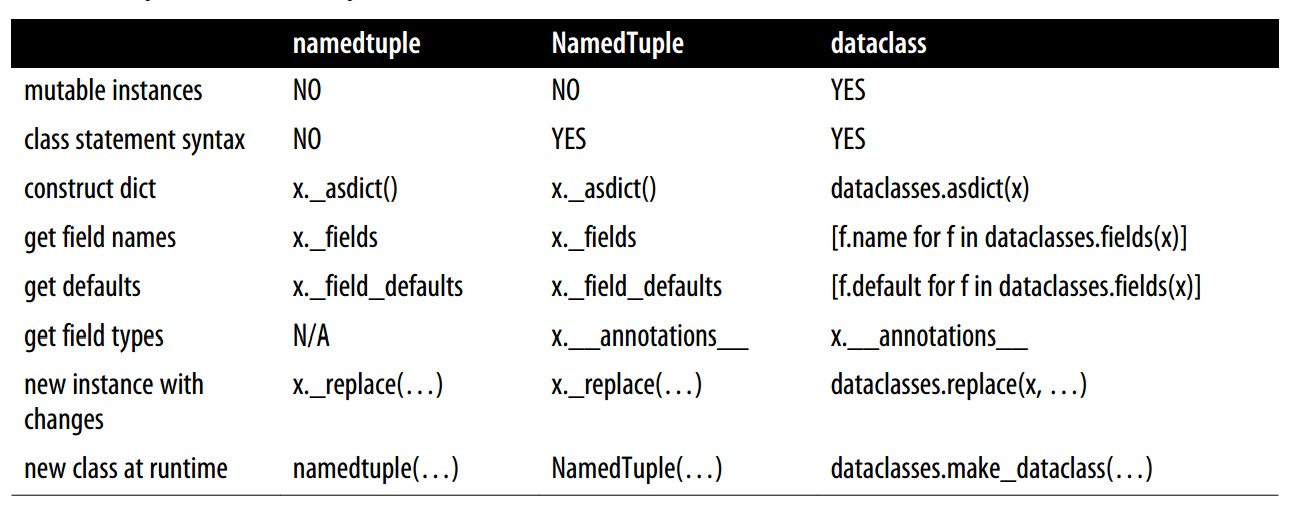
Mutability
- Immutability:
collections.namedtupleandtyping.NamedTuplecreate immutable instances, as they are subclasses oftuple.
- Mutability with
@dataclass:- By default,
@dataclassproduces mutable classes. - Use
frozen=Trueto make adataclassimmutable, raising an exception if you try to modify a field after initialization.
- By default,
Class Statement Syntax
- Supported Syntax:
typing.NamedTupleand@dataclasssupport the regular class statement syntax.- This syntax makes it easier to add methods and docstrings to the class.
Converting to dict
- Dictionary Conversion:
- Named tuples provide an instance method
. _asdict()to convert an instance to adict. - For data classes, use the
dataclasses.asdict()function to achieve the same result.
- Named tuples provide an instance method
Field Names and Default Values
- Accessing Metadata:
- Named tuple classes store field metadata in the
._fieldsand._fields_defaultsattributes. - For data classes, use the
dataclasses.fields()function, which returns a tuple ofFieldobjects with attributes likenameanddefault.
- Named tuple classes store field metadata in the
Field Types
- Getting Field Types:
typing.NamedTupleand@dataclassclasses use the__annotations__attribute to map field names to types.- Use
typing.get_type_hints(MyClass)instead of reading__annotations__directly for accurate type information.
Creating Instances with Changes
- Replacing Attributes:
- For a named tuple instance
x, usex._replace(**kwargs)to create a new instance with updated attributes. - For a data class, use
dataclasses.replace(x, **kwargs)to achieve similar functionality.
- For a named tuple instance
Creating Classes at Runtime
- Dynamic Class Creation:
- Named tuples and
typing.NamedTuplesupport creating classes at runtime using the default function call syntax. - The
dataclassesmodule provides amake_dataclassfunction to dynamically create data classes.
- Named tuples and
Side notes: Type Annotations
- Type Hints:
- Classes built with
typing.NamedTupleand@dataclasshave an__annotations__attribute holding the type hints for fields.
- Classes built with
- Recommended Practice:
- Instead of directly reading from
__annotations__, use:inspect.get_annotations(MyClass)(added in Python 3.10)typing.get_type_hints(MyClass)(Python 3.5 to 3.9)
- These functions resolve forward references and provide additional services.
- Instead of directly reading from
Classic Named Tuples
- The
collections.namedtuplefunction is a factory that creates subclasses oftuple, enhanced with field names, a class name, and an informative__repr__. - Named tuples can be used anywhere tuples are needed, and many functions in the Python standard library now return named tuples for convenience.
Features of Named Tuples
-
Memory Efficiency:
- Named tuple instances use the same amount of memory as regular tuples since field names are stored in the class rather than each instance.
-
Named Fields:
- Named tuples allow you to access fields by name, which makes the code more readable.
-
Compatibility with Tuples:
- Named tuples are fully compatible with tuples, meaning you can use them in any context where tuples are expected.
Defining a Named Tuple
>>> from collections import namedtuple
>>> City = namedtuple('City', 'name country population coordinates')
>>> tokyo = City('Tokyo', 'JP', 36.933, (35.689722, 139.691667))
>>> tokyo
City(name='Tokyo', country='JP', population=36.933, coordinates=(35.689722, 139.691667))
>>> tokyo.population
36.933
>>> tokyo.coordinates
(35.689722, 139.691667)
>>> tokyo[1]
'JP'
Key Points
-
Creation:
- To create a named tuple, provide a class name and field names, either as a space-delimited string or an iterable of strings.
-
Field Access:
- Fields can be accessed by name (e.g.,
tokyo.population) or by position (e.g.,tokyo[1]).
- Fields can be accessed by name (e.g.,
-
Inheritance from Tuple:
- Named tuples inherit methods like
__eq__for equality comparison and__lt__for sorting, making them useful in collections.
- Named tuples inherit methods like
Named Tuple Methods and Attributes
Named tuples offer additional attributes and methods beyond those inherited from tuple.
>>> City._fields
('name', 'country', 'population', 'coordinates')
>>> Coordinate = namedtuple('Coordinate', 'lat lon')
>>> delhi_data = ('Delhi NCR', 'IN', 21.935, Coordinate(28.613889, 77.208889))
>>> delhi = City._make(delhi_data)
>>> delhi._asdict()
{'name': 'Delhi NCR', 'country': 'IN', 'population': 21.935, 'coordinates': Coordinate(lat=28.613889, lon=77.208889)}
>>> import json
>>> json.dumps(delhi._asdict())
'{"name": "Delhi NCR", "country": "IN", "population": 21.935, "coordinates": [28.613889, 77.208889]}'
Important Attributes and Methods
-
._fields:- A tuple containing the field names of the class.
-
._make(iterable):- A class method to create an instance from an iterable, equivalent to using the constructor directly (e.g.,
City(*delhi_data)).
- A class method to create an instance from an iterable, equivalent to using the constructor directly (e.g.,
-
._asdict():- An instance method that returns a
dictrepresentation of the named tuple, useful for serialization.
- An instance method that returns a
-
JSON Serialization:
- The
._asdict()method can be used to serialize named tuple data into JSON format.
- The
The _asdict() Method in Named Tuples
-
Prior to Python 3.8:
- The
_asdict()method returned anOrderedDict. This was important because dictionaries did not preserve insertion order in versions before Python 3.7.
- The
-
Python 3.8 and Later:
- Since Python 3.8,
_asdict()returns a regulardict. - This change is acceptable because, starting from Python 3.7, dictionaries in Python maintain insertion order as an implementation detail, and from Python 3.8, this behavior is officially guaranteed.
- Since Python 3.8,
When to Use an OrderedDict
-
Creating an
OrderedDict:-
If your application specifically requires an
OrderedDict, you can easily create one from the result of_asdict():from collections import OrderedDict # Example of converting to OrderedDict city_data = tokyo._asdict() ordered_city_data = OrderedDict(city_data)
-
-
Use Cases for
OrderedDict:- An
OrderedDictmay still be necessary if you need backward compatibility with Python versions before 3.7. - It may also be useful if your application depends on the order of key-value pairs for some operations.
- An
Default Values for Fields
Since Python 3.7, namedtuple accepts a defaults keyword-only argument that provides default values for fields.
>>> Coordinate = namedtuple('Coordinate', 'lat lon reference', defaults=['WGS84'])
>>> Coordinate(0, 0)
Coordinate(lat=0, lon=0, reference='WGS84')
>>> Coordinate._field_defaults
{'reference': 'WGS84'}
Key Points
-
Defaults:
- The
defaultsparameter allows specifying default values for the rightmost fields.
- The
-
Field Defaults:
- The
_field_defaultsattribute provides a dictionary of fields with their default values.
- The
Hacking a namedtuple to Inject a Method
While the class syntax of typing.NamedTuple and @dataclass makes it easy to add methods, you can also add methods to a namedtuple, though it requires a bit of a hack.
Adding Methods to a Named Tuple
When using collections.namedtuple, you create simple, immutable classes that act like tuples with named fields. However, adding methods to these classes isn't as straightforward as with standard classes.
Example: Adding a Method to Card
Card = collections.namedtuple('Card', ['rank', 'suit'])To enhance this Card class with a method for custom sorting (like the spades_high function), you can assign the function to a class attribute.
>>> from collections import namedtuple
>>> Card = namedtuple('Card', ['rank', 'suit'])

>>> Card.suit_values = dict(spades=3, hearts=2, diamonds=1, clubs=0)

>>> def spades_high(card):
...     rank_value = FrenchDeck.ranks.index(card.rank)
...     suit_value = card.suit_values[card.suit]
...     return rank_value * len(card.suit_values) + suit_value

>>> Card.overall_rank = spades_high

>>> lowest_card = Card('2', 'clubs')
>>> highest_card = Card('A', 'spades')

>>> lowest_card.overall_rank()
0

>>> highest_card.overall_rank()
51
Key Points
-
Adding Class Attributes:
- You can add class attributes to store values, such as
suit_values, which assigns integer values to each suit.
- You can add class attributes to store values, such as
-
Defining the Method:
- The
spades_highfunction calculates a card's rank by using both the card's rank and suit. - Note that
spades_highdoesn't need aselfargument since it’s assigned to the class.
- The
-
Attaching the Method:
- Assign the function to the
namedtupleclass (Card) as an attribute to make it a method (overall_rank).
- Assign the function to the
-
Usage:
- You can now call
overall_rankonCardinstances, just like a regular method.
- You can now call
Benefits and Considerations
-
Readability and Maintenance:
- While possible, attaching methods this way can make the code less readable and harder to maintain compared to defining methods within a class statement.
-
Dynamic Language Features:
- This hack highlights Python's dynamic nature, allowing flexibility in modifying class behavior at runtime.
Typed Named Tuples (typing.NamedTuple)
-
Typed named tuples provide a way to define simple data structures with explicit type annotations for each field. This can improve code readability and make it easier to maintain.
- Combines the benefits of named tuples with type annotations, enhancing code readability and maintenance.
- Provides a simple syntax for defining immutable data structures with explicit types.
-
Use Cases:
- Ideal for defining lightweight, immutable classes where type annotations add clarity.
- Useful in contexts where type checking tools like
mypyare employed for enforcing type correctness.
Defining a Typed Named Tuple
Coordinate can be rewritten using typing.NamedTuple, which allows you to specify types for each field.
from typing import NamedTuple

class Coordinate(NamedTuple):
    lat: float
    lon: float
    reference: str = 'WGS84'
Key Points
-
Type Annotations:
- Each instance field must have a type annotation. This is a requirement for using
typing.NamedTuple.
- Each instance field must have a type annotation. This is a requirement for using
-
Default Values:
- Fields can be initialized with default values, as shown with the
referencefield (reference: str = 'WGS84').
- Fields can be initialized with default values, as shown with the
Features of typing.NamedTuple
-
Similar to
collections.namedtuple:- Classes built using
typing.NamedTuplehave the same methods as those generated bycollections.namedtuple, plus the methods inherited fromtuple.
- Classes built using
-
Type Annotations:
- The primary feature of
typing.NamedTupleis the inclusion of type annotations for each field. - These annotations are stored in the
__annotations__attribute of the class.
- The primary feature of
-
No Runtime Type Checking:
- Type annotations are not enforced at runtime by Python. They serve as documentation and are useful for static type checkers like
mypy.
- Type annotations are not enforced at runtime by Python. They serve as documentation and are useful for static type checkers like
-
Annotations Attribute:
- The
__annotations__attribute stores the field types but is not utilized by Python during runtime.
- The
Example Usage
# Define a typed named tuple for coordinates
from typing import NamedTuple

class Coordinate(NamedTuple):
    lat: float
    lon: float
    reference: str = 'WGS84'

# Create an instance of the typed named tuple
location = Coordinate(55.7558, 37.6176)

# Accessing fields
print(location.lat)       # Output: 55.7558
print(location.reference) # Output: WGS84

# Convert to a dictionary
location_dict = location._asdict()
print(location_dict)      # Output: {'lat': 55.7558, 'lon': 37.6176, 'reference': 'WGS84'}
Type Hints (a.k.a type annotations)
- The main feature of typing.NamedTuple are the type annotations
- Type hints, also known as type annotations, are a feature in Python that allows developers to specify the expected types of function arguments, return values, variables, and attributes.
- They are primarily used to improve code readability and to enable static type checking.
Key Points About Type Hints
-
Type Annotations Overview:
- Type hints are used to declare the expected data types for function arguments, return values, variables, and class attributes.
- They provide a way to document the intended usage of code, helping developers understand the expected input and output types.
-
No Runtime Enforcement:
- Type hints are not enforced by the Python bytecode compiler or interpreter.
- There is no type checking at runtime, meaning that Python will not raise an error if the wrong data type is used.
from typing import NamedTuple class Coordinate(NamedTuple): lat: float lon: float # This will run without errors at runtime point = Coordinate(lat='Ni!', lon=None) print(point) # Output: Coordinate(lat='Ni!', lon=None)- In the example above, despite the type hints, the code will execute without error, creating a
Coordinatewith invalid data types.
The Role of Type Checkers
-
Purpose of Type Hints:
- Type hints are primarily used to support third-party type checkers such as
mypyor integrated development environments (IDEs) like PyCharm. - These tools perform static analysis, checking the code for type correctness without executing it.
- Type hints are primarily used to support third-party type checkers such as
-
Using
mypy:- Type checkers like
mypyanalyze Python source code to ensure that the types used in the code match the specified annotations.
# Running mypy on the example code $ mypy nocheck_demo.py nocheck_demo.py:8: error: Argument 1 to "Coordinate" has incompatible type "str"; expected "float" nocheck_demo.py:8: error: Argument 2 to "Coordinate" has incompatible type "None"; expected "float"- In the output above,
mypyidentifies that the arguments provided toCoordinateare of incorrect types (strandNone), highlighting a type mismatch with the expectedfloattype.
- Type checkers like
Practical Benefits of Type Hints
-
Improved Code Clarity:
- Type hints serve as documentation, making it easier for developers to understand and maintain code by clearly indicating what types are expected.
-
Early Error Detection:
- By using static type checkers, developers can catch type-related errors early in the development process, reducing the likelihood of runtime errors.
-
Enhanced Tooling:
- IDEs and linters leverage type hints to provide better code completion, refactoring support, and error checking.
More on Variable Annotation Syntax in Python
- Variable annotations allow developers to specify the expected data type of variables, including attributes within classes.
- This feature is defined in PEP 526, and it is widely used in Python to improve code readability and facilitate static type checking.
Basic Syntax of Variable Annotations
var_name: some_type-
Example:
name: str
age: int
Acceptable Type Hints
Type hints specify what data types are expected and are outlined in PEP 484. Here are some common types used in the context of data classes:
-
Concrete Classes:
-
Use standard data types or user-defined classes.
-
Example:
name: str
deck: FrenchDeck
-
-
Parameterized Collection Types:
-
Specify collections with specific data types using the generic syntax.
-
Examples:
numbers: list[int]
point: tuple[str, float]
-
-
Optional Types:
-
Use
typing.Optionalto denote that a variable can be of a specific type orNone. -
Example:
description: Optional[str]
-
Using Variable Annotations in Data Classes
- In
typing.NamedTupleand@dataclass, variable annotations can also be used to define default values for attributes. - This makes the attributes optional during object construction, as they will default to the specified value if omitted.
Syntax with Default Values
var_name: some_type = a_value-
Example:
class Coordinate(NamedTuple): lat: float lon: float reference: str = 'WGS84'- Here,
referenceis a string attribute with a default value of'WGS84'.
- Here,
Example with typing.NamedTuple
from typing import NamedTuple, Optional

class Person(NamedTuple):
    name: str
    age: int
    email: Optional[str] = None

# Creating an instance with default value for email
person = Person(name="Alice", age=30)
print(person) # Output: Person(name='Alice', age=30, email=None)- In this example, the
emailfield is optional and defaults toNoneif not provided.
Example with @dataclass
from dataclasses import dataclass
from typing import Optional

@dataclass
class Product:
    name: str
    price: float
    description: Optional[str] = None

# Creating an instance with default description
product = Product(name="Laptop", price=999.99)
print(product) # Output: Product(name='Laptop', price=999.99, description=None)- Here, the
descriptionattribute is optional and has a default value ofNone.
Plain Class with Type Hints
class DemoPlainClass:
    a: int
    b: float = 1.1
c = 'spam'- Annotations in DemoPlainClass:
ais an entry in__annotations__but does not become a class attribute.bis saved as an annotation and also becomes a class attribute with a value of1.1.cis a plain class attribute with no annotation.
Inspecting the Plain Class
>>> from demo_plain import DemoPlainClass
>>> DemoPlainClass.__annotations__
{'a': <class 'int'>, 'b': <class 'float'>}

>>> DemoPlainClass.a
Traceback (most recent call last):
  File "<stdin>", line 1, in <module>
AttributeError: type object 'DemoPlainClass' has no attribute 'a'

>>> DemoPlainClass.b
1.1

>>> DemoPlainClass.c
'spam'- Explanation:
__annotations__records type hints.ais not a class attribute since no value is bound to it.bandcare stored as class attributes because they have assigned values.
Instance Behavior
- Class Attributes in Instances:
- Creating an instance of
DemoPlainClass(o = DemoPlainClass()) will not includeaas an attribute. Accessingo.araisesAttributeError. o.bando.cwill retrieve the class attributes with values1.1and'spam'.
- Creating an instance of
import typing

class DemoNTClass(typing.NamedTuple):
    a: int
    b: float = 1.1
c = 'spam'- Annotations in DemoNTClass:
aandbare both annotations and instance attributes, withbhaving a default value of1.1.cremains a plain class attribute with the value'spam'.
Inspecting the Named Tuple Class
>>> from demo_nt import DemoNTClass
>>> DemoNTClass.__annotations__
{'a': <class 'int'>, 'b': <class 'float'>}

>>> DemoNTClass.a
<_collections._tuplegetter object at 0x101f0f940>

>>> DemoNTClass.b
<_collections._tuplegetter object at 0x101f0f8b0>

>>> DemoNTClass.c
'spam'-
Explanation:
aandbare both descriptors, similar to property getters, allowing access to instance attributes.cis a standard class attribute.
-
Docstring:
>>> DemoNTClass.__doc__ 'DemoNTClass(a, b)' -
Instance Creation:
>>> nt = DemoNTClass(8) >>> nt.a 8 >>> nt.b 1.1 >>> nt.c 'spam' -
Behavior:
- The constructor requires
aand optionallyb(due to its default value).nt.caccesses the class attributec.
- The constructor requires
-
Immutability:
DemoNTClassinstances are immutable, reflecting the behavior of tuples. Assigning values tont.a,nt.b,nt.c, ornt.zraisesAttributeError.
Class Decorated with @dataclass
from dataclasses import dataclass

@dataclass
class DemoDataClass:
    a: int
    b: float = 1.1
c = 'spam'- Annotations in DemoDataClass:
aandbbecome instance attributes controlled by descriptors.balso has a default value, whilecremains a class attribute with no annotation.
Inspecting the Data Class
>>> from demo_dc import DemoDataClass
>>> DemoDataClass.__annotations__
{'a': <class 'int'>, 'b': <class 'float'>}

>>> DemoDataClass.__doc__
'DemoDataClass(a: int, b: float = 1.1)'

>>> DemoDataClass.a
Traceback (most recent call last):
  File "<stdin>", line 1, in <module>
AttributeError: type object 'DemoDataClass' has no attribute 'a'

>>> DemoDataClass.b
1.1

>>> DemoDataClass.c
'spam'- Explanation:
__annotations__stores the expected types.adoes not exist as a class attribute; it is created only in instances.bexists as a class attribute with its default value, whilecis a typical class attribute.
Instance Behavior
>>> dc = DemoDataClass(9)
>>> dc.a
9

>>> dc.b
1.1

>>> dc.c
'spam'-
Explanation:
aandbare instance attributes withbhaving a default value, whilecis accessed as a class attribute.
-
Mutability:
DemoDataClassinstances are mutable. You can change attributes and add new ones:
>>> dc.a = 10 >>> dc.b = 'oops' >>> dc.c = 'whatever' >>> dc.z = 'secret stash'- Changing
dc.cdoes not affect the class attributec. You can also add a new attributez.
Summary
-
Variable Annotations:
- Define expected data types and are stored in
__annotations__but have no runtime enforcement. - Used in both
typing.NamedTupleand@dataclassto enhance class definitions.
- Define expected data types and are stored in
-
Behavior of Named Tuples:
typing.NamedTupleuses descriptors for read-only attributes, reflecting immutability.
-
Behavior of Data Classes:
@dataclassallows mutable instances with public attributes that can be read and modified.
-
Class vs. Instance Attributes:
- Named tuples have instance attributes controlled by descriptors, while data classes allow direct instance attribute manipulation.
More About @dataclass
- The
@dataclassdecorator in Python simplifies the creation of classes that are primarily used for storing data. - It automatically generates special methods like
__init__(),__repr__(), and__eq__()based on class attributes.
Decorator Signature
- The signature for the
@dataclassdecorator includes several keyword-only arguments that allow for customization:
@dataclass(*, init=True, repr=True, eq=True, order=False, unsafe_hash=False, frozen=False)- The
*indicates that all parameters are keyword-only.
Default Settings
The default settings of the @dataclass decorator are generally suitable for common use cases.
-
init=True:- Generates an
__init__()method to initialize instance attributes.
- Generates an
-
repr=True:- Generates a
__repr__()method that returns a string representation of the instance, useful for debugging.
- Generates a
-
eq=True:- Generates an
__eq__()method for comparing instances based on their attribute values.
- Generates an
-
order=False:- By default, instances of the class are not orderable. Setting
order=Trueallows instances to be compared and sorted.
- By default, instances of the class are not orderable. Setting
-
unsafe_hash=False:- By default, instances are unhashable. Setting this to
Trueforces the creation of a__hash__()method, which can lead to incorrect behavior if the class is mutable.
- By default, instances are unhashable. Setting this to
-
frozen=False:- Allows instances to be mutable by default. Setting
frozen=Truemakes instances immutable.
- Allows instances to be mutable by default. Setting
Commonly Modified Options
While the defaults are useful for many situations, you may want to modify the following options:
-
frozen=True:- Protects instances from accidental modification by making them immutable.
- Immutability can be bypassed by a determined programmer, but such actions are usually evident in code reviews.
-
order=True:- Enables sorting of instances by generating comparison methods like
__lt__,__le__,__gt__, and__ge__. - Useful when you need to maintain ordered collections of data class instances.
- Enables sorting of instances by generating comparison methods like
Hashing and Mutability
-
Hashable Instances:
- If both
eq=Trueandfrozen=True, the@dataclassdecorator generates a__hash__()method, making instances hashable. - This is because immutable objects can safely be used as dictionary keys or set elements.
- If both
-
Unhashable Instances:
- If
frozen=False,@dataclasssets__hash__toNone, overriding any superclass__hash__method. This prevents instances from being used as dictionary keys or set elements.
- If
-
Unsafe Hashing:
unsafe_hash=True:- Forces the creation of a
__hash__()method, even if the class is mutable. - This option is discouraged unless you are sure the class is logically immutable despite potential internal mutations.
- Specialized use cases might require this, but careful consideration and understanding are necessary.
- Forces the creation of a
Example of a Frozen and Orderable Data Class
from dataclasses import dataclass

@dataclass(order=True, frozen=True)
class Point:
    x: int
    y: int

# Creating instances
p1 = Point(1, 2)
p2 = Point(3, 4)

# Accessing attributes
print(p1.x)  # Output: 1

# Attempting to modify attributes (will raise an error due to frozen=True)
# p1.x = 10  # Raises: dataclasses.FrozenInstanceError

# Comparing instances (order=True enables this)
print(p1 < p2)  # Output: True

# Hashing (frozen=True makes it hashable)
point_set = {p1, p2}  # Allowed
Field Options in @dataclass
- The
@dataclassdecorator provides a way to automate the creation of data classes, making it easier to define classes that primarily store data. - A key aspect of data classes is how they handle default values for fields, particularly when those defaults are mutable.
Default Values and Type Hints
- When defining fields in a data class, you can specify default values using type hints.
- However, Python does not allow parameters without defaults to follow parameters with defaults in the
__init__method. This means once a field with a default value is declared, all subsequent fields must also have default values.
@dataclass
class ExampleClass:
    a: int
    b: float = 1.1
c: str = 'default'- Here,
bandchave default values, whileadoes not. All fields afterbmust have default values.
Mutable Default Values
- Mutable default values, such as lists or dictionaries, can lead to bugs if not handled correctly.
- This issue arises when a mutable default value is shared among all instances of the class, which can result in unexpected behavior.
@dataclass
class ClubMember:
    name: str
guests: list = []- Problem: Each instance of
ClubMembershares the sameguestslist, which can be modified by any instance.
When you load the module with the above class, you'll encounter:
ValueError: mutable default <class 'list'> for field guests is not allowed: use default_factory-
Solution: Use
default_factory -
To avoid sharing mutable defaults, use the
default_factoryoption with thefield()function. -
This ensures each instance gets its own independent copy of the mutable object.
from dataclasses import dataclass, field

@dataclass
class ClubMember:
    name: str
guests: list = field(default_factory=list)- Explanation: Using
default_factory=listensures a new list is created for each instance ofClubMember.
Using default_factory
- The
default_factoryparameter accepts a callable (such as a function or a class) that is invoked with zero arguments to produce a default value each time a new instance is created.
@dataclass
class ClubMember:
    name: str
guests: list = field(default_factory=list)- Each
ClubMemberinstance now has its own separateguestslist, preventing accidental sharing and modification.
Generic type annotations (Since Python 3.9)
from dataclasses import dataclass, field

@dataclass
class ClubMember:
    name: str
guests: list[str] = field(default_factory=list)-
list[str]Syntax: Specifies thatguestsshould be a list of strings. -
Python 3.8 and Earlier: Use
Listfrom thetypingmodule:from typing import List from dataclasses import dataclass, field @dataclass class ClubMember: name: str guests: List[str] = field(default_factory=list) -
Type Checking: Type annotations like
list[str]allow tools likemypyto perform static type checking, helping identify potential bugs when incorrect types are used.
Customizing Field Behavior
The field() function in @dataclass provides additional options for customizing field behavior beyond default values.
Hiding Fields from __repr__
You can exclude fields from being included in the __repr__() method by setting the repr parameter to False.
@dataclass
class ClubMember:
    name: str
    guests: list = field(default_factory=list)
athlete: bool = field(default=False, repr=False)repr=False: Theathletefield will not be shown in the__repr__()output, making it useful for sensitive or less important fields.
Example Class with Various Field Options
Here is a comprehensive example showing how to use different field options in a data class:
from dataclasses import dataclass, field
from typing import List

@dataclass
class ClubMember:
    name: str
    guests: List[str] = field(default_factory=list)  # Each instance has its own list
    athlete: bool = field(default=False, repr=False)  # Hidden from repr

# Create an instance of ClubMember
member = ClubMember(name='Alice')
print(member)  # Output: ClubMember(name='Alice', guests=[])

# Adding guests
member.guests.append('Bob')
member.guests.append('Charlie')
print(member)  # Output: ClubMember(name='Alice', guests=['Bob', 'Charlie'])

# Checking athlete attribute (not shown in repr)
print(member.athlete)  # Output: False

# Modifying the athlete attribute
member.athlete = True
print(member.athlete)  # Output: True
Key Takeaways
- Default Values: Use
default_factoryfor mutable defaults to avoid shared mutable states across instances. - Field Annotations: Type annotations improve type checking and code readability.
- Field Customization: Use
field()to fine-tune behavior, such as hiding fields from__repr__.
Post-init Processing in @dataclass
- The
@dataclassdecorator automatically generates an__init__method for initializing instance attributes with passed arguments or their default values. - However, there are scenarios where additional processing is needed during initialization, such as validation or computing field values based on other fields. This is where the
__post_init__method comes into play.
The __post_init__ Method
-
Purpose:
__post_init__allows you to perform additional initialization steps after the__init__method has completed. It is automatically called at the end of the generated__init__method. -
Common Use Cases:
- Validating field values.
- Computing derived attributes based on other fields.
- Enforcing constraints or invariants that involve multiple fields.
Example Use Case: HackerClubMember
The HackerClubMember class should:
- Accept an optional
handleargument. - Automatically set the
handleto the first part of the member's name ifhandleis omitted. - Ensure that all members have a unique
handle. - Require that
handlebe provided as a keyword argument if noguestsare specified.
Doctests for HackerClubMember
"""
HackerClubMember objects accept an optional handle argument::
 >>> anna = HackerClubMember('Anna Ravenscroft', handle='AnnaRaven')
 >>> anna
 HackerClubMember(name='Anna Ravenscroft', guests=[], handle='AnnaRaven')

If handle is omitted, it's set to the first part of the member's name::
 >>> leo = HackerClubMember('Leo Rochael')
 >>> leo
 HackerClubMember(name='Leo Rochael', guests=[], handle='Leo')

Members must have a unique handle. The following leo2 will not be created,
because its handle would be 'Leo', which was taken by leo::
 >>> leo2 = HackerClubMember('Leo DaVinci')
 Traceback (most recent call last):
 ...
 ValueError: handle 'Leo' already exists.

To fix, leo2 must be created with an explicit handle::
 >>> leo2 = HackerClubMember('Leo DaVinci', handle='Neo')
 >>> leo2
 HackerClubMember(name='Leo DaVinci', guests=[], handle='Neo')
"""
Implementation using the __post_init__ method
from dataclasses import dataclass
from club import ClubMember

@dataclass
class HackerClubMember(ClubMember):
    all_handles = set()
    handle: str = ''

    def __post_init__(self):
        cls = self.__class__

        # Set handle to the first part of the name if it is empty
        if self.handle == '':
            self.handle = self.name.split()[0]

        # Ensure handle is unique
        if self.handle in cls.all_handles:
            msg = f'handle {self.handle!r} already exists.'
            raise ValueError(msg)

        # Add the new handle to the set of all handles
cls.all_handles.add(self.handle)-
Class Attribute:
all_handlesis a class attribute, used to track all existing handles and ensure they are unique. -
Instance Field:
handleis an instance field of typestrwith a default value of an empty string, making it optional. -
Post-initialization Logic:
-
Compute Default Handle: If
handleis not provided (empty string), it defaults to the first part ofname. -
Validate Handle Uniqueness: If the
handlealready exists inall_handles, aValueErroris raised. -
Add Handle to Set: If the handle is unique, it is added to the
all_handlesset.
-
-
Problem: Handling Static Type Checkers
- The above implementation works functionally but may not satisfy static type checkers like
mypybecause they may not correctly infer types due to dynamic class attribute usage.
- The above implementation works functionally but may not satisfy static type checkers like
Typed Class Attributes in @dataclass
- In Python, the
@dataclassdecorator simplifies the creation of classes that primarily store data by automatically generating special methods like__init__,__repr__, and__eq__. - This functionality is enhanced through the use of variable annotations and options like
ClassVarandInitVarfor managing class and instance-level attributes.
Class Attributes vs. Instance Attributes
When defining class attributes in a @dataclass, it's important to distinguish between attributes meant to be shared across all instances (class attributes) and those unique to each instance (instance attributes).
Type Annotations and ClassVar
- To ensure proper handling of class attributes in
@dataclassand static type checking, use theClassVarannotation:
from dataclasses import dataclass
from typing import ClassVar, Set

@dataclass
class HackerClubMember(ClubMember):
    all_handles: ClassVar[Set[str]] = set()  # Class-level attribute
    handle: str = ''  # Instance-level attribute

    def __post_init__(self):
        cls = self.__class__
        if self.handle == '':
            self.handle = self.name.split()[0]
        if self.handle in cls.all_handles:
            msg = f'handle {self.handle!r} already exists.'
            raise ValueError(msg)
cls.all_handles.add(self.handle)ClassVarAnnotation:ClassVartells@dataclassnot to treatall_handlesas an instance attribute.ClassVaris important for distinguishing shared class attributes from instance attributes, preventing them from being included in the generated__init__method or instance representations.
Using InitVar for Initialization
InitVaris another type from thedataclassesmodule, used for parameters that are passed to__init__but not stored as instance attributes. It allows passing additional arguments to__post_init__.
from dataclasses import dataclass, field, InitVar

@dataclass
class DatabaseRecord:
    database: InitVar[DatabaseConnection]
    record_id: str
    data: dict = field(default_factory=dict)

    def __post_init__(self, database: DatabaseConnection):
        # Example initialization logic using the database parameter
self.data = database.fetch_record(self.record_id)InitVarUsage:databaseis not stored as an instance attribute but is used during initialization to fetch data.
Example: Dublin Core Resource Record
- The Dublin Core Schema provides a practical example of a
@dataclasswith multiple fields and type annotations.
from dataclasses import dataclass, field
from typing import Optional
from enum import Enum, auto
from datetime import date

class ResourceType(Enum):
    BOOK = auto()
    EBOOK = auto()
    VIDEO = auto()

@dataclass
class Resource:
    """Media resource description."""
    identifier: str
    title: str = '<untitled>'
    creators: list[str] = field(default_factory=list)
    date: Optional[date] = None
    type: ResourceType = ResourceType.BOOK
    description: str = ''
    language: str = ''
subjects: list[str] = field(default_factory=list)- Field Annotations:
- Fields are annotated with their expected types, such as
str,list[str], andOptional[date]. - Default values are provided for optional fields, ensuring that required fields are initialized first.
- Fields like
creatorsandsubjectsusedefault_factoryto ensure unique lists for each instance.
- Fields are annotated with their expected types, such as
>>> description = 'Improving the design of existing code'
>>> book = Resource(
...     '978-0-13-475759-9', 'Refactoring, 2nd Edition',
...     ['Martin Fowler', 'Kent Beck'], date(2018, 11, 19),
...     ResourceType.BOOK, description, 'EN',
...     ['computer programming', 'OOP']
... )
>>> book # doctest: +NORMALIZE_WHITESPACE
Resource(
    identifier='978-0-13-475759-9',
    title='Refactoring, 2nd Edition',
    creators=['Martin Fowler', 'Kent Beck'],
    date=datetime.date(2018, 11, 19),
    type=<ResourceType.BOOK: 1>,
    description='Improving the design of existing code',
    language='EN',
    subjects=['computer programming', 'OOP'],
)
Customizing __repr__
- To enhance readability, you can customize the
__repr__method of a data class by iterating over its fields.
from dataclasses import fields

def __repr__(self):
    cls = self.__class__
    cls_name = cls.__name__
    indent = ' ' * 4
    res = [f'{cls_name}(']
    for f in fields(cls):
        value = getattr(self, f.name)
        res.append(f'{indent}{f.name} = {value!r},')
    res.append(')')
return '\n'.join(res)- Implementation Details:
- The
fieldsfunction from thedataclassesmodule retrieves the data class fields. getattr(self, f.name)accesses the field values dynamically.repr(value)provides a string representation of each field value, ensuring clear and detailed output.
- The
Data Class as a Code Smell
Understanding Code Smells
- A code smell is a surface indication in code that may point to a deeper problem in the system.
- The term was coined by Kent Beck and popularized by Martin Fowler in his book Refactoring: Improving the Design of Existing Code.
Key Points About Code Smells
-
Quick to Spot:
- Smells are usually easy to identify, such as a long method or a class with many fields but no behavior.
- They act as a "red flag" or indicator for further examination.
-
Not Always Bad:
- Smells don't inherently signify a problem; they suggest that further investigation is needed.
- Some smells may be acceptable depending on the context and design decisions.
-
Opportunity for Refactoring:
- Identifying smells often leads to discovering design improvements and opportunities for refactoring.
Data Class as a Code Smell
- In object-oriented programming, the goal is to encapsulate data and behavior within the same class.
- A data class that only holds fields with getters and setters, and lacks behavior, may indicate a code smell.
Characteristics of a Data Class Smell
-
Dumb Data Holders:
- Data classes often serve as containers without meaningful methods or logic.
- They may be overly manipulated by external functions or classes, leading to scattered logic.
-
Maintenance Challenges:
- Widely used data classes with no behavior can result in duplicated or scattered code across the system, complicating maintenance.
-
Potential for Improvement:
- Refactoring can involve bringing related behavior into the data class to enhance encapsulation and cohesion.
Scenarios Where Data Classes Make Sense
- Despite their potential as a code smell, data classes can be useful in specific situations:
1. Data Class as Scaffolding
-
Temporary Implementation:
- A data class may serve as an initial, simple implementation to get a project or module started.
- Over time, the class can evolve to include its own methods and logic as the system matures.
-
Python as a Rapid Prototyping Tool:
- Python is often used for quick problem-solving and experimentation, where temporary scaffolding may be left in place for simplicity.
2. Data Class as Intermediate Representation
-
Interchange Formats:
- Data classes can be used to build records for export to formats like JSON or XML, or to store imported data temporarily.
-
Immutability:
- Treat instances as immutable while they serve as intermediate representations, even if the fields themselves are mutable.
- Avoid modifying fields directly; instead, create new instances with the required changes or use custom builder methods.
Code Smell Scenario
Imagine a data class that is widely used but contains no methods beyond simple accessors:
from dataclasses import dataclass

@dataclass
class User:
    username: str
    email: str
    age: int

# Example of potential misuse
def print_user_details(user: User):
    print(f"Username: {user.username}")
    print(f"Email: {user.email}")
    print(f"Age: {user.age}")

def update_user_email(user: User, new_email: str):
user.email = new_email-
Issue:
- The
Userclass is manipulated externally, lacking encapsulated behavior.
- The
-
Improvement:
- Move relevant behavior into the
Userclass to improve encapsulation:
- Move relevant behavior into the
from dataclasses import dataclass

@dataclass
class User:
    username: str
    email: str
    age: int

    def update_email(self, new_email: str):
        self.email = new_email

    def __str__(self):
        return f"User(username={self.username}, email={self.email}, age={self.age})"

# Using encapsulated methods
user = User("john_doe", "john@example.com", 30)
print(user)
user.update_email("john.doe@example.com")
print(user)
Appropriate Data Class Use
Here's an example of a data class used as an intermediate representation:
from dataclasses import dataclass, field
from typing import List, Dict

@dataclass
class Record:
    data: Dict[str, any] = field(default_factory=dict)

    def to_json(self) -> Dict[str, any]:
        return self.data

# Building records for export
record = Record({"id": 1, "name": "Sample"})
json_data = record.to_json()
print(json_data) # {'id': 1, 'name': 'Sample'}- Immutability Consideration:
- Treat
recordas immutable, even thoughdatais a mutable dictionary.
- Treat
Key Takeaways
-
Code Smell Awareness:
- Recognize when a data class might indicate a design problem and explore refactoring opportunities.
- Look for signs that the data class is too dependent on external functions for its behavior.
-
Contextual Use:
- Consider whether a data class is appropriate for temporary scaffolding or as an intermediate data representation.
- Evaluate the trade-offs between simplicity and the potential for scattered logic when using data classes.
-
Encapsulation:
- Strive to encapsulate related behavior within the data class to enhance cohesion and maintainability.
Pattern Matching Class Instances in Python
- Pattern matching is a feature introduced in Python 3.10, allowing for a more readable and expressive way to match complex data structures.
- It is similar to switch-case statements in other languages but offers more powerful capabilities, particularly with classes.
Overview of Class Patterns
- Class patterns are used to match instances of classes by their type and optionally by their attributes.
- This feature can be applied to any class instance, not just data classes.
- Class patterns provide a structured way to deconstruct and inspect objects.
There are three variations of class patterns:
- Simple Class Patterns
- Keyword Class Patterns
- Positional Class Patterns
Simple Class Patterns
- Simple class patterns match instances of specific types, similar to type checks. The syntax resembles a constructor invocation.
# Example: Matching a sequence with specific types

sequence = ["John Doe", 42, "USA", (40.7128, -74.0060)]

match sequence:
    case [str(name), _, _, (float(lat), float(lon))]:
print(f"Name: {name}, Coordinates: ({lat}, {lon})")- Explanation:
- The pattern
[str(name), _, _, (float(lat), float(lon))]matches a four-item sequence. - The first item is a
strand is bound toname. - The last item is a 2-tuple with two
floatinstances, bound tolatandlon.
- The pattern
Matching Simple Types
A class pattern can match specific types directly:
# Matching a float value

def process_value(x):
    match x:
        case float():
            print("This is a float:", x)
        case _:
            print("Not a float:", x)

process_value(3.14)  # Output: This is a float: 3.14
process_value("Hello") # Output: Not a float: Hello-
Caution: Be careful with syntax errors when using simple patterns:
match x: case float: # DANGER!!! do_something_with(x)-
Issue:
case float:matches any subject because Python treatsfloatas a variable and binds it to the subject.
-
Correct Usage:
- Use
float()to properly matchfloatinstances.
- Use
-
Special Case: Built-in Types
- The simple pattern syntax (e.g.,
float(x)) is a special case that applies only to nine "blessed" built-in types, which are:bytes,dict,float,frozenset,int,list,set,str,tuple.
Keyword Class Patterns
- Keyword class patterns match class instances by checking specific attributes and their values.
First, consider the following City class defined using typing.NamedTuple:
import typing

class City(typing.NamedTuple):
    continent: str
    name: str
    country: str
The City class has three attributes: continent, name, and country. Now, let's define a list of City instances:
cities = [
    City('Asia', 'Tokyo', 'JP'),
    City('Asia', 'Delhi', 'IN'),
    City('North America', 'Mexico City', 'MX'),
    City('North America', 'New York', 'US'),
    City('South America', 'São Paulo', 'BR'),
]
This list, cities, contains five instances of the City class, each representing a different city.
Matching Cities by Continent
Suppose we want to find all cities located in Asia. We can achieve this using keyword class patterns:
def match_asian_cities():
    results = []
    for city in cities:
        match city:
            case City(continent='Asia'):
                results.append(city)
    return results

asian_cities = match_asian_cities()
print(asian_cities)
[City(continent='Asia', name='Tokyo', country='JP'), City(continent='Asia', name='Delhi', country='IN')]Matching and Binding Attributes
def match_asian_countries():
    results = []
    for city in cities:
        match city:
            case City(continent='Asia', country=cc):
                results.append(cc)
    return results

asian_countries = match_asian_countries()
print(asian_countries)
['JP', 'IN']Flexibility in Pattern Matching
You can also use the same attribute names in the pattern for binding:
- The pattern uses
country=countryto bind thecountryattribute directly to a variable namedcountry. - This approach is equivalent to using a different variable name but can enhance readability when the context is clear.
def match_asian_countries_with_names():
    results = []
    for city in cities:
        match city:
            case City(continent='Asia', country=country):
                results.append(country)
    return results
Positional Class Patterns
- Positional class patterns allow you to match class instances by the order of their attributes, similar to how positional arguments work in functions.
- This type of pattern matching is both concise and intuitive, especially when dealing with data structures where attribute order is well-defined.
Matching Asian Cities by Position
def match_asian_cities_pos():
    results = []
    for city in cities:
        match city:
            case City('Asia'):
                results.append(city)
    return results

asian_cities = match_asian_cities_pos()
print(asian_cities)
[City(continent='Asia', name='Tokyo', country='JP'), City(continent='Asia', name='Delhi', country='IN')]Extracting Country Using Positional Pattern
def match_asian_countries_pos():
    results = []
    for city in cities:
        match city:
            case City('Asia', _, country):
                results.append(country)
    return results

asian_countries = match_asian_countries_pos()
print(asian_countries)
['JP', 'IN']Understanding __match_args__
- The ability to use positional patterns relies on a special class attribute named
__match_args__. - This attribute is automatically created by class builders like
NamedTupleand specifies the order of attributes for positional pattern matching.
Inspecting __match_args__
For the City class, the __match_args__ attribute defines the order of attributes:
>>> City.__match_args__
('continent', 'name', 'country')__match_args__lists the attribute names in the order they will be used in positional patterns.- In this case, the order is
('continent', 'name', 'country'), meaningcontinentis first,nameis second, andcountryis third.
Combining Positional and Keyword Patterns
def match_asian_cities_with_name():
    results = []
    for city in cities:
        match city:
            case City('Asia', name):
                results.append(name)
    return results

asian_cities_with_names = match_asian_cities_with_name()
print(asian_cities_with_names)- The pattern
City('Asia', name)uses a positional pattern to matchcontinentand bindsnameto the second attribute (name).
['Tokyo', 'Delhi']