ch03.dict_and_sets
Ch 3. Dictionaries and Sets
graph LR;

GG["Hashable?"] --> GGX["Stable Hash Code through __hash__()"]
GG --> GGY["Equality Comparison through __eq__()"]
GG --> GGZ["Consistency between Equality and Hashing"]
graph LR;
A["Dictionary Syntax"] --> X["Dictionary Comprehension\n"]
A --> Y["Unpacking dictionary with **\ninto several key=val"]
A --> Z["Packing several key=val\nas parameter, through **"]
A --> XX["Merging with |, |=, .update(), ..."]
A --> XY["Pattern Matching with Mappings"]graph LR;
BB["Handling missing keys"] --> J["setdefault Method\nUpdate Mutable Values\nAvoids Second Search"]
BB --> BBX["Using defaultdict"]
BB --> BBY["implementing __missing__"]graph LR;
D["Specialized Mappings"]
E["defaultdict"]
F["ChainMap\nmaintains references\nto a list of dictionaries or mappings"]
DDS["shelve.Shelf\nPersistent Storage for Python Objects"]
G["Counter"] --> GGX["Can be used as multiset"]
H["OrderedDict"] --> HX["Key Ordering in ==\nBackward Compatibility"]
H --> HY["popitem(last=False) can pop first inserted"]
H --> HZ["move_to_end() method\ne.g. for LRU like ops"]
I["UserDict\nBase Class for Custom Mappings"]
D --> E
D --> F
D --> G
D --> DDS
D --> H
D --> Igraph LR;
P["collections.abc Module"]
Q["Mapping and MutableMapping ABCs\nRuntime Type Checking"]
R["MappingProxyType\nImmutable Façade"]
P --> Q
P --> Rgraph LR;
FF["set"] --> FFX["set"]
FFX --> FFXA["can use set comprehension"]
FF --> FFY["frozenset"]
FF --> FFZ["set operators"]
S["Dictionary Views\nEfficient .keys(), .values(), .items()"]
T["dict_keys and dict_items\nSupport frozenset Operators"]
S --> T
FFZ --> T
Introduction
- Python dictionaries (
dict) are a fundamental part of the language, serving as highly versatile data structures that support a wide range of functionalities. - They are a core component of Python's internal implementation and are optimized for performance.
Key Areas Where Dictionaries Are Used
-
Class and Instance Attributes:
- The attributes of classes and instances are stored as dictionaries. This allows for dynamic attribute management and flexible object models.
-
Module Namespaces:
- Each module in Python has its own namespace, represented as a dictionary. This enables efficient organization and access to variables and functions within modules.
-
Function Keyword Arguments:
- Keyword arguments in functions are passed and managed using dictionaries, enabling flexible and readable function calls.
-
Built-in Types and Functions:
- The
__builtins__.__dict__dictionary stores all built-in types, objects, and functions, providing quick access to core Python features.
- The
Modern dict Syntax
- Some require Python 3.9 (like the
|operator) or Python 3.10 (like match/case).
Dictionary Comprehensions in Python
- The syntax of a dictionary comprehension is similar to that of a list comprehension, with the addition of a colon (
:) to separate keys and values. The general form is: - Dictionary comprehensions are typically more efficient than constructing dictionaries with loops because they are optimized internally by Python.
{key_expression: value_expression for item in iterable if condition}key_expression: Expression for the key in the resulting dictionary.value_expression: Expression for the value in the resulting dictionary.iterable: Any iterable from which the elements are taken.condition: An optional condition to filter elements.
dial_codes = [
    (880, 'Bangladesh'),
    (55, 'Brazil'),
    (86, 'China'),
    (91, 'India'),
    (62, 'Indonesia'),
    (81, 'Japan'),
    (234, 'Nigeria'),
    (92, 'Pakistan'),
    (7, 'Russia'),
    (1, 'United States'),
]


# Swap the pairs: country is the key, and code is the value
country_dial = {country: code for code, country in dial_codes}
Using Conditions in Dictionary Comprehensions
You can also apply conditions to filter the items in the comprehension:
# Create a dictionary of country codes less than 70, with country names in uppercase
filtered_country_dial = {
  code: country.upper()
    for country, code in sorted(country_dial.items()) if code < 70}

# Display the resulting dictionary
print(filtered_country_dial)
Unpacking Mappings in Python
- Python's unpacking generalizations, introduced in PEP 448, provide enhanced support for unpacking mappings.
- These enhancements, available since Python 3.5, allow for more flexible and expressive manipulation of dictionaries and other mapping types.
1. Multiple Mapping Unpacking in Function Calls
- Prior to Python 3.5, you could only unpack a single dictionary into a function's keyword arguments using
**. - With PEP 448, you can unpack multiple mappings into a single function call, as long as all keys are strings and unique across all mappings.
# Function that accepts any number of keyword arguments
def dump(**kwargs):
    return kwargs

# Unpacking multiple dictionaries into a function call
result = dump(**{'x': 1}, y=2, **{'z': 3})

# Displaying the result
print(result)
{'x': 1, 'y': 2, 'z': 3}- The function
dump(**kwargs)accepts any number of keyword arguments and returns them as a dictionary. - The function call
dump(**{'x': 1}, y=2, **{'z': 3})unpacks multiple mappings into thekwargsdictionary. - The keys
'x','y', and'z'are unique across the mappings, so the unpacking succeeds without any conflicts.
Key Considerations
-
Unique Keys:
- All keys must be strings and unique across the unpacked mappings, as duplicate keyword arguments are not allowed in function calls.
-
Flexible Argument Passing:
- This feature enables more flexible function calls, allowing you to dynamically compose keyword arguments from multiple sources.
2. Unpacking Mappings in Dictionary Literals
- PEP 448 also introduced the ability to use
**unpacking within dictionary literals, allowing you to merge multiple mappings into a single dictionary. - This syntax supports multiple unpackings and allows duplicate keys, with later occurrences overwriting previous ones.
Example: Unpacking Mappings in Dictionary Literals
# Unpacking multiple mappings into a dictionary literal
merged_dict = {'a': 0, **{'x': 1}, 'y': 2, **{'z': 3, 'x': 4}}

# Displaying the merged dictionary
print(merged_dict)
{'a': 0, 'x': 4, 'y': 2, 'z': 3}- The dictionary literal
{'a': 0, **{'x': 1}, 'y': 2, **{'z': 3, 'x': 4}}merges multiple mappings into a single dictionary. - Duplicate keys are allowed, and later occurrences overwrite previous ones. In this example, the key
'x'appears twice, with the final value being4.
Use Cases
-
Merging Dictionaries:
- Dictionary unpacking is useful for merging multiple dictionaries, especially when the order of precedence for keys matters.
-
Constructing Complex Dictionaries:
- This syntax allows for the construction of complex dictionaries from multiple sources, facilitating cleaner and more expressive code.
Alternative Ways to Merge Dictionaries
- Using
update()Method
# Using the update() method to merge dictionaries
dict1 = {'a': 0, 'x': 1}
dict2 = {'y': 2, 'z': 3, 'x': 4}

# Creating a copy of dict1 and updating it with dict2
merged_dict = dict1.copy()
merged_dict.update(dict2)

# Displaying the merged dictionary
print(merged_dict)
{'a': 0, 'x': 4, 'y': 2, 'z': 3}Merging Mappings with the | and |= Operators
Using the | Operator to Merge Dictionaries
- The
|operator is used to merge two dictionaries into a new one. The resulting dictionary contains all key-value pairs from both dictionaries, with keys from the right-hand operand overwriting keys from the left-hand operand in case of conflicts.
# Define two dictionaries
d1 = {'a': 1, 'b': 3}
d2 = {'a': 2, 'b': 4, 'c': 6}

# Merge dictionaries using the | operator
merged_dict = d1 | d2

# Display the merged dictionary
print(merged_dict)
{'a': 2, 'b': 4, 'c': 6}Behavior with Different Types
- The type of the resulting dictionary is usually the same as the type of the left operand (
d1in this case). - However, if user-defined dictionary-like types are involved, the behavior may vary according to operator overloading rules.
Using the |= Operator to Update Dictionaries
- The
|=operator updates a dictionary in place by merging another dictionary into it. - This operation modifies the original dictionary rather than creating a new one.
# Define two dictionaries
d1 = {'a': 1, 'b': 3}
d2 = {'a': 2, 'b': 4, 'c': 6}

# Display original dictionary
print("Original d1:", d1)

# Update d1 in place using the |= operator
d1 |= d2

# Display the updated dictionary
print("Updated d1:", d1)
Original d1: {'a': 1, 'b': 3}
Updated d1: {'a': 2, 'b': 4, 'c': 6}Using update()
# Using the update() method to merge dictionaries
d1 = {'a': 1, 'b': 3}
d2 = {'a': 2, 'b': 4, 'c': 6}

# Merge dictionaries
d1.update(d2)
print(d1)
{'a': 2, 'b': 4, 'c': 6}Using Dictionary Unpacking (Python 3.5+)
# Using dictionary unpacking to merge dictionaries
d1 = {'a': 1, 'b': 3}
d2 = {'a': 2, 'b': 4, 'c': 6}

# Merge dictionaries using unpacking
merged_dict = {**d1, **d2}
print(merged_dict)
{'a': 2, 'b': 4, 'c': 6}- Explanation:
- Dictionary unpacking
{**d1, **d2}creates a new dictionary by unpacking key-value pairs fromd1andd2.
- Dictionary unpacking
Pattern Matching with Mappings in Python
- Mapping patterns are designed to match dictionary-like structures, which include any actual or virtual subclass of
collections.abc.Mapping. - The syntax for mapping patterns resembles dictionary literals, but with the ability to match specific key-value pairs and even nest other patterns, such as sequence patterns.
Example: Extracting Data with Mapping Patterns
def get_creators(record: dict) -> list:
    match record:
        case {'type': 'book', 'api': 2, 'authors': [*names]}:
            return names
        case {'type': 'book', 'api': 1, 'author': name}:
            return [name]
        case {'type': 'book'}:
            raise ValueError(f"Invalid 'book' record: {record!r}")
        case {'type': 'movie', 'director': name}:
            return [name]
        case _:
raise ValueError(f'Invalid record: {record!r}')-
Pattern:
{'type': 'book', 'api': 2, 'authors': [*names]}- Description: Matches any mapping with
'type'equal to'book','api'equal to2, and an'authors'key whose value is a sequence. - Action: The variable
namesis bound to the list of authors, which is then returned.
- Description: Matches any mapping with
-
Pattern:
{'type': 'book', 'api': 1, 'author': name}- Description: Matches any mapping with
'type'equal to'book','api'equal to1, and an'author'key whose value is a single object. - Action: The single author name is returned inside a list.
- Description: Matches any mapping with
-
Pattern:
{'type': 'book'}- Description: Matches any other mapping with
'type'equal to'book'but missing required keys for specific versions. - Action: Raises a
ValueError, indicating an invalid record for books.
- Description: Matches any other mapping with
-
Pattern:
{'type': 'movie', 'director': name}- Description: Matches any mapping with
'type'equal to'movie'and a'director'key. - Action: The director's name is returned inside a list.
- Description: Matches any mapping with
-
Pattern:
_- Description: A catch-all pattern that matches anything not matched by previous cases.
- Action: Raises a
ValueError, indicating an invalid record type.
Handling of Mapping Patterns
-
Order-Independent Matching:
- The order of keys in patterns is irrelevant.
- This means patterns can match against mappings regardless of how keys are ordered, which is useful for matching dictionaries like
OrderedDict.
-
Partial Matching:
- Unlike sequence patterns, mapping patterns succeed on partial matches.
- If all required keys are present in the mapping, a match occurs, even if extra keys exist in the subject.
-
Destructuring with Patterns:
- Mapping patterns allow destructuring complex data structures with nested patterns, providing a clean way to extract data.
-
Combining with Other Patterns:
- You can nest sequence patterns within mapping patterns to handle nested data structures.
Handling Missing Keys
- In the context of pattern matching, a match succeeds only if the required keys are present in the subject.
- Pattern matching uses the
d.get(key, sentinel)method internally, ensuring that missing keys result in a failed match rather than triggering default values or exceptions.
>>> b1 = dict(api=1, author='Douglas Hofstadter',
...           type='book', title='Gödel, Escher, Bach')
>>> get_creators(b1)
['Douglas Hofstadter']- Explanation:
- The first example matches the second pattern (
{'type': 'book', 'api': 1, 'author': name}) and extracts the author name.
- The first example matches the second pattern (
>>> from collections import OrderedDict
>>> b2 = OrderedDict(api=2, type='book',
...                  title='Python in a Nutshell',
...                  authors='Martelli Ravenscroft Holden'.split())
>>> get_creators(b2)
['Martelli', 'Ravenscroft', 'Holden']- Explanation:
- The second example matches the first pattern (
{'type': 'book', 'api': 2, 'authors': [*names]}) and returns the list of authors.
- The second example matches the first pattern (
>>> get_creators({'type': 'book', 'pages': 770})
Traceback (most recent call last):
 ...
ValueError: Invalid 'book' record: {'type': 'book', 'pages': 770}- Explanation:
- The third example matches the third pattern (
{'type': 'book'}) but lacks the required keys for valid book records, raising aValueError.
- The third example matches the third pattern (
>>> get_creators('Spam, spam, spam')
Traceback (most recent call last):
 ...
ValueError: Invalid record: 'Spam, spam, spam'- Explanation:
- The fourth example doesn't match any pattern and falls to the catch-all, raising a
ValueError.
- The fourth example doesn't match any pattern and falls to the catch-all, raising a
Capturing Additional Key-Value Pairs
- When matching mapping patterns, you can capture additional key-value pairs using
**syntax. This is useful if you need to capture extra information beyond the required keys.
food = dict(category='ice cream', flavor='vanilla', cost=199)

match food:
    case {'category': 'ice cream', **details}:
        print(f'Ice cream details: {details}')
Output:
Ice cream details: {'flavor': 'vanilla', 'cost': 199}- Explanation:
- The pattern
{'category': 'ice cream', **details}matches any dictionary with'category'equal to'ice cream'and captures all other key-value pairs into thedetailsdictionary.
- The pattern
Standard API of Mapping Types in Python
- Python's standard library includes several built-in types and tools to work with mappings, most notably the
dicttype. - For more advanced use cases, Python provides abstract base classes (ABCs) that define interfaces for mapping types.
- These are part of the
collections.abcmodule and offer a formalized way to define custom mapping types that behave consistently with Python's built-in dictionary types.
Mapping and MutableMapping ABCs
The collections.abc module defines two key abstract base classes for mapping types:
- Mapping
- MutableMapping
Hashability of Keys
- All standard and custom mappings built on top of hash tables share a common limitation: keys must be hashable.
- Hashability is a requirement because hash tables use hash values of keys to store and retrieve data efficiently.
What Is Hashable in Python?
Definition of Hashable
An object in Python is considered hashable if it meets the following criteria:
-
Stable Hash Code:
- The object has a hash code that remains constant during its lifetime. This requires the object to implement a
__hash__()method.
- The object has a hash code that remains constant during its lifetime. This requires the object to implement a
-
Equality Comparison:
- The object can be compared to other objects for equality, which means it implements an
__eq__()method.
- The object can be compared to other objects for equality, which means it implements an
-
Consistency between Equality and Hashing:
- If two objects compare equal (
__eq__()returnsTrue), they must have the same hash code (__hash__()returns the same value). (e.g. ifa == b, thenhash(a) == hash(b)) - This consistency is vital for the integrity of hash-based collections. When you look up an item in a dictionary or set, the hash code is used to find the correct bucket or slot where the item should be. Once in that bucket, the equality comparison is used to find the exact item. If the hash code were different for two objects that are considered equal, the collection might end up in a state where it cannot correctly locate or differentiate between these objects. This would lead to logical errors and data corruption.
- If two objects compare equal (
Built-in Hashable Types
-
Immutable Numeric Types:
- All built-in numeric types, such as
int,float, andcomplex, are hashable because they are immutable.
- All built-in numeric types, such as
-
Immutable Sequence Types:
- Strings (
str) and bytes (bytes) are hashable because they are immutable.
- Strings (
-
Tuples:
- A tuple is hashable if all its elements are hashable. This makes tuples a common choice for keys in dictionaries if they contain hashable items.
-
Frozensets:
- A
frozensetis always hashable because it is immutable and requires that all its elements are hashable.
- A
Hashable Tuple
# A tuple containing hashable elements
tt = (1, 2, (30, 40))

# Calculate hash
hash_tt = hash(tt)
print("Hash of hashable tuple:", hash_tt)
Hash of hashable tuple: 8027212646858338501Unhashable Tuple
# A tuple containing an unhashable list
tl = (1, 2, [30, 40])

# Attempt to calculate hash
try:
    hash_tl = hash(tl)
except TypeError as e:
print("Error:", e)Error: unhashable type: 'list'Hashable Tuple with Frozenset
# A tuple containing a frozenset, which is hashable
tf = (1, 2, frozenset([30, 40]))

# Calculate hash
hash_tf = hash(tf)
print("Hash of hashable tuple with frozenset:", hash_tf)
Hash of hashable tuple with frozenset: -4118419923444501110Considerations for Hashing
Hash Code Variability
- Platform and Version Dependent:
- The hash code of an object may vary across different Python versions, machine architectures, and due to randomization for security reasons (a feature known as hash randomization).
- Thus, hash values are only consistent within a single Python process.
User-Defined Types
-
Default Behavior:
- User-defined types are hashable by default because their hash code is derived from their
id(), and the__eq__()method inherited from theobjectclass compares object IDs.
- User-defined types are hashable by default because their hash code is derived from their
-
Custom Equality and Hashing:
- If a user-defined class implements a custom
__eq__()method to compare objects based on internal state, it must also implement a consistent__hash__()method. The__hash__()method should only consider immutable attributes to ensure that the hash code does not change over the object's lifetime.
- If a user-defined class implements a custom
Example: Custom Hashable Class
class Point:
    def __init__(self, x, y):
        self.x = x
        self.y = y

    def __eq__(self, other):
        if isinstance(other, Point):
            return self.x == other.x and self.y == other.y
        return False

    def __hash__(self):
        return hash((self.x, self.y))

# Usage
p1 = Point(1, 2)
p2 = Point(1, 2)

# Compare points
print(p1 == p2)  # Output: True

# Hash codes
print(hash(p1))  # Example output: -3550055125485641917
print(hash(p2)) # Same output as above since they are equal- Explanation:
- The
Pointclass implements__eq__()and__hash__()based on itsxandyattributes. Since these attributes are immutable, the class instances are hashable and behave correctly when used in hash-based collections.
- The
Hashable Types and Mappings
- Hashability is crucial for keys in mapping types like
dict,defaultdict, andOrderedDict, as these data structures rely on hash codes for efficient key lookups. - Dictionaries and Sets:
- Keys in dictionaries and elements in sets must be hashable because these collections use hash tables to store and retrieve data efficiently.
Common Mapping Methods in Python
Key Mapping Types
dict: The standard dictionary type in Python, used for general-purpose key-value storage.defaultdict: A dictionary subclass that provides default values for missing keys.OrderedDict: A dictionary subclass that maintains the order of keys based on their insertion order.
update()
- The
update()method is an example of duck typing in Python. It updates the dictionary with elements from another dictionary or an iterable of key-value pairs. The method first checks if the argument has akeys()method, treating it as a mapping. If not, it assumes the argument is an iterable of key-value pairs.
# Using update with another dictionary
d1 = {'a': 1, 'b': 2}
d2 = {'b': 3, 'c': 4}
d1.update(d2)
print(d1)  # Output: {'a': 1, 'b': 3, 'c': 4}

# Using update with an iterable of pairs
d3 = {'x': 5}
d3.update([('y', 6), ('z', 7)])
print(d3)  # Output: {'x': 5, 'y': 6, 'z': 7}
Inserting or Updating Mutable Values in a Dictionary
Using dict.get() vs. dict.setdefault()
-
When working with dictionaries, especially when updating mutable values such as lists, using
dict.get()might not be the most efficient approach. Instead,dict.setdefault()can simplify the code and improve performance by reducing the number of key lookups. -
Consider a script to index words in a text file, mapping each word to a list of occurrences where the word appears. Each occurrence is represented as a pair of line and column numbers.
"""Build an index mapping word -> list of occurrences""" import re import sys WORD_RE = re.compile(r'\w+') index = {} with open(sys.argv[1], encoding='utf-8') as fp: for line_no, line in enumerate(fp, 1): for match in WORD_RE.finditer(line): word = match.group() column_no = match.start() + 1 location = (line_no, column_no) # This is inefficient occurrences = index.get(word, []) occurrences.append(location) index[word] = occurrences- The script reads a text file and builds an index of word occurrences.
dict.get(word, [])retrieves the list of occurrences for a word, or an empty list if the word is not found.- After updating the list, it assigns it back to the dictionary, resulting in redundant key lookups.
"""Build an index mapping word -> list of occurrences""" import re import sys WORD_RE = re.compile(r'\w+') index = {} with open(sys.argv[1], encoding='utf-8') as fp: for line_no, line in enumerate(fp, 1): for match in WORD_RE.finditer(line): word = match.group() column_no = match.start() + 1 location = (line_no, column_no) # Efficiently retrieve or create the list of occurrences index.setdefault(word, []).append(location) -
Explanation:
index.setdefault(word, [])retrieves the list of occurrences for a word or sets it to an empty list if the word is not found.- The list is updated in place, eliminating redundant key lookups.
Performance Comparison
The code snippet using setdefault():
my_dict.setdefault(key, []).append(new_value)is equivalent to the longer version using if statements:
if key not in my_dict:
    my_dict[key] = []
my_dict[key].append(new_value)- Key Differences:
- The
setdefault()approach performs a single lookup. - The
ifstatement approach performs at least two lookups (three if the key is not found).
- The
Handling Missing Keys Efficiently
- Using
dict.setdefault()is particularly useful when dealing with mutable values, such as lists or dictionaries, where you want to insert or update items efficiently. This method ensures that a key exists in the dictionary and retrieves or initializes the associated value in one step.
Automatic Handling of Missing Keys in Python
- Handling missing keys in mappings (dictionaries) can be streamlined using two main approaches: using
defaultdictfrom thecollectionsmodule, or subclassingdictand implementing the__missing__method.
1. Using defaultdict for Missing Keys
defaultdictis a subclass ofdictthat calls a factory function to supply missing values when a key is accessed but does not exist in the dictionary. This can simplify code by avoiding explicit checks for key existence.
How defaultdict Works
- When you instantiate a
defaultdict, you provide a callable that produces the default value. This callable is stored in the instance attributedefault_factory. When a missing key is accessed,defaultdict:
- Calls the
default_factoryto create a new value. - Inserts the key and the newly created value into the dictionary.
- Returns the newly created value.
"""Build an index mapping word -> list of occurrences"""
import collections
import re
import sys

WORD_RE = re.compile(r'\w+')
index = collections.defaultdict(list) # <--------------------

with open(sys.argv[1], encoding='utf-8') as fp:
    for line_no, line in enumerate(fp, 1):
        for match in WORD_RE.finditer(line):
            word = match.group()
            column_no = match.start() + 1
            location = (line_no, column_no)
index[word].append(location) # <--------------------- Explanation:
- The
defaultdictis created withlistas thedefault_factory. - For each word, if it’s not already in the dictionary,
defaultdictautomatically creates a new list and appends the location.
- The
2. Using __missing__ Method in Custom Dictionary Subclasses
- The
__missing__method provides another way to handle missing keys in a dictionary subclass. This method is automatically invoked bydict.__getitem__()when a key is not found. - The
__missing__method only affects__getitem__()and not other dictionary methods likeget()or membership tests.
class DefaultDict(dict):
    def __init__(self, default_factory):
        super().__init__()
        self.default_factory = default_factory

    def __missing__(self, key):
        if self.default_factory is None:
            raise KeyError(key)
        self[key] = value = self.default_factory()
        return value

# Usage
dd = DefaultDict(list)

dd['a'].append(1)
print(dd)  # Output: {'a': [1]}

dd['b'].append(2)
print(dd)  # Output: {'a': [1], 'b': [2]}
Variations of dict in Python
collections.OrderedDict
OrderedDictis a dictionary subclass that maintains the order of keys based on their insertion order.- While this feature has been incorporated into the regular
dictin Python 3.6+,OrderedDictstill has specific use cases and characteristics that differentiate it from the built-indict.
Key Differences Between OrderedDict and dict
-
Equality Operation:
- In
OrderedDict, the equality operation (==) checks not only that the keys and values are identical but also that the order of the keys is the same. - In a regular
dict, equality is based solely on the keys and values, regardless of their order.
from collections import OrderedDict d1 = OrderedDict([('a', 1), ('b', 2)]) d2 = OrderedDict([('b', 2), ('a', 1)]) print(d1 == d2) # Output: False, because the order is different d3 = {'a': 1, 'b': 2} d4 = {'b': 2, 'a': 1} print(d3 == d4) # Output: True, because order does not matter in dict - In
-
popitem()Method:OrderedDict.popitem()has an additional argument that allows you to specify whether to remove and return the last or the first inserted key-value pair.- In a regular
dict,popitem()only removes and returns the last inserted key-value pair (reflecting insertion order in Python 3.7+).
d = OrderedDict([('a', 1), ('b', 2)]) print(d.popitem(last=False)) # Output: ('a', 1), removes the first item print(d.popitem()) # Output: ('b', 2), removes the last item -
move_to_end()Method:OrderedDicthas amove_to_end(key, last=True)method, which efficiently moves an existing key to either end of the dictionary.- This method is particularly useful in scenarios like implementing an LRU (Least Recently Used) cache.
d = OrderedDict([('a', 1), ('b', 2), ('c', 3)]) d.move_to_end('b') print(d) # Output: OrderedDict([('a', 1), ('c', 3), ('b', 2)]) -
Design Priorities:
dict:- Optimized for mapping operations like lookups and updates.
- Tracking insertion order is secondary (but now included in Python 3.6+).
OrderedDict:- Optimized for operations involving reordering, such as moving elements to different positions.
- This makes it more suitable for use cases that require frequent reordering, like implementing a cache.
-
Efficiency Considerations:
OrderedDict:- Better suited for frequent reordering operations, such as tracking recent accesses.
- Less space-efficient and slower in iteration and update operations compared to a regular
dict.
dict:- More space-efficient and faster for general-purpose usage where order preservation is needed but reordering is not frequent.
Use Cases for OrderedDict
Even though the built-in dict maintains insertion order since Python 3.6+, OrderedDict remains relevant in specific scenarios:
- Backward Compatibility: Code that needs to maintain compatibility with Python versions before 3.6.
- Order-Sensitive Equality: When the order of keys matters in equality comparisons.
- Efficient Reordering: Use cases where frequent reordering of elements is required, such as implementing LRU caches or other order-sensitive algorithms.
collections.ChainMap
ChainMapis a convenient tool from thecollectionsmodule in Python that allows you to group multiple dictionaries or mappings together and treat them as a single unit.- It performs lookups across the grouped mappings in the order they were added, which is particularly useful in scenarios like variable scopes in programming languages, where a lookup should proceed from the innermost scope outward.
How ChainMap Works
- A
ChainMapinstance maintains references to a list of dictionaries or mappings, rather than copying them. - When you attempt to retrieve a value using a key,
ChainMapchecks each mapping in the order they were provided during the creation of theChainMapinstance. The lookup stops as soon as a key is found.
from collections import ChainMap

# Define two dictionaries
d1 = dict(a=1, b=3)
d2 = dict(a=2, b=4, c=6)

# Create a ChainMap instance
chain = ChainMap(d1, d2)

# Lookups
print(chain['a'])  # Output: 1 (from d1)
print(chain['c'])  # Output: 6 (from d2)
Mutable Operations on ChainMap
While ChainMap allows you to look up keys across multiple mappings, any updates, insertions, or deletions only affect the first dictionary in the chain.
# Modify the ChainMap
chain['c'] = -1

# Check the dictionaries
print(d1)  # Output: {'a': 1, 'b': 3, 'c': -1} (updated with new 'c' value)
print(d2)  # Output: {'a': 2, 'b': 4, 'c': 6}  (unchanged)
Use Cases for ChainMap
ChainMap is particularly useful in scenarios where multiple contexts or layers need to be managed simultaneously:
-
Nested Scopes in Interpreters:
-
ChainMapcan be used to model the behavior of nested variable scopes in programming languages. For example, local variables can be stored in the first dictionary, global variables in the second, and built-ins in the third.import builtins # mimics how Python looks up variables: it first checks # the local scope, then the global scope, and finally # the built-in scope. pylookup = ChainMap(locals(), globals(), vars(builtins))
-
-
Configuration Management:
ChainMapcan combine multiple configuration sources (e.g., default settings, user settings, and environment variables), allowing for layered configuration without overriding the original mappings.
default_settings = {'theme': 'light', 'show_line_numbers': True} user_settings = {'theme': 'dark'} env_settings = {'show_line_numbers': False} config = ChainMap(env_settings, user_settings, default_settings) print(config['theme']) # Output: 'dark' print(config['show_line_numbers']) # Output: False -
Dynamic Scope Changes:
- When implementing dynamic scopes or context-dependent variables,
ChainMapcan easily be updated to reflect the current state by adding or removing mappings.
- When implementing dynamic scopes or context-dependent variables,
collections.Counter
-
collections.Counteris a specialized dictionary subclass in Python designed for counting hashable objects. It allows you to easily count occurrences of elements, and it offers several powerful features for tallying and manipulating these counts. -
Counterworks by storing elements as dictionary keys and their counts as the corresponding values. You can initialize aCounterwith an iterable, a dictionary, or by using keyword arguments.import collections # Create a Counter from a string ct = collections.Counter('abracadabra') # Output the counts print(ct) # Output: Counter({'a': 5, 'b': 2, 'r': 2, 'c': 1, 'd': 1}) -
You can update the counts in a
Counterusing the.update()method, which accepts an iterable or anotherCounter.# Update the counter with more characters ct.update('aaaaazzz') # Output the updated counts print(ct) # Output: Counter({'a': 10, 'z': 3, 'b': 2, 'r': 2, 'c': 1, 'd': 1}) -
most_common([n]):- Returns a list of the
nmost common elements and their counts, sorted in descending order of frequency.
# Get the 3 most common elements print(ct.most_common(3)) # Output: [('a', 10), ('z', 3), ('b', 2)] - Returns a list of the
-
Arithmetic Operations:
Countersupports addition (+), subtraction (-), union (|), and intersection (&) operations.
ct1 = collections.Counter('hello') ct2 = collections.Counter('world') # Addition of counters print(ct1 + ct2) # Output: Counter({'l': 3, 'o': 2, 'h': 1, 'e': 1, 'w': 1, 'r': 1, 'd': 1}) # Subtraction of counters print(ct1 - ct2) # Output: Counter({'h': 1, 'e': 1, 'l': 1}) -
elements():- Returns an iterator over elements, repeating each as many times as its count.
ct = collections.Counter({'a': 2, 'b': 3, 'c': 1})
print(list(ct.elements()))  # Output: ['a', 'a', 'b', 'b', 'b', 'c']
Using Counter as a Multiset
-
In mathematics, a multiset is a generalized concept of a set that allows multiple occurrences of its elements.
Countercan be used as a multiset where each key represents an element, and its count represents the multiplicity (how many times it appears in the set).# Example of a multiset using Counter multiset = collections.Counter(['apple', 'banana', 'apple', 'orange', 'banana', 'apple']) # Display the multiset print(multiset) # Output: Counter({'apple': 3, 'banana': 2, 'orange': 1}) # Add another apple multiset.update(['apple']) print(multiset) # Output: Counter({'apple': 4, 'banana': 2, 'orange': 1}) # Remove an apple multiset.subtract(['apple']) print(multiset) # Output: Counter({'apple': 3, 'banana': 2, 'orange': 1}) -
Explanation:
- The
Counterbehaves like a multiset, allowing you to add or remove elements and adjusting the counts accordingly.
- The
shelve.Shelf: Persistent Storage for Python Objects
- The
shelvemodule in Python's standard library offers a convenient way to persistently store a mapping of string keys to Python objects. - These objects are serialized using the
picklemodule, and the resulting data is stored in a DBM-style database. - The term "shelve" is a playful reference to storing pickle jars on shelves, as the data is pickled and saved on disk.
Key Features of shelve.Shelf
-
Mapping Type:
shelve.Shelfis a subclass ofabc.MutableMapping, meaning it behaves like a standard Python dictionary. You can use it to store and retrieve key-value pairs, where keys are strings and values are pickled Python objects.
-
Persistence:
- Unlike a standard dictionary, the data stored in a
Shelfobject is persistent, meaning it is saved to disk and can be reloaded across different Python sessions.
- Unlike a standard dictionary, the data stored in a
-
Automatic Storage:
- When you assign a new value to a key,
shelve.Shelfautomatically saves the key-value pair to disk.
- When you assign a new value to a key,
-
Context Manager Support:
Shelfobjects can be used within awithstatement to ensure they are properly closed after use, which helps avoid data corruption and ensures all data is written to disk.
-
String Keys:
- Keys must be strings, as the underlying DBM database requires this.
-
Pickleable Values:
- Values must be objects that can be serialized by the
picklemodule. This includes most built-in Python types, but some objects (like open file handles) cannot be pickled.
- Values must be objects that can be serialized by the
Basic Example of Using shelve.Shelf
import shelve

# Open a shelf (file on disk)
with shelve.open('my_shelf.db') as shelf:
    # Store data in the shelf
    shelf['name'] = 'Alice'
    shelf['age'] = 30
    shelf['hobbies'] = ['reading', 'hiking', 'coding']

    # Retrieve data from the shelf
    print(shelf['name'])     # Output: 'Alice'
    print(shelf['age'])      # Output: 30
    print(shelf['hobbies'])  # Output: ['reading', 'hiking', 'coding']

# Shelf is automatically closed at the end of the `with` block
Managing Shelf Storage
The shelve.Shelf class provides additional methods for managing the storage:
-
sync(): This method forces any unsaved data to be written to disk. It can be useful if you want to ensure that all data is saved at a specific point in your code.with shelve.open('my_shelf.db') as shelf: shelf['new_data'] = 'important information' shelf.sync() # Ensure the data is written to disk immediately -
close(): This method closes the shelf explicitly. Whileclose()is called automatically when the shelf is used as a context manager, you can call it manually if not using thewithstatement.shelf = shelve.open('my_shelf.db') shelf['more_data'] = 'some value' shelf.close() # Manually close the shelf
Caveats and Considerations
-
Serialization Limitations:
- Not all Python objects can be pickled and stored in a
Shelf. Objects like file handles, database connections, and certain custom objects may not be serializable.
- Not all Python objects can be pickled and stored in a
-
Concurrent Access:
- The
shelvemodule is not designed for concurrent access from multiple processes or threads. If your application requires this, consider using a more robust database solution.
- The
-
Potential Risks with
pickle:- The
picklemodule has several known issues and security concerns, particularly when loading data from untrusted sources. It's recommended to understand these risks and consider alternative serialization formats if security is a concern.
- The
-
Database Size:
- Shelves are backed by DBM-style databases, which may have limitations on the size and number of entries they can handle efficiently.
When to Use shelve.Shelf
- Prototyping and Small Projects:
shelveis ideal for simple use cases where you need a quick way to persistently store data between sessions without setting up a full database. - Lightweight Data Persistence: If your application needs to store a small number of key-value pairs persistently and without much overhead,
shelveis a good fit. - Temporary or Intermediate Storage: Use
shelvefor temporary storage during computations or as a quick solution during development.
Subclassing UserDict Instead of dict
- When creating a new mapping type in Python, it's often better to subclass
collections.UserDictrather than directly subclassingdict. - This approach offers several advantages, primarily because
UserDictprovides a more flexible and less error-prone foundation for creating custom dictionary-like objects.
Key Advantages of Subclassing UserDict
-
Avoiding Implementation Shortcuts:
- The built-in
dicthas various internal implementation shortcuts that can complicate subclassing. For example, directly subclassingdictmight force you to override several methods to ensure consistent behavior across all dictionary operations. UserDict, on the other hand, avoids these complications by using composition. It stores the actual data in an internal dictionary calleddata, making it easier to manage and extend.
- The built-in
-
Simpler Method Overrides:
- With
UserDict, you often only need to override a few methods (__setitem__,__getitem__, etc.) without worrying about internal optimizations or side effects present indict.
- With
-
Composition over Inheritance:
UserDictis not a subclass ofdict. Instead, it wraps adictinternally (self.data). This composition approach makes it easier to control how data is stored and manipulated, reducing the risk of unintended recursion or other issues.
import collections

class StrKeyDict(collections.UserDict):
    def __missing__(self, key):
        if isinstance(key, str):
            raise KeyError(key)
        return self[str(key)]

    def __contains__(self, key):
        return str(key) in self.data

    def __setitem__(self, key, item):
        self.data[str(key)] = item
__missing__(self, key):- This method handles cases where a key is not found in the dictionary. If the key is not a string, it converts it to a string and retries the lookup.
__contains__(self, key):- This method checks if the string version of the key is in the dictionary, ensuring consistency in key handling.
__setitem__(self, key, item):- This method ensures that all keys are converted to strings before being added to the dictionary. This simplifies key management and avoids issues with mixed key types.
Inheritance from UserDict and ABCs
-
UserDictinherits fromabc.MutableMapping, which provides default implementations for many standard dictionary methods. This inheritance simplifies the creation of fully functional dictionary-like objects: -
MutableMapping.update:- This method allows bulk updates from other mappings or iterables. It uses
self[key] = valueinternally, which ensures that the custom__setitem__logic is applied.
- This method allows bulk updates from other mappings or iterables. It uses
-
Mapping.get:- The
getmethod is inherited fromMapping, and it behaves consistently with__getitem__, avoiding the need for custom implementations.
- The
Immutable Mappings
-
Problem: Standard library mappings are mutable, which can lead to accidental modifications.
- For example, in hardware programming libraries like Pingo, the
board.pinsmapping represents physical GPIO pins, and altering this mapping could create inconsistencies with the actual hardware.
- For example, in hardware programming libraries like Pingo, the
-
Solution: Use
MappingProxyTypefrom thetypesmodule to create a read-only, dynamic proxy for the original mapping.- Behavior:
- The
mappingproxyinstance reflects changes made to the original mapping but prevents modifications via the proxy itself.
- The
- Behavior:
-
Example:
from types import MappingProxyType

d = {1: 'A'}
d_proxy = MappingProxyType(d)

# Access through proxy
print(d_proxy)  # Output: mappingproxy({1: 'A'})
print(d_proxy[1])  # Output: 'A'

# Attempting modification through proxy raises an error
d_proxy[2] = 'x'  # TypeError: 'mappingproxy' object does not support item assignment

# Modifications in the original mapping are reflected in the proxy
d[2] = 'B'
print(d_proxy)  # Output: mappingproxy({1: 'A', 2: 'B'})
print(d_proxy[2])  # Output: 'B'
Dictionary Views
-
Overview:
- The
dictmethods.keys(),.values(), and.items()return instances ofdict_keys,dict_values, anddict_itemsrespectively. - These views provide a read-only, memory-efficient way to access dictionary data, unlike older methods in Python 2 that duplicated data by returning lists.
- The
-
Key Features:
- Read-Only Projections:
- These views are read-only and directly reflect the current state of the dictionary.
- Memory Efficiency:
- Views avoid the memory overhead associated with creating duplicate lists of dictionary content.
- Dynamic Nature:
- Changes to the dictionary are immediately visible in any existing view.
- Read-Only Projections:
-
Example:
d = dict(a=10, b=20, c=30) values = d.values() # View representation print(values) # Output: dict_values([10, 20, 30]) # Length of the view print(len(values)) # Output: 3 # Convert view to list print(list(values)) # Output: [10, 20, 30] # Reverse iteration over the values print(reversed(values)) # Output: <dict_reversevalueiterator object> # Attempting to index the view raises an error values[0] # TypeError: 'dict_values' object is not subscriptable -
Dynamic Updates:
-
If the dictionary is modified, the view reflects these changes automatically:
d['z'] = 99
print(d)  # Output: {'a': 10, 'b': 20, 'c': 30, 'z': 99}
print(values)  # Output: dict_values([10, 20, 30, 99])
-
-
Internal Classes:
-
dict_keys,dict_values, anddict_itemsare internal classes in Python. -
They are not accessible directly via standard library modules or builtins.
-
Attempts to instantiate these classes directly result in errors:
values_class = type({}.values())
v = values_class()  # TypeError: cannot create 'dict_values' instances
-
-
Functionality:
dict_values: Supports basic methods like__len__,__iter__, and__reversed__.dict_keysanddict_items: In addition to these methods, they support several set operations, similar to thefrozensetclass.
Practical Consequences of How dict Works
-
Key Characteristics:
- Keys Must Be Hashable:
- Keys must be objects that implement proper
__hash__and__eq__methods.
- Keys must be objects that implement proper
- Fast Item Access:
- Python can quickly locate a key, even in a
dictwith millions of keys, by computing the key's hash code and finding the corresponding index in the hash table. This process usually requires only a few comparisons.
- Python can quickly locate a key, even in a
- Preserved Key Ordering:
- From Python 3.6 (official in 3.7),
dictpreserves the insertion order of keys. This is a result of a more compact memory layout in CPython.
- From Python 3.6 (official in 3.7),
- Keys Must Be Hashable:
-
Memory Considerations:
- Memory Overhead:
- Although
dictis now more compact, it still requires significant memory. A hash table needs to store more data per entry compared to an array of pointers, and to maintain efficiency, at least one-third of the hash table must remain empty.
- Although
- Memory Overhead:
-
Instance Attributes and Memory Optimization:
- Avoid Creating Attributes Outside
__init__:- To save memory, define all instance attributes within the
__init__method.
- To save memory, define all instance attributes within the
- PEP 412 - Key-Sharing Dictionary:
- Implemented in Python 3.3, this optimization allows instances of the same class to share a common hash table for their
__dict__attributes, provided they have identical attribute names after__init__runs. - Impact:
- This shared hash table reduces memory usage by 10% to 20% in object-oriented programs.
- If an attribute is added outside of
__init__, a new hash table is created for that particular instance, increasing memory usage.
- Implemented in Python 3.3, this optimization allows instances of the same class to share a common hash table for their
- Avoid Creating Attributes Outside
Set Theory in Python
-
Sets in Python, including
setandfrozenset, are used to create collections of unique objects.set: Mutable, unordered collection.frozenset: Immutable version of a set.
-
Elements in a set must be hashable.
setobjects are not hashable, so you can't have nested sets.frozensetis hashable, allowing it to be an element within another set.
-
Common operations:
- Union:
a | b - Intersection:
a & b - Difference:
a - b - Symmetric Difference:
a ^ b
- Union:
-
On-the-Fly Set Creation:
-
If
needlesandhaystackare not sets, you can create them on the fly:found = len(set(needles) & set(haystack)) # or found = len(set(needles).intersection(haystack)) -
Performance Note:
- Building sets on the fly has an additional cost but can still be faster if one of the collections is already a set.
-
Set Literals
-
Syntax:
-
Set literals use
{...}notation:{1},{1, 2}, etc. -
Empty Set:
- No literal syntax for an empty set; use
set(). {}creates an empty dictionary, not a set.
s = {1} print(type(s)) # Output: <class 'set'> print(s) # Output: {1} s.pop() # Removes an element print(s) # Output: set() # Now empty - No literal syntax for an empty set; use
-
Literal set syntax (
{1, 2, 3}) is faster and more readable than usingset([1, 2, 3]). -
The literal syntax leverages the
BUILD_SETbytecode, which is optimized.
-
-
frozenset:
- No literal syntax for
frozenset; must use the constructor.
frozenset(range(10)) # Output: frozenset({0, 1, 2, 3, 4, 5, 6, 7, 8, 9}) - No literal syntax for
Set Comprehensions (Setcomps)
-
Introduced in Python 2.7, allows building sets using comprehension syntax, similar to list comprehensions.
from unicodedata import name
chars_with_sign = {chr(i) for i in range(32, 256) if 'SIGN' in name(chr(i), '')}
print(chars_with_sign)
# Output: {'§', '=', '¢', '#', '¤', '<', '¥', 'µ', '×', '$', '¶', '£', '©', '°', '+', '÷', '±', '>', '¬', '®', '%'}
Practical Consequences of How Sets Work
- Hash Table Implementation:
- Sets are implemented using hash tables, affecting performance and behavior.
- Hashability:
- Set elements must be hashable, implementing
__hash__and__eq__methods.
- Set elements must be hashable, implementing
- Efficient Membership Testing:
- Set membership tests are very fast, even with millions of elements.
- Memory Overhead:
- Sets use more memory than a low-level array, but this trade-off offers faster lookups.
- Element Ordering:
- Element order in a set is influenced by insertion order but is not reliable.
- Adding elements might change the order due to the need for hash table resizing, which can occur if the table becomes more than two-thirds full.
Set Operations in Python
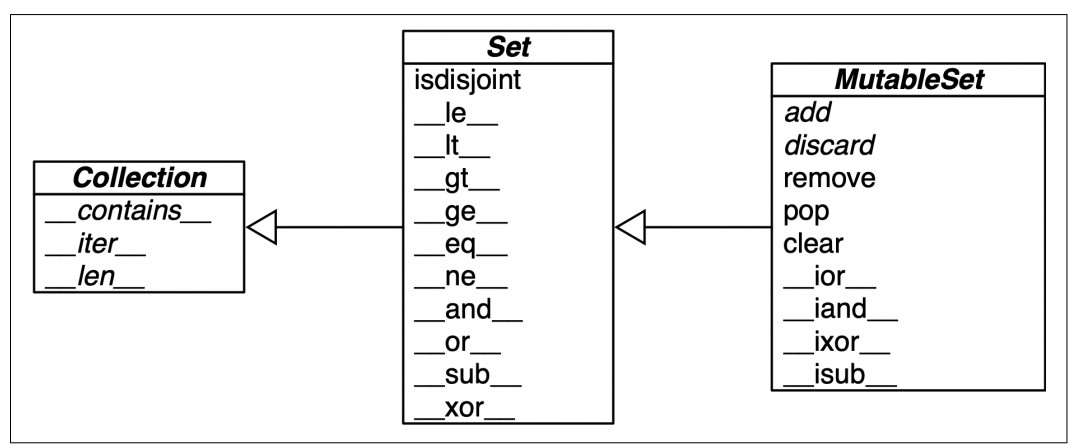
-
Usage Notes:
-
Overview:
- Mutable Set Operations: These include methods that modify the original set in place.
- Immutable Set Operations: These operations are available for both
setandfrozenset, but in-place modifications are not allowed onfrozenset.
-
Table of Common Set Operations:
- Union (
|or.union()method):- Python 3.5+ Syntax:
- Use
{*a, *b, *c, *d}to create a new set with the union of multiple iterables.
- Use
- Python 3.5+ Syntax:
- Intersection (
&or.intersection()method): - Difference (
-or.difference()method): - Symmetric Difference (
^or.symmetric_difference()method):- Returns elements in either set but not in both.
- Subset (
<=or.issubset()method):- Checks if one set is a subset of another.
- Superset (
>=or.issuperset()method):- Checks if one set is a superset of another.
- Union (
-
In-Place Operations:
-
Intersection Update (
&=or.intersection_update()method):- Modifies the original set to keep only elements found in both sets.
-
Difference Update (
-=or.difference_update()method):- Modifies the original set to remove elements found in another set.
-
Symmetric Difference Update (
^=or.symmetric_difference_update()method):- Modifies the original set to keep elements in either set but not in both.
-
Infix Operators: Require both operands to be sets.
-
Methods: Can take any iterable as an argument, allowing operations across different types of collections (e.g., lists, tuples).
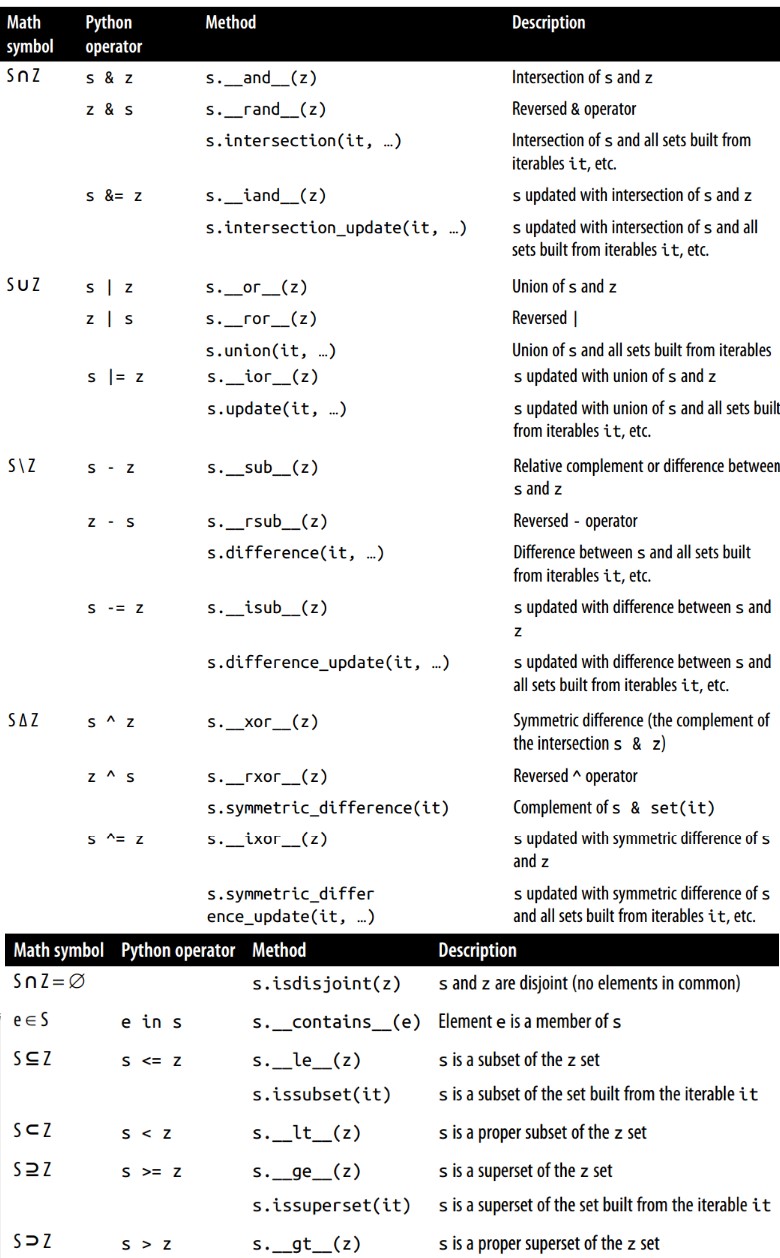
-
Set Operations on dict Views
-
The view objects returned by
dict.keys()anddict.items()behave similarly tofrozensetand support powerful set operations such as intersection (&), union (|), difference (-), and symmetric difference (^). -
These operations can be applied directly to compare keys and items between dictionaries, or between a dictionary view and a set.
d1 = dict(a=1, b=2, c=3, d=4) d2 = dict(b=20, d=40, e=50) common_keys = d1.keys() & d2.keys() print(common_keys) # Output: {'b', 'd'} -
Compatibility with Sets:
-
dict_keysviews can be directly compared with aset:s = {'a', 'e', 'i'} key_intersection = d1.keys() & s key_union = d1.keys() | s print(key_intersection) # Output: {'a'} print(key_union) # Output: {'a', 'c', 'b', 'd', 'i', 'e'} -
Operations on
dict_items:-
dict_itemsviews can also be treated like sets, but only if all dictionary values are hashable. -
Example:
d1 = dict(a=1, b=2, c=3) d2 = dict(a=1, c=4, d=5) common_items = d1.items() & d2.items() print(common_items) # Output: {('a', 1)} -
Important: If any value in a
dict_itemsview is unhashable, attempting set operations will raise aTypeError.
-
-
-
Efficiency and Practicality:
- Using set operators on dictionary views eliminates the need for loops and conditional statements when comparing dictionary contents.
- Python's underlying C implementation makes these operations highly efficient, saving both development time and computational resources.