ch09.decorator_and_closures
Decorator
graph LR;
    A["Decorators\nis syntax sugar\nto apply functions to other funciton"]

    subgraph concepts["Concepts to understand decorators"]
      J["Import Time (when a module is loaded) vs. Runtime"]
      K["Variable Scoping\n - global\n - local\n - non-local"]
      L["Closures\n\nA function with an extended scope\nthat includes variables \nfrom the local scope of an outer function."]
      K -.-> L
    end

    J --> |Execute at import time\nright after module loaded|A
    K --> A
    L --> A
    concepts --> N["Also userful for\n- Event-Oriented Programming\n- GUIs and Asynchronous I/O with Callbacks"]


    U["Advanced Decorator techniques"]

    R["Parameterized Decorators\nTwo or More Nested Functions"]
    X["Class-Based Implementation\nEasier to Read and Maintain"]
    T["@functools.wraps\nDecorates the inner function\nto preserve the original function’s metadata."]

    U --> R
    U --> V["Stacked Decorators\n(applied from bottom up)"]
    U --> X
    U --> T
    U --> SingleDispatch["singledispatch (htmlize example)"]
Decorators 101
-
Definition:
- A decorator is a callable that takes another function as an argument.
- It performs some processing with the decorated function and returns it or replaces it with another function or callable object.
-
Usage:
-
Example with
@decoratedecorator:@decorate def target(): print('running target()') -
Equivalent to:
def target():
    print('running target()')
target = decorate(target)
-
-
Example:
-
Defining a simple decorator
deco:def deco(func): def inner(): print('running inner()') # Note, not using func in simple example return inner -
Applying the decorator:
@deco def target(): print('running target()') -
Output:
>>> target()
running inner()
>>> target
<function deco.<locals>.inner at 0x10063b598>
-
-
Key Points:
- Decorators are syntactic sugar, making it easier to apply a function to another function.
- They can be called like regular callables, which is useful in metaprogramming.
- Three Essential Facts:
- A decorator is a function or another callable.
- A decorator may replace the decorated function with a different one.
- Decorators are executed immediately when a module is loaded.
When Python Executes Decorators
-
Execution Timing:
- Decorators run immediately after the decorated function is defined, typically at import time (when a module is loaded).
-
Example Code:
- Most decorators define inner functions and use closures to modify or enhance the behavior of the decorated function.
- Registration decorators are common in frameworks to register functions without altering them.
- Decorators are often defined in separate modules from their applications.
registry = [] def register(func): print(f'running register({func})') registry.append(func) return func @register def f1(): print('running f1()') @register def f2(): print('running f2()') def f3(): print('running f3()') def main(): print('running main()') print('registry ->', registry) f1() f2() f3() if __name__ == '__main__': main() -
Output When Run as Script:
$ python3 registration.py running register(<function f1 at 0x100631bf8>) running register(<function f2 at 0x100631c80>) running main() registry -> [<function f1 at 0x100631bf8>, <function f2 at 0x100631c80>] running f1() running f2() running f3()- Explanation:
registerruns twice before any other function.registerreceives the decorated function as an argument.- After the module is loaded,
registrycontains references tof1andf2. f1,f2, andf3execute only when called bymain.
- Explanation:
-
Output When Imported:
>>> import registration running register(<function f1 at 0x10063b1e0>) running register(<function f2 at 0x10063b268>)-
Inspecting
registry:>>> registration.registry [<function f1 at 0x10063b1e0>, <function f2 at 0x10063b268>]
-
-
Characteristics:
- Decorator
registeris defined in the same module as decorated functions. registerreturns the same function unchanged.
- Decorator
-
Usefulness:
- Similar decorators are common in frameworks (e.g., URL routing in web frameworks).
- Such decorators may or may not modify the decorated function.
-
Key Points:
- Import Time vs. Runtime:
- Decorators execute at import time, registering functions or performing setup.
- Decorated functions execute at runtime when explicitly called.
- Practical Usage:
- Useful for registering functions, logging, enforcing access control, instrumentation, etc.
- Import Time vs. Runtime:
Registration Decorators
- Typical Usage in Real Code:
- Common Scenarios:
- Decorator function is often defined in a different module from where it is applied.
- Most decorators define and return an inner function to replace the original decorated function.
- Common Scenarios:
Variable Scope Rules in Python
-
Local and Global Scope:
- Variables defined inside a function are local to that function.
- Variables defined outside of any function are global.
-
Local Variable Assignment Error**
b = 6 def f2(a): print(a) print(b) b = 9 f2(3)-
Output:
3 Traceback (most recent call last): File "<stdin>", line 1, in <module> File "<stdin>", line 3, in f2 UnboundLocalError: local variable 'b' referenced before assignment -
Explanation:
- Python treats
bas a local variable due to the assignmentb = 9. - The local
bis referenced before being assigned, leading toUnboundLocalError.
- Python treats
-
-
Python Design Choice:
- Variables assigned within a function are treated as local by default.
- This avoids the accidental clobbering of global variables seen in JavaScript.
-
Using
globalDeclaration:- To modify a global variable within a function, use the
globalkeyword.
b = 6 def f3(a): global b print(a) print(b) b = 9 f3(3)-
Output:
3
6
>>> b
9
- To modify a global variable within a function, use the
-
Scopes in Action:
- Global Scope:
- Variables assigned outside any class or function block.
- Local Scope:
- Variables assigned as parameters or directly in the function body.
- Global Scope:
-
Nonlocal Scope:
- Used for closures to refer to variables in the enclosing function's scope.
- Fundamental for understanding closures and decorators.
Closures
-
Common Confusion:
- Closures are often confused with anonymous functions.
- Defining functions inside other functions isn't common until the concept of anonymous functions is introduced.
- Closures only matter with nested functions, so both concepts are learned together.
-
What is a Closure?
- A function with an extended scope that includes variables from the local scope of an outer function.
- These variables are neither global nor local to the function itself.
- Important: the function can accessnon-global variables defined outside its body, regardless of whether the function is anonymous.
-
Example: Running Average with Class:
class Averager: def __init__(self): self.series = [] def __call__(self, new_value): self.series.append(new_value) total = sum(self.series) return total / len(self.series) avg = Averager() >>> avg(10) 10.0 >>> avg(11) 10.5 >>> avg(12) 11.0Averagerclass maintains state inself.series.
-
Functional Implementation Using Closures:
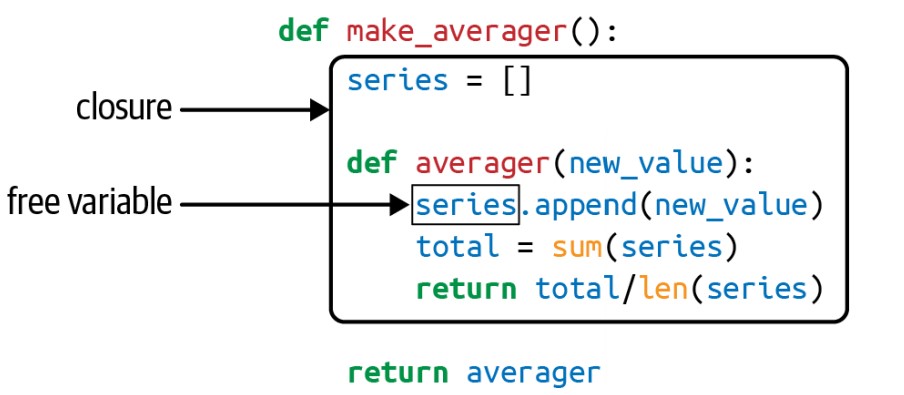
def make_averager(): series = [] def averager(new_value): series.append(new_value) total = sum(series) return total / len(series) return averager avg = make_averager() >>> avg(10) 10.0 >>> avg(11) 10.5 >>> avg(12) 11.0seriesis a local variable inmake_averager.averagerfunction maintains access toserieseven aftermake_averagerhas returned.
-
Inspecting the Closure:
seriesis a free variable inaverager.- Free variable: A variable not bound in the local scope but used in a function.
>>> avg.__code__.co_varnames ('new_value', 'total') >>> avg.__code__.co_freevars ('series',) >>> avg.__closure__ (<cell at 0x107a44f78: list object at 0x107a91a48>,) >>> avg.__closure__[0].cell_contents [10, 11, 12]__closure__contains the bindings for free variables.
-
Key Points:
- A closure retains the bindings of free variables at the time of function definition.
- This allows the function to use these variables later, even if the outer function's scope is no longer available.
-
Closures are not inherently tied to anonymous functions.
-
Closures capture the local state of an outer function, enabling functions to remember the environment where they were created.
-
Useful for creating functions with persistent state, avoiding the need for classes in some scenarios.
-
Free variables and closures can be inspected via special attributes (
__code__.co_freevarsand__closure__).
The nonlocal Declaration
-
Issue with Previous Implementation:
-
Inefficiency:
- Storing all values in the series and computing the sum every time
averageris called.
- Storing all values in the series and computing the sum every time
-
Broken Implementation:
def make_averager(): count = 0 total = 0 def averager(new_value): count += 1 total += new_value return total / count return averager-
Error:
>>> avg = make_averager() >>> avg(10) Traceback (most recent call last): ... UnboundLocalError: local variable 'count' referenced before assignment -
Explanation:
count += 1andtotal += new_valueimply assignment, making them local variables.- As numbers are immutable, reassignment creates a new local variable, causing the
UnboundLocalError.
-
-
-
Correct Implementation Using
nonlocal:-
Purpose of
nonlocal:- Allows assignment to variables in the enclosing scope, making them free variables.
-
Fixed Implementation:
def make_averager(): count = 0 total = 0 def averager(new_value): nonlocal count, total count += 1 total += new_value return total / count return averager- Explanation:
nonlocal count, totaldeclarescountandtotalas free variables.- Enables their bindings to be modified within
averager.
- Explanation:
-
Variable Lookup Logic in Python
When a function is defined, the Python bytecode compiler determines how to fetch a variable x based on the following rules:
-
Global Declaration:
- If there is a
global xdeclaration,xis fetched from and assigned to the global variablexin the module.
x = 10 def func(): global x x = 20 # Modifies the global variable x func() print(x) # Output: 20 - If there is a
-
Nonlocal Declaration:
- If there is a
nonlocal xdeclaration,xis fetched from and assigned to thexin the nearest enclosing function scope.
def outer(): x = 10 def inner(): nonlocal x x = 20 # Modifies the x in outer function inner() print(x) # Output: 20 outer() - If there is a
-
Local Scope:
- If
xis a parameter or is assigned a value within the function body, thenxis a local variable.
def func(x): x = 20 # Local variable x print(x) func(10) # Output: 20 - If
-
Referenced but Not Assigned (Free Variable):
- If
xis referenced but not assigned and is not a parameter,xwill be looked up in the local scopes of the surrounding function bodies (nonlocal scopes).
def outer(): x = 10 def inner(): print(x) # Looks up x in the outer function inner() outer() # Output: 10 - If
- Lookup Order:
- Python searches for variables in the following order: Local -> Enclosing -> Global -> Built-in (LEGB).
Example to Illustrate All Scenarios
x = "global x"

def outer():
    x = "outer x"

    def inner():
        nonlocal x  # Refers to x in outer function
        x = "inner x"  # Modifies x in outer function

    print("Before inner call:", x)  # Output: outer x
    inner()
    print("After inner call:", x)  # Output: inner x

def test_global():
    global x  # Refers to global x
    x = "modified global x"

outer()
print(x)  # Output: global x
test_global()
print(x)  # Output: modified global x
Implementing a Simple Decorator
A Decorator to Clock Function Execution
This example defines a decorator that measures the execution time of a function and logs the function's name, its arguments, and the result.
import time

def clock(func):
    def clocked(*args):
        t0 = time.perf_counter()
        result = func(*args)
        elapsed = time.perf_counter() - t0
        name = func.__name__
        arg_str = ', '.join(repr(arg) for arg in args)
        print(f'[{elapsed:0.8f}s] {name}({arg_str}) -> {result!r}')
        return result
return clocked-
Inner Function
clocked:- Accepts any number of positional arguments using
*args. - Records the start time.
- Calls the original function
funcwith*argsand stores the result. - Calculates the elapsed time.
- Logs the function name, arguments, elapsed time, and result.
- Returns the result of the original function.
- Accepts any number of positional arguments using
-
Returning
clocked:- The inner function
clockedreplaces the original function when the decorator is applied.
- The inner function
Using the clock Decorator
clockdeco_demo.py:
import time
from clockdeco0 import clock

@clock
def snooze(seconds):
    time.sleep(seconds)

@clock
def factorial(n):
    return 1 if n < 2 else n * factorial(n - 1)

if __name__ == '__main__':
    print('*' * 40, 'Calling snooze(.123)')
    snooze(.123)
    print('*' * 40, 'Calling factorial(6)')
print('6! =', factorial(6))- Applying the
clockDecorator:- The
@clockdecorator is applied tosnoozeandfactorial. - When these functions are called, their execution is logged by the
clockdecorator.
- The
Output:
$ python3 clockdeco_demo.py
**************************************** Calling snooze(.123)
[0.12363791s] snooze(0.123) -> None
**************************************** Calling factorial(6)
[0.00000095s] factorial(1) -> 1
[0.00002408s] factorial(2) -> 2
[0.00003934s] factorial(3) -> 6
[0.00005221s] factorial(4) -> 24
[0.00006390s] factorial(5) -> 120
[0.00008297s] factorial(6) -> 720
6! = 720
How It Works
-
Decorator Syntax:
@clock def factorial(n): return 1 if n < 2 else n * factorial(n - 1)-
This is syntactic sugar for:
def factorial(n):
    return 1 if n < 2 else n * factorial(n - 1)
factorial = clock(factorial)
-
-
Function Replacement:
- The
clockdecorator replacesfactorialwithclocked. - Calling
factorial(n)now executesclocked(n).
- The
-
Steps Executed by
clocked:- Records the start time
t0. - Calls the original
factorialfunction and saves the result. - Computes the elapsed time.
- Logs the elapsed time, function name, arguments, and result.
- Returns the result from the original function.
- Records the start time
Limitations of the clock Decorator
- Keyword Arguments:
- The current implementation does not support keyword arguments.
- Function Metadata:
- The decorator masks the original function's
__name__and__doc__.
- The decorator masks the original function's
Improved clock Decorator
The improved clock decorator handles keyword arguments and preserves the metadata (__name__ and __doc__) of the decorated function using functools.wraps.
import time
import functools

def clock(func):
    @functools.wraps(func)
    def clocked(*args, **kwargs):
        t0 = time.perf_counter()
        result = func(*args, **kwargs)
        elapsed = time.perf_counter() - t0
        name = func.__name__
        arg_lst = [repr(arg) for arg in args]
        arg_lst.extend(f'{k}={v!r}' for k, v in kwargs.items())
        arg_str = ', '.join(arg_lst)
        print(f'[{elapsed:0.8f}s] {name}({arg_str}) -> {result!r}')
        return result
return clocked-
Using
functools.wraps:- Decorates the inner
clockedfunction to preserve the original function’s metadata.
- Decorates the inner
-
Handling Keyword Arguments:
clockedaccepts both positional (*args) and keyword arguments (**kwargs).- Constructs
arg_lstto include both positional and keyword arguments for logging.
Stacked Decorators
-
Concept:
- Stacked decorators are applied from the bottom up.
- The order of application is crucial.
-
Syntax:
@alpha @beta def my_fn(): ...-
Equivalent to:
my_fn = alpha(beta(my_fn)) -
betais applied first, thenalpha.
-
Memoization with functools.cache
-
Concept:
- Memoization is an optimization technique to cache results of expensive function calls.
-
Example: Fibonacci Sequence with
@cacheand@clockDecorators:
import functools
from clockdeco import clock

@functools.cache
@clock
def fibonacci(n):
    if n < 2:
        return n
    return fibonacci(n - 2) + fibonacci(n - 1)

if __name__ == '__main__':
print(fibonacci(6))- The
@clockdecorator logs the execution time and details of each call. - The
@cachedecorator caches the results of the Fibonacci function to avoid redundant calculations.
Important Notes
-
Hashable Arguments:
- All arguments for the decorated function must be hashable since
@cacheuses a dictionary to store results.
- All arguments for the decorated function must be hashable since
-
Memory Considerations:
functools.cachecan consume significant memory if there are many unique cache entries.- For long-running processes, use
functools.lru_cachewith a specifiedmaxsizeto limit memory usage.
Using functools.lru_cache
Key Points of lru_cache
-
LRU (Least Recently Used):
- Old entries that have not been accessed recently are discarded to make room for new ones.
- Helps manage memory usage efficiently.
-
Decorator Usage:
-
Simple Way:
@functools.lru_cache def costly_function(a, b): ... -
Parameterized Way (since Python 3.2):
@functools.lru_cache()
def costly_function(a, b):
    ...
-
-
Parameters:
maxsize=128:- Maximum number of entries the cache can hold. Once the cache is full, the least recently used entries are discarded.
- Default is 128; recommended to be a power of 2 for optimal performance.
- Setting
maxsize=Nonedisables LRU logic, making the cache unlimited but potentially memory-intensive.
typed=False:- If
True, arguments of different types (e.g.,1and1.0) are cached separately. - If
False, arguments considered equal (e.g.,1and1.0) share the same cache entry.
- If
Example Usage of lru_cache
import functools
from clockdeco import clock

@functools.lru_cache(maxsize=2**20, typed=True)
@clock
def fibonacci(n):
    if n < 2:
        return n
    return fibonacci(n - 2) + fibonacci(n - 1)

if __name__ == '__main__':
print(fibonacci(6))- Explanation:
maxsize=2**20: Cache can store up to 1,048,576 entries.typed=True: Different argument types are cached separately.
Benefits of lru_cache
-
Memory Efficiency:
- Bounded cache size prevents unbounded memory usage.
- LRU policy ensures that only recent results are kept, discarding older, unused results.
-
Performance Optimization:
- Caching results of expensive function calls avoids repeated computations.
- Suitable for functions with deterministic results that are called frequently with the same arguments.
Practical Considerations
-
Hashable Arguments:
- All arguments to the decorated function must be hashable, as the cache relies on a dictionary for storage.
-
Use Cases:
- Effective for recursive functions, such as computing Fibonacci numbers.
- Useful for caching results from remote API calls or database queries to avoid redundant requests.
Single Dispatch Generic Functions in Python
Example goal: create a tool to generate HTML displays for various Python objects
Initial Function
import html

def htmlize(obj):
    content = html.escape(repr(obj))
return f'<pre>{content}</pre>'- Handles any Python type by default.
Custom Displays for Specific Types
-
String (
str)- Replace embedded newline characters with
<br/>\n - Use
<p>tags instead of<pre>
- Replace embedded newline characters with
-
Integer (
int)- Show number in decimal and hexadecimal (special case for
bool)
- Show number in decimal and hexadecimal (special case for
-
List (
list)- Output an HTML list, formatting each item according to its type
-
Float (
float) and Decimal (decimal.Decimal)- Display value as usual and as a fraction
Example Usages
>>> htmlize({1, 2, 3})
'<pre>{1, 2, 3}</pre>'
>>> htmlize(abs)
'<pre><built-in function abs></pre>'
>>> htmlize('Heimlich & Co.\n- a game')
'<p>Heimlich & Co.<br/>\n- a game</p>'
>>> htmlize(42)
'<pre>42 (0x2a)</pre>'
>>> print(htmlize(['alpha', 66, {3, 2, 1}]))
<ul>
<li><p>alpha</p></li>
<li><pre>66 (0x42)</pre></li>
<li><pre>{1, 2, 3}</pre></li>
</ul>
>>> htmlize(True)
'<pre>True</pre>'
>>> htmlize(fractions.Fraction(2, 3))
'<pre>2/3</pre>'
>>> htmlize(2/3)
'<pre>0.6666666666666666 (2/3)</pre>'
>>> htmlize(decimal.Decimal('0.02380952'))
'<pre>0.02380952 (1/42)</pre>'Implementation Using singledispatch
singledispatchallows creating a generic function with specializations for different types.- Modular and extensible.
Code Implementation
from functools import singledispatch
from collections import abc
import fractions
import decimal
import html
import numbers

@singledispatch
def htmlize(obj: object) -> str:
    content = html.escape(repr(obj))
    return f'<pre>{content}</pre>'

@htmlize.register
def _(text: str) -> str:
    content = html.escape(text).replace('\n', '<br/>\n')
    return f'<p>{content}</p>'

@htmlize.register
def _(seq: abc.Sequence) -> str:
    inner = '</li>\n<li>'.join(htmlize(item) for item in seq)
    return '<ul>\n<li>' + inner + '</li>\n</ul>'

@htmlize.register
def _(n: numbers.Integral) -> str:
    return f'<pre>{n} (0x{n:x})</pre>'

@htmlize.register
def _(n: bool) -> str:
    return f'<pre>{n}</pre>'

@htmlize.register(fractions.Fraction)
def _(x) -> str:
    frac = fractions.Fraction(x)
    return f'<pre>{frac.numerator}/{frac.denominator}</pre>'

@htmlize.register(decimal.Decimal)
@htmlize.register(float)
def _(x) -> str:
    frac = fractions.Fraction(x).limit_denominator()
    return f'<pre>{x} ({frac.numerator}/{frac.denominator})</pre>'
Key Points
- Base function: Handles
objecttype. - Specialized functions: Registered for specific types using
@htmlize.register. - Type Hints: Ensure the correct function is used for each type.
- Modular Extension: Specialized functions can be added in any module, supporting extensibility.
Benefits of singledispatch
- Extensible by users: Users can add specialized functions in separate modules.
- Modular responsibility: Distributes functionality across multiple functions, reducing the size and complexity of the base function.
- ABC Support: Use abstract base classes (ABCs) like
numbers.Integralfor broader type compatibility.
Further Reading
- PEP 443: Single-dispatch generic functions
Parameterized Decorators in Python
A parameterized decorator accepts arguments, making it flexible and customizable. We achieve this by creating a decorator factory that returns the actual decorator.
Basic Decorator Example
registry = []

def register(func):
    print(f'running register({func})')
    registry.append(func)
    return func

@register
def f1():
    print('running f1()')

print('running main()')
print('registry ->', registry)
f1()registerdecorator adds the decorated function to aregistry.
Parameterized Registration Decorator
To enable or disable function registration, we modify the register to accept an optional parameter active.
registry = set()

def register(active=True):
    def decorate(func):
        print(f'running register(active={active})->decorate({func})')
        if active:
            registry.add(func)
        else:
            registry.discard(func)
        return func
    return decorate

@register(active=False)
def f1():
    print('running f1()')

@register()
def f2():
    print('running f2()')

def f3():
print('running f3()')- Inner
decoratefunction: Actual decorator that adds/removes the function based onactive. registerfunction: Decorator factory returning thedecoratefunction.
Key Points
- Registry as a Set: Faster addition/removal of functions.
- Decorator Factory:
registeris called as a function to return thedecoratedecorator. - Active Parameter: Controls whether the function is added to the registry.
Usage and Output
When importing the module, the output demonstrates function registration based on the active parameter.
>>> import registration_param
running register(active=False)->decorate(<function f1 at 0x10063c1e0>)
running register(active=True)->decorate(<function f2 at 0x10063c268>)
>>> registration_param.registry
[<function f2 at 0x10063c268>]- Only
f2is registered becausef1was decorated withactive=False.
Dynamic Function Registration
Using register as a regular function to add or remove functions dynamically.
>>> from registration_param import *
running register(active=False)->decorate(<function f1 at 0x10073c1e0>)
running register(active=True)->decorate(<function f2 at 0x10073c268>)
>>> registry
{<function f2 at 0x10073c268>}
>>> register()(f3)
running register(active=True)->decorate(<function f3 at 0x10073c158>)
<function f3 at 0x10073c158>
>>> registry
{<function f3 at 0x10073c158>, <function f2 at 0x10073c268>}
>>> register(active=False)(f2)
running register(active=False)->decorate(<function f2 at 0x10073c268>)
<function f2 at 0x10073c268>
>>> registry
{<function f3 at 0x10073c158>}- Adding a Function:
register()(f3)addsf3to the registry. - Removing a Function:
register(active=False)(f2)removesf2from the registry.
Parameterized Clock Decorator
import time

DEFAULT_FMT = '[{elapsed:0.8f}s] {name}({args}) -> {result}'

def clock(fmt=DEFAULT_FMT):
    def decorate(func):
        def clocked(*_args):
            t0 = time.perf_counter()
            _result = func(*_args)
            elapsed = time.perf_counter() - t0
            name = func.__name__
            args = ', '.join(repr(arg) for arg in _args)
            result = repr(_result)
            print(fmt.format(**locals()))
            return _result
        return clocked
    return decorate

if __name__ == '__main__':
    @clock()
    def snooze(seconds):
        time.sleep(seconds)

    for i in range(3):
        snooze(.123)
Explanation
clockFunction: Parameterized decorator factory.decorateFunction: The actual decorator.clockedFunction: Wraps the decorated function, measuring execution time.- Output Formatting: Uses
fmtstring to format the output.
Usage and Output
-
Default Format
$ python3 clockdeco_param.py [0.12412500s] snooze(0.123) -> None [0.12411904s] snooze(0.123) -> None [0.12410498s] snooze(0.123) -> None -
Custom Format Example 1
import time
from clockdeco_param import clock

@clock('{name}: {elapsed}s')
def snooze(seconds):
    time.sleep(seconds)

for i in range(3):
    snooze(.123)
Output
$ python3 clockdeco_param_demo1.py snooze: 0.12414693832397461s snooze: 0.1241159439086914s snooze: 0.12412118911743164s -
Custom Format Example 2
import time
from clockdeco_param import clock

@clock('{name}({args}) dt={elapsed:0.3f}s')
def snooze(seconds):
    time.sleep(seconds)

for i in range(3):
    snooze(.123)
Output
$ python3 clockdeco_param_demo2.py
snooze(0.123) dt=0.124s
snooze(0.123) dt=0.124s
snooze(0.123) dt=0.124s
Key Points
- Decorator Factory:
clockreturnsdecorate, which returnsclocked. - Local Variables in
fmt: Uselocals()to reference variables within theclockedfunction.
Additional Notes
- Class-Based Decorators: For more complex decorators, consider implementing them as classes with a
__call__method. - Static Analysis Tools: Using
locals()may lead to warnings from static checking tools. Know when to ignore such warnings for better code clarity.
Class-Based Clock Decorator
import time

DEFAULT_FMT = '[{elapsed:0.8f}s] {name}({args}) -> {result}'

class clock:
    def __init__(self, fmt=DEFAULT_FMT):
        self.fmt = fmt

    def __call__(self, func):
        def clocked(*_args):
            t0 = time.perf_counter()
            _result = func(*_args)
            elapsed = time.perf_counter() - t0
            name = func.__name__
            args = ', '.join(repr(arg) for arg in _args)
            result = repr(_result)
            print(self.fmt.format(**locals()))
            return _result
        return clocked

# Example usage
if __name__ == '__main__':
    @clock()
    def snooze(seconds):
        time.sleep(seconds)

    for i in range(3):
        snooze(.123)
Explanation
- Class
clock: Acts as the parameterized decorator factory. __init__Method: Initializes the format string (fmt).__call__Method: Makes instances ofclockcallable, allowing them to be used as decorators.clockedFunction: Wraps the decorated function to measure and print execution time.
Comparison with Function-Based Decorator
-
Class-Based Decorator:
- Organization: Encapsulates decorator logic within a class, providing a clean and organized structure.
- State Management: Easier to manage state and configuration within the class.
- Flexibility: Potentially more flexible and extensible for complex scenarios.
-
Function-Based Decorator:
- Simplicity: Easier to understand and implement for simple use cases.
- Readability: Function-based decorators can be more readable for straightforward scenarios.
Dynamic Scope Versus Lexical Scope
Key Concepts
-
Dynamic Scope:
- Free variables are evaluated in the environment where the function is invoked.
- Easier to implement.
- Makes functions less opaque, as users must know about their internals to set up the correct environment.
- Example languages: LaTeX, Emacs Lisp (by default), early Lisp.
-
Lexical Scope:
- Free variables are evaluated considering the environment where the function is defined.
- Requires support for closures.
- Makes source code easier to read and understand.
- Example languages: Python (current), Scheme, most languages since Algol.
- Exception: JavaScript (with
thisbeing dynamically or lexically scoped depending on the code).
Dynamic Scope Example (Hypothetical in Python)
If Python had dynamic scope:
>>> avg = make_averager()
>>> series = []
>>> avg(10)  # 10.0
>>> avg(11)  # 10.5
>>> avg(12)  # 11.0
>>> series = [1]
>>> avg(5) # 3.0- The function
make_averagerinternally refers to a list namedseries. - Changing
seriesexternally affects the function's behavior.
Problems with Dynamic Scope
- Function Transparency: Users must understand the function's internal dependencies to use it correctly.
- Variable Clashes: Accidental changes to free variables can lead to unexpected behavior.
- Complexity: Makes it harder to manage and reason about the code.
Historical Context
- Lisp: Dynamic scope was initially used, leading to issues with higher-order functions.
- Scheme: Introduced in 1975, adopted lexical scope, addressing many issues of dynamic scope.
- JavaScript: Has a special case with
this, which can be confusing due to mixed scoping rules.
Lexical Scope Example in Python
Python uses lexical scope, making functions more predictable and easier to understand:
def make_averager():
    series = []

    def averager(new_value):
        series.append(new_value)
        return sum(series) / len(series)

    return averager

avg = make_averager()
print(avg(10))  # 10.0
print(avg(11))  # 10.5
print(avg(12)) # 11.0seriesis defined withinmake_averager, and its scope is limited to the inneraveragerfunction.- External changes to variables named
seriesdo not affect theaveragerfunction.
Importance of Lexical Scope
- Readability: Easier to read and reason about the code, knowing that a function's free variables are bound to their definitions.
- Closures: Lexical scope enables closures, allowing functions to capture and carry their defining environment.
Conclusion
- Dynamic Scope: Simpler to implement but leads to unpredictable and harder-to-maintain code.
- Lexical Scope: More complex to implement due to closures but results in clearer and more maintainable code.
- Modern Trend: Most modern programming languages use lexical scope, with a few exceptions. Python's adoption of lexical scope has contributed to its readability and maintainability.