ch21.asynchronous_programming
Ch 21. Asynchronous Programming
Types of Coroutines in Python (from Python 3.5+)
-
Native Coroutine:
- Defined using
async def. - Uses
awaitto delegate to other native coroutines, similar to how classic coroutines useyield from. - Even without
awaitin the body,async defalways defines a native coroutine. awaitcan only be used inside native coroutines.
- Defined using
-
Classic Coroutine:
- A generator function that consumes data via
my_coro.send(data)and reads the data usingyield. - Can delegate to other classic coroutines using
yield from. - Cannot be driven by
awaitand is no longer supported byasyncio.
- A generator function that consumes data via
-
Generator-based Coroutine:
- A generator function decorated with
@types.coroutine. - Introduced in Python 3.5 to make the generator compatible with the
awaitkeyword.
- A generator function decorated with
Asynchronous Generators
- Defined using
async defandyieldin its body. - Returns an asynchronous generator object with the
__anext__coroutine method to retrieve the next item.
Example: Probing Domains with asyncio
Scenario: Checking if Python keyword-based domains (e.g., await.dev) are available.
-
Explanation:
- The
+indicates the domain was resolved via DNS. - No
+means the domain did not resolve and may be available.
- The
-
Key Details:
- DNS probing is done using native coroutine objects.
- The asynchronous operations reduce total execution time compared to sequential checks.
#!/usr/bin/env python3
import asyncio
import socket
from keyword import kwlist

MAX_KEYWORD_LEN = 4  # Limit the length of keywords to 4 characters

async def probe(domain: str) -> tuple[str, bool]:
    loop = asyncio.get_running_loop()  # Get the current event loop
    try:
        await loop.getaddrinfo(domain, None)  # Check domain's DNS info
    except socket.gaierror:
        return (domain, False)  # Domain not resolved
    return (domain, True)  # Domain resolved

async def main() -> None:
    names = (kw for kw in kwlist if len(kw) <= MAX_KEYWORD_LEN)  # Filter keywords
    domains = (f'{name}.dev'.lower() for name in names)  # Generate domain names
    coros = [probe(domain) for domain in domains]  # List of coroutine objects
    for coro in asyncio.as_completed(coros):  # Process as coroutines complete
        domain, found = await coro
        mark = '+' if found else ' '
        print(f'{mark} {domain}')

if __name__ == '__main__':
    asyncio.run(main())  # Start the event loop
Key Points
- Keyword Length: Limit the domain names to Python keywords with a maximum of 4 characters.
probefunction:- Probes a domain using
asyncioto check if it resolves. - Returns a tuple containing the domain and a boolean indicating resolution status.
- Probes a domain using
maincoroutine:- Generates domain names based on Python keywords and probes each domain.
- Uses
asyncio.as_completedto process results as they complete (not in submission order). - Prints resolved domains with a
+mark.
asyncio.get_running_loop(used inprobe) was added in Python 3.7.- Raises
RuntimeErrorif no loop is running. - Deprecated
asyncio.get_event_loopin Python 3.10, which may create an event loop if necessary.
- Raises
Guido’s Trick to Read Asynchronous Code
-
Tip: Ignore the
asyncandawaitkeywords when reading code to make it easier to follow. It will then resemble a regular sequential function. -
Example: The coroutine below:
async def probe(domain: str) -> tuple[str, bool]:
    loop = asyncio.get_running_loop()
    try:
        await loop.getaddrinfo(domain, None)
    except socket.gaierror:
        return (domain, False)
    return (domain, True)
Can be understood as:
def probe(domain: str) -> tuple[str, bool]:  # no async
    loop = asyncio.get_running_loop()
    try:
        loop.getaddrinfo(domain, None)  # no await
    except socket.gaierror:
        return (domain, False)
    return (domain, True)
The only difference: the asynchronous version magically avoids blocking.
How Coroutines Work
-
Suspension of Execution:
awaitsuspends the coroutine’s execution, yielding control to the event loop.- While a coroutine (e.g.,
probe('if.dev')) is suspended, the event loop can drive other coroutines (e.g.,probe('or.dev')).
-
Example Execution:
- During
await loop.getaddrinfo(domain, None)inprobe('if.dev'), control is handed back to the event loop while waiting for the DNS resolution. - The event loop continues to work on other coroutines until it gets a response for
getaddrinfo('if.dev', None). - Once the result is ready, the suspended
probe('if.dev')coroutine resumes and continues execution from where it left off (handling exceptions or returning the result).
- During
The Awaitable Concept
-
forKeyword: Works with iterables. -
awaitKeyword: Works with awaitables. -
As an end user of asyncio, these are the awaitables you will see on a daily basis:
- A native coroutine object, which you get by calling a native coroutine function
- An asyncio.Task, which you usually get by passing a coroutine object to
asyncio.create_task()
Common Awaitables in asyncio
import asyncio
import itertools

async def spin(msg: str) -> None:  # <1>
    for char in itertools.cycle(r'\|/-'):
        status = f'\r{char} {msg}'
        print(status, flush=True, end='')
        try:
            await asyncio.sleep(.1)  # <2>
        except asyncio.CancelledError:  # <3>
            break
    blanks = ' ' * len(status)
    print(f'\r{blanks}\r', end='')

async def slow() -> int:
    await asyncio.sleep(3)  # <4>
    return 42

def main() -> None:  # <1>
    result = asyncio.run(supervisor())  # <2>
    print(f'Answer: {result}')

async def supervisor() -> int:  # <3>
    spinner = asyncio.create_task(spin('thinking!'))  # <4>
    print(f'spinner object: {spinner}')  # <5>
    result = await slow()  # <6>
    spinner.cancel()  # <7>
    return result

if __name__ == '__main__':
main()-
Native Coroutine Object:
- Created by calling a native coroutine function (defined with
async def).
- Created by calling a native coroutine function (defined with
-
asyncio.Task:- Usually created by passing a coroutine object to
asyncio.create_task(). - Task Usage:
- You don’t always need to
awaitaTask. - Example: Use
asyncio.create_task(one_coro())to schedule a coroutine for concurrent execution without waiting for its result. - If you don’t expect to cancel the task or wait for it, there is no need to keep the Task object returned from create_task. Creating the task is enough to schedule the coroutine to run.
- You don’t always need to
- Usually created by passing a coroutine object to
-
await other_coro():- Runs
other_coroimmediately and waits for its result. - This is used when the result of the coroutine is required before continuing, e.g.,
res = await slow()in spinner_async.py.
- Runs
Lower-level Awaitables
When implementing asynchronous libraries or contributing to asyncio itself, you may also deal with these lower-level awaitables:
-
Objects with an
__await__method:- Return an iterator.
- Example: An
asyncio.Futureinstance (sinceasyncio.Taskis a subclass ofasyncio.Future).
-
Objects from Other Languages:
- These are written using the Python/C API and have a
tp_as_async.am_awaitfunction, which returns an iterator (similar to the__await__method).
- These are written using the Python/C API and have a
-
Generator-based Coroutine Objects:
- These are still used in some codebases but are being deprecated.
Key Explanation from PEPs
-
PEP 492:
- States that
awaituses theyield frommechanism but with an additional validation step. - Only accepts awaitable objects.
- States that
-
PEP 380:
- Introduced the
yield fromconstruct, which is referred to inawaitimplementation details.
- Introduced the
Downloading with asyncio and HTTPX
-
HTTPX:
- An asynchronous HTTP client library (not part of the standard library).
- Used to perform HTTP requests asynchronously with the
AsyncClient.
-
Asynchronous Design:
- The script downloads 20 flags concurrently using native coroutines.
- Designed to avoid blocking the event loop during network I/O.
import asyncio

from httpx import AsyncClient  # <1>

from flags import BASE_URL, save_flag, main  # <2>

def download_many(cc_list: list[str]) -> int:    # <1>
    return asyncio.run(supervisor(cc_list))      # <2>

async def supervisor(cc_list: list[str]) -> int:
    async with AsyncClient() as client:          # <3>
        to_do = [download_one(client, cc)
                 for cc in sorted(cc_list)]      # <4>
        res = await asyncio.gather(*to_do)       # <5>

    return len(res)                              # <6>

async def download_one(client: AsyncClient, cc: str):  # <3>
    image = await get_flag(client, cc)
    save_flag(image, f'{cc}.gif')
    print(cc, end=' ', flush=True)
    return cc

async def get_flag(client: AsyncClient, cc: str) -> bytes:  # <4>
    url = f'{BASE_URL}/{cc}/{cc}.gif'.lower()
    resp = await client.get(url, timeout=6.1,
                                  follow_redirects=True)  # <5>
    return resp.read()  # <6>

if __name__ == '__main__':
    main(download_many)
Main Functions Overview
-
download_manyFunction:- Purpose: Acts as the entry point, running the
supervisorcoroutine. - Details:
- Plain function to be passed to the
main()function fromflags.py. - Uses
asyncio.run()to execute the event loop and drive thesupervisorcoroutine.
- Plain function to be passed to the
- Purpose: Acts as the entry point, running the
-
supervisorCoroutine:- Purpose: Coordinates downloading of flags concurrently.
- Details:
- Uses
AsyncClient(HTTPX) for asynchronous HTTP requests. - Builds a list of coroutines (
to_do) by callingdownload_onefor each flag. - Waits for all downloads to complete using
asyncio.gather, which collects results in submission order.
- Uses
-
download_oneCoroutine:- Purpose: Downloads a single flag image.
- Details:
- Calls
get_flagto fetch the image data. - Saves the flag using
save_flag()and displays the country code. - Returns the country code of the downloaded flag.
- Calls
-
get_flagCoroutine:- Purpose: Retrieves the flag image from the URL.
- Details:
- Constructs the flag image URL and makes an asynchronous
GETrequest. - Returns the flag image as bytes.
- Constructs the flag image URL and makes an asynchronous
Important Points
AsyncClient: Acts as an asynchronous context manager. Ensures proper setup and teardown of resources.asyncio.gather: Waits for all coroutines (downloads) to finish and returns a list of results.- Concurrency: By using
asyncio, multiple flag downloads occur simultaneously, greatly improving performance compared to sequential downloads. - Blocking I/O: The
save_flag()function is a blocking I/O operation and should ideally be asynchronous. However, as Python does not have an async filesystem API, it is done synchronously here.- Thread Delegation: In more advanced usage (as discussed later in the book), blocking I/O like
save_flag()can be delegated to a thread to prevent blocking the event loop.
- Thread Delegation: In more advanced usage (as discussed later in the book), blocking I/O like
The Secret of Native Coroutines: Humble Generators
-
Difference from Classic Coroutines:
- In native coroutines (like in
flags_asyncio.py), there are no visible.send()calls oryieldexpressions, unlike classic coroutines. - Instead, native coroutines use
awaitto suspend execution and wait for other coroutines or asynchronous tasks to complete.
- In native coroutines (like in
-
How Native Coroutines Work:
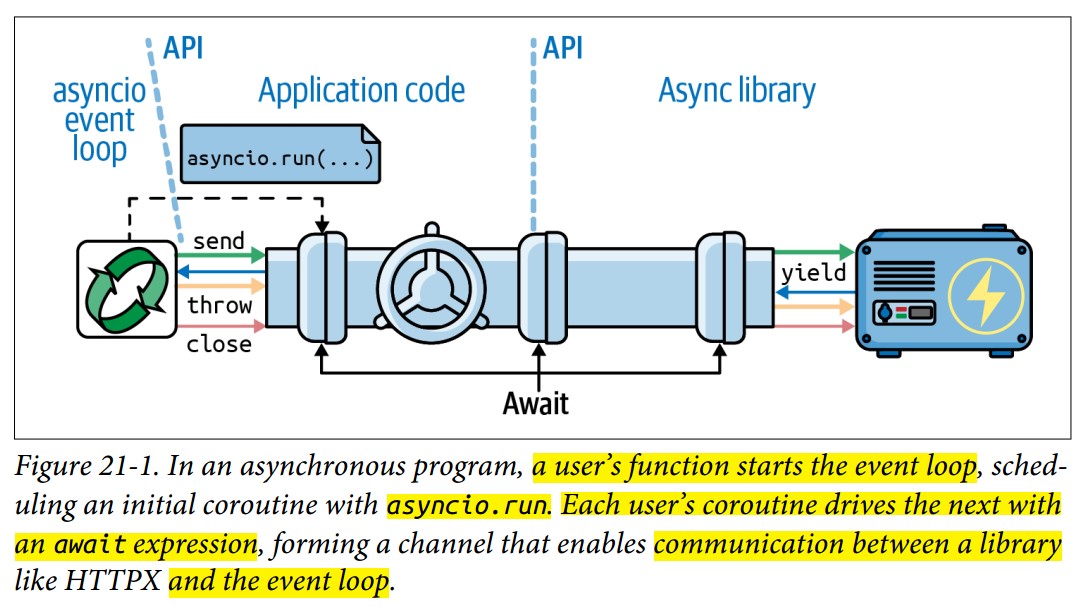
- Event Loop: The
asyncioevent loop is responsible for making.send()calls that drive the coroutines. - Await Chains: Coroutines
awaitother coroutines or awaitable objects, which eventually reach low-level awaitables like timers or network I/O operations.- These low-level awaitables are typically implemented deep in the libraries (such as HTTPX) or Python/C extensions.
- Borrowed from
yield from:awaitborrows most of its functionality from theyield fromconstruct in classic coroutines, which also uses.send()to drive execution.
- Concurrency with
asyncio:- Functions like
asyncio.gatherandasyncio.create_taskallow multiple coroutines to run concurrently. - These functions enable concurrent execution of I/O operations using a single event loop and a single thread.
- Functions like
The All-or-Nothing Problem
-
Asynchronous I/O Requirement:
- To maximize performance with
asyncio, every I/O function must be asynchronous. This ensures that control can be handed back to the event loop while waiting for I/O operations. - If a function blocks, it should either be rewritten as a coroutine or run in a separate thread or process (see "Delegating Tasks to Executors" for details).
- To maximize performance with
-
Rewriting Blocking Functions:
- In
flags_asyncio.py, theget_flagfunction had to be rewritten as a coroutine to utilize the asynchronous API of HTTPX. - Similarly,
download_onefromflags_threadpool.py(Example 20-3) could not be reused because it was designed for synchronous execution. In theasyncioversion, it had to be rewritten as a coroutine to handle theawaitoperations.
- In
-
Concurrency in
flags_asyncio.py:- In
supervisor, multipledownload_onecoroutine objects are created and driven concurrently byasyncio.gather. This allows for concurrent downloads without blocking the event loop.
- In
Takeaways
- Native coroutines are driven by the
asyncioevent loop, which makes the.send()calls internally, unlike classic coroutines where.send()is explicitly used. - To achieve peak performance with
asyncio, all I/O-bound functions must be asynchronous or delegated to separate threads/processes if they cannot be made non-blocking.
Asynchronous Context Managers
-
Context Managers Recap:
- In synchronous code, context managers use
__enter__and__exit__methods to run setup and teardown code around awithblock (e.g., file handling, database transactions).
- In synchronous code, context managers use
-
Limitation in Asynchronous Code:
- In asynchronous programming, setup and teardown operations often involve I/O and should not block the event loop.
- However, the classic
withstatement doesn’t support coroutines for__enter__or__exit__.
-
Solution:
async withStatement:- PEP 492 introduced the
async withstatement, which works with asynchronous context managers—objects that implement__aenter__and__aexit__as coroutines.
- PEP 492 introduced the
Example: Asynchronous Database Transaction (asyncpg)
-
Original Synchronous-Style Code:
tr = connection.transaction() await tr.start() try: await connection.execute("INSERT INTO mytable VALUES (1, 2, 3)") except: await tr.rollback() raise else: await tr.commit() -
Rewritten with
async with:async with connection.transaction(): await connection.execute("INSERT INTO mytable VALUES (1, 2, 3)") -
How It Works:
__aenter__: Starts the transaction withawait self.start().__aexit__: Rolls back or commits the transaction based on whether an exception occurred, usingawaitfor asynchronous I/O.- This allows
asyncpgto handle multiple transactions concurrently, improving efficiency.
Asynchronous Context Manager in httpx
-
HTTPX's
AsyncClient:- The
AsyncClientclass inhttpxis also an asynchronous context manager. - It uses
awaitin its__aenter__and__aexit__methods to manage setup (e.g., opening connections) and teardown (e.g., closing connections).
- The
-
Usage in
flags_asyncio.py:async with AsyncClient() as client: # Perform HTTP requests with the client -
The
async withblock ensures that theAsyncClientis properly managed, opening and closing connections asynchronously without blocking the event loop. -
By using
async with, you avoid manually starting and stopping operations (like transactions) and simplify the flow of asynchronous code. -
Side note: Connection Pooling in
asyncpg:asyncpgalso provides connection pooling, helping to manage PostgreSQL’s limited concurrency by maintaining a pool of internal connections without the need for external tools likepgbouncer.
Enhancing the asyncio Downloader
-
Progress Display:
- The script integrates the
tqdmlibrary to show a progress bar during downloads. - Instead of waiting for all downloads to finish (like with
asyncio.gather), it processes each download as it completes usingasyncio.as_completed, enabling real-time progress updates.
- The script integrates the
-
Error Handling:
- Handles various HTTP errors such as timeouts and
HTTPStatusError(e.g., 404 Not Found). - Gracefully continues downloading the remaining flags even after encountering errors.
- Handles various HTTP errors such as timeouts and
-
Concurrency Control:
- Uses a semaphore to limit the number of concurrent download requests.
- The default is set to a low concurrency level (
DEFAULT_CONCUR_REQ = 5) to avoid overwhelming servers and triggering HTTP errors (e.g., 503 Service Temporarily Unavailable). - Can handle up to 1000 concurrent requests (
MAX_CONCUR_REQ = 1000).
Code Breakdown
get_flag Coroutine
-
Similar to the sequential version but adapted for asynchronous execution.
-
Makes an asynchronous HTTP request using
httpx.AsyncClient. -
Raises an error if the response status is not successful.
async def get_flag(client: httpx.AsyncClient, base_url: str, cc: str) -> bytes:
    url = f'{base_url}/{cc}/{cc}.gif'.lower()
    resp = await client.get(url, timeout=3.1, follow_redirects=True)
    resp.raise_for_status()  # Raise HTTP error for unsuccessful status codes
    return resp.content
download_one Coroutine
-
Downloads a single flag with error handling and concurrency control using
asyncio.Semaphore. -
If an error occurs (e.g., 404 Not Found), it logs the error and continues.
-
Saves the flag image using
asyncio.to_threadto avoid blocking the event loop with file I/O operations.async def download_one(client: httpx.AsyncClient, cc: str, base_url: str, semaphore: asyncio.Semaphore, verbose: bool) -> DownloadStatus: try: # A semaphore controls the number of concurrent downloads. async with semaphore: # Controls concurrent downloads image = await get_flag(client, base_url, cc) except httpx.HTTPStatusError as exc: res = exc.response if res.status_code == HTTPStatus.NOT_FOUND: status = DownloadStatus.NOT_FOUND msg = f'not found: {res.url}' else: raise # Re-raise for other HTTP errors else: # Save flag in a separate thread await asyncio.to_thread(save_flag, image, f'{cc}.gif') status = DownloadStatus.OK msg = 'OK' if verbose and msg: print(cc, msg) return status
Important Notes
- Testing Concurrent Clients:
- Be mindful when testing against external servers, as they might suspect a DoS attack due to the high rate of requests from
asyncioclients. - Use local test servers to avoid causing issues with real servers
- Be mindful when testing against external servers, as they might suspect a DoS attack due to the high rate of requests from
- Thread Delegation for I/O:
- File I/O can block the event loop since it’s much slower than reading/writing from RAM.
asyncio.to_threadprovides an easy way to offload such tasks to a thread pool, ensuring the event loop remains responsive.
Throttling Requests with asyncio.Semaphore
-
Why Throttle Requests?
- Network clients can overwhelm a server if too many requests are sent concurrently.
- Throttling helps by limiting the number of concurrent requests, preventing issues like HTTP errors (e.g., 503 Service Temporarily Unavailable).
-
How a Semaphore Helps:
- A semaphore is a synchronization primitive that controls access to a resource by multiple coroutines.
- It allows a set number of coroutines to proceed, while others wait until the semaphore's counter increases (i.e., other coroutines finish).
- In this script,
asyncio.Semaphoreis used to limit how many coroutines (requests) can be active at a time.
supervisor Coroutine
-
Coordinates the download process, handling concurrency, progress, and error handling.
async def supervisor(cc_list: list[str], base_url: str, verbose: bool, concur_req: int) -> Counter[DownloadStatus]: counter: Counter[DownloadStatus] = Counter() semaphore = asyncio.Semaphore(concur_req) # Controls concurrent requests async with httpx.AsyncClient() as client: to_do = [download_one(client, cc, base_url, semaphore, verbose) for cc in sorted(cc_list)] # Create coroutine list to_do_iter = asyncio.as_completed(to_do) # Get coroutines as they complete if not verbose: to_do_iter = tqdm.tqdm(to_do_iter, total=len(cc_list)) # Add progress bar error: httpx.HTTPError | None = None for coro in to_do_iter: try: status = await coro # Process completed coroutine except httpx.HTTPStatusError as exc: error_msg = f'HTTP error {exc.response.status_code} - {exc.response.reason_phrase}' error = exc except httpx.RequestError as exc: error_msg = f'{exc} {type(exc)}'.strip() error = exc except KeyboardInterrupt: break if error: status = DownloadStatus.ERROR if verbose: url = str(error.request.url) cc = Path(url).stem.upper() print(f'{cc} error: {error_msg}') counter[status] += 1 return counter -
Semaphore Creation:
semaphore = asyncio.Semaphore(concur_req)limits the number of active download coroutines toconcur_req(controlled by a command-line argument).
-
Handling Concurrent Downloads:
to_docreates a list of coroutines for each country code (flag).asyncio.as_completed(to_do)ensures results are processed as they finish (not waiting for all to complete).- Instead of waiting for all coroutines to finish (as with
asyncio.gather) - This allows real-time updates to the progress bar as each flag finishes downloading.
- Instead of waiting for all coroutines to finish (as with
-
Progress Bar:
- If verbosity is disabled, the
tqdmprogress bar wraps the iteratorto_do_iter, tracking download progress.
- If verbosity is disabled, the
-
Error Handling:
- Captures and handles various HTTP errors (e.g., 404 Not Found or connection issues).
- Errors are logged and counted, and processing continues with the remaining requests.
- The syntax
error: httpx.HTTPError | None = Noneis valid in Python 3.10 and later versions. It uses the new union type syntax introduced in PEP 593, which allows you to use the pipe symbol (|) to denote a union of types.
download_many Function
-
Invokes the
supervisorcoroutine usingasyncio.runto execute the event loop. -
Returns the final status count (number of successful/failed downloads).
def download_many(cc_list: list[str], base_url: str, verbose: bool, concur_req: int) -> Counter[DownloadStatus]:
    coro = supervisor(cc_list, base_url, verbose, concur_req)
    counts = asyncio.run(coro)  # Run the coroutine
    return counts
Using Semaphores for Concurrency Control
-
asyncio.SemaphoreUsage:- The semaphore limits the number of concurrent coroutines by ensuring that only
concur_reqdownloads are active at once.
async def download_one(..., semaphore: asyncio.Semaphore, ...): async with semaphore: # Acquire the semaphore # Perform download operation - The semaphore limits the number of concurrent coroutines by ensuring that only
-
Why This Is Important:
- It prevents overloading the server with too many requests at once.
- By managing concurrency, the program remains efficient without triggering server-side errors like rate-limiting or overloading.
Error Handling and Exception Scope
- Extracting Errors:
-
If an error occurs, the
errorvariable captures the exception, and the relevant message is logged after thetry/exceptblock. -
Python's
try/exceptblock doesn't create a new scope, but exceptions captured in theexceptblock (exc) are scoped to that block. This is why the error is saved in theerrorvariable.
-
Making Multiple Requests for Each Flag Download
The new goal is to download:
- The flag image.
- The country metadata (JSON file) to get the country name and include it in the file name.
In a threaded environment, this would be done by making two blocking requests. However, in an asynchronous script, await allows you to handle both requests sequentially while keeping local variables in scope, avoiding the complexity of callbacks.
get_country Coroutine
-
This coroutine retrieves the
metadata.jsonfile, which contains the country name.async def get_country(client: httpx.AsyncClient, base_url: str, cc: str) -> str: url = f'{base_url}/{cc}/metadata.json'.lower() resp = await client.get(url, timeout=3.1, follow_redirects=True) resp.raise_for_status() metadata = resp.json() return metadata['country'] -
Fetches the JSON file at the URL:
<base_url>/<cc>/metadata.json. -
Uses
await client.get(...)to asynchronously retrieve the file. -
Returns the country name from the
metadatadictionary, extracted from the JSON response.
Modified download_one Coroutine (Example 21-9)
-
The
download_onecoroutine now handles two sequential requests:- Fetches the flag image.
- Fetches the country metadata to get the country name.
async def download_one(client: httpx.AsyncClient, cc: str, base_url: str, semaphore: asyncio.Semaphore, verbose: bool) -> DownloadStatus: try: async with semaphore: image = await get_flag(client, base_url, cc) async with semaphore: country = await get_country(client, base_url, cc) except httpx.HTTPStatusError as exc: res = exc.response if res.status_code == HTTPStatus.NOT_FOUND: status = DownloadStatus.NOT_FOUND msg = f'not found: {res.url}' else: raise else: filename = country.replace(' ', '_') # Replace spaces with underscores for filenames await asyncio.to_thread(save_flag, image, f'{filename}.gif') status = DownloadStatus.OK msg = 'OK' if verbose and msg: print(cc, msg) return status -
Two Asynchronous Requests:
- First, it fetches the flag image using
await get_flag(client, base_url, cc). - Then, it fetches the country metadata using
await get_country(client, base_url, cc).
- First, it fetches the flag image using
-
Semaphore for Throttling:
- Both
get_flagandget_countryare wrapped inasync with semaphoreto ensure concurrency control. This ensures no more than the allowed number of requests happen concurrently. - Semaphore blocks are separate for each request to keep the time the semaphore is held to a minimum.
- Both
-
Creating the Filename:
- The
countryname is used to create the file name, replacing spaces with underscores for better readability. - The flag image is then saved using
await asyncio.to_thread(save_flag, image, f'{filename}.gif').
- The
-
Error Handling:
- If either the flag or metadata request fails with an HTTP error, it handles the error gracefully and logs it.
Why Not Use asyncio.gather?
- You could use
asyncio.gatherto make both requests (for the flag and metadata) in parallel, but in this case, it’s unnecessary:- Reason: If fetching the flag fails, there’s no point in fetching the metadata. It makes more sense to fetch them sequentially in this case.
Summary of Improvements
-
Sequential Asynchronous Requests:
download_onenow makes two HTTP requests, one for the flag and one for the metadata, usingawaitfor both.
-
Concurrency Control with Semaphores:
- The semaphore is used to throttle both the flag and metadata requests, limiting how many are active concurrently.
-
Simplified Code without Callbacks:
- The use of
awaitmakes the code easier to follow compared to a callback-based approach, where the flow would have been split across multiple functions.
- The use of
-
Efficient File Naming:
- The country name is used to generate a more descriptive filename for the saved flag image.
Delegate Tasks to Executors
- Node.js Advantage: In Node.js, all I/O (network and file) is asynchronous, but Python lacks asynchronous APIs for file I/O. This means file operations in Python can block the event loop, degrading performance.
- Solution in Python: Use
asynciowith executors (e.g., thread pools) to delegate blocking tasks like file I/O to separate threads or processes, ensuring that the main event loop remains non-blocking.
Example: Saving Flags Asynchronously
Original Code (Python 3.9+)
-
In the
download_onecoroutine (Example 21-6), this line saves the downloaded image to disk without blocking the event loop:await asyncio.to_thread(save_flag, image, f'{cc}.gif') -
asyncio.to_thread:- Introduced in Python 3.9.
- Simplifies offloading a blocking task (like file I/O) to a thread without manually managing the executor.
- Allows passing keyword arguments directly, making it more flexible than the older
run_in_executor.
Supporting Python 3.7 and 3.8: Using run_in_executor
For compatibility with Python 3.7 and 3.8, you can replace asyncio.to_thread with run_in_executor. Example 21-10 shows how to do this:
loop = asyncio.get_running_loop()
loop.run_in_executor(None, save_flag, image, f'{cc}.gif')
Explanation
-
Getting the Event Loop:
loop = asyncio.get_running_loop()retrieves the current event loop.
-
Running in an Executor:
loop.run_in_executor(None, save_flag, image, f'{cc}.gif')offloads thesave_flagfunction to a thread pool (or a process pool if specified).- The first argument (
None) specifies the executor to use. PassingNoneselects the default ThreadPoolExecutor.
-
Argument Handling:
run_in_executorallows passing positional arguments directly to the function (save_flagin this case).- If you need to pass keyword arguments, you must use
functools.partial.
Under the Hood: run_in_executor in asyncio
-
run_in_executoris used byasynciointernally for blocking calls, likegetaddrinfo(for DNS lookups). This function is blocking because it depends on network latency and DNS resolution time. -
Thread Pool Usage:
- Thread pools are often used behind asynchronous APIs, as they provide a pragmatic way to manage blocking I/O while maintaining a non-blocking interface via coroutines.
- Example: The
MotorMongoDB driver wraps a threaded core with anasync/awaitinterface to manage database I/O efficiently.
When to Use ProcessPoolExecutor
-
For CPU-Intensive Tasks:
- If a task is CPU-bound (e.g., heavy computation), using a ThreadPoolExecutor won’t help due to Python’s Global Interpreter Lock (GIL), which limits CPU-bound threads.
- Instead, you can use a ProcessPoolExecutor, which runs tasks in separate processes, bypassing the GIL.
-
How to Use:
- In Supervisor: Start the
ProcessPoolExecutorin a central coroutine (likesupervisor) and pass it to tasks that need to use it. - This reduces the overhead of starting new processes for each task and allows better resource management.
- In Supervisor: Start the
Caution: run_in_executor Cancellation Issues
Caleb’s Warning
-
Cancellation Issues:
- Tasks running in an executor (like a thread pool) don’t have a true cancellation mechanism. This can lead to situations where:
- Long-running tasks (in a thread) might block the program from shutting down cleanly.
- The
asyncio.runfunction waits for the executor to finish, and if a task doesn’t stop, it could block the program indefinitely.
- Tasks running in an executor (like a thread pool) don’t have a true cancellation mechanism. This can lead to situations where:
-
Implication:
- Even though a coroutine might appear cancellable, tasks offloaded to a thread are not truly cancellable, and you must ensure they finish on their own or implement a manual cancellation mechanism.
Caleb humorously suggests renaming
run_in_executortorun_in_executor_uncancellableto reflect this behavior.
Summary
-
Delegating Blocking Tasks: For tasks like file I/O, you can delegate work to a thread pool using
asyncio.to_thread(Python 3.9+) orrun_in_executor(Python 3.7/3.8). -
Thread vs Process Pools:
- Use ThreadPoolExecutor for I/O-bound tasks (e.g., file I/O).
- Use ProcessPoolExecutor for CPU-bound tasks (e.g., heavy computation) to avoid the GIL.
-
Cancellation Caveat: Be cautious with
run_in_executorbecause tasks running in threads are not truly cancellable, which can cause shutdown issues in some cases.